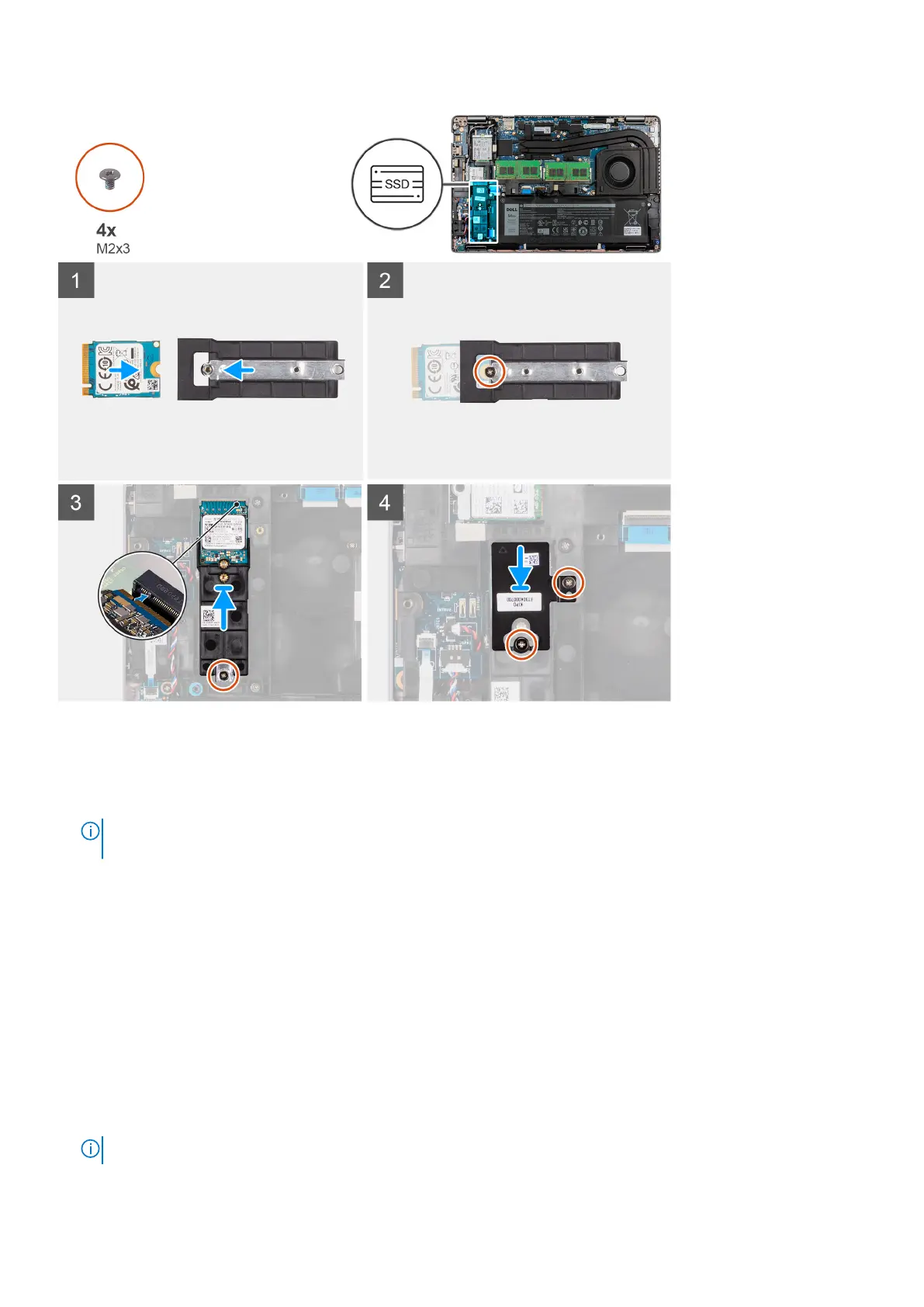
Steps
1. Align the notch on the M.2 2230 solid-state drive with the tab on the solid-state drive slot.
2. Slide the M.2 2230 solid-state drive into the solid-state drive slot on the system board
3. Replace the single screw (M2x3) that secures the solid-state drive to the holder and system board.
NOTE:
If the computer is not shipped with a M.2 2230 solid-state drive, you must obtain a customer kit that includes
holder and a screw to install the M.2 2230 solid-state drive.
4. Align and place the solid-state drive thermal plate on the 2230 solid-state drive slot.
5. Replace the two screws (M2x3) that secure the solid-state drive thermal plate to the palm-rest and keyboard assembly.
Next steps
1. Install the microSD card.
2. Install the base cover.
3. Follow the procedure in After working inside your computer.
Removing the 2280 solid-state drive
Prerequisites
1. Follow the procedure in Before working inside your computer.
NOTE: Solid-state drives are fragile. Exercise care when handling the solid-state drive.
Removing and installing components 23












 To Next Page