Next steps
1. Install the assembly inner frame.
2. Install the battery.
3. Install the wireless card.
4. Install the 2280 solid-state drive or 2230 solid-state drive.
5. Install the base cover.
6. Install the microSD card.
7. Follow the procedure in After working inside your computer.
Coin-cell battery
Removing the coin-cell battery
Prerequisites
1. Follow the procedure in Before working inside your computer.
CAUTION: Removing the coin-cell battery resets the BIOS setup program’s settings to default. It is
recommended that you note the BIOS setup program’s settings before removing the coin-cell battery.
2. Remove the microSD card.
3. Remove the base cover.
4. Remove the 2280 solid-state drive or 2230 solid-state drive.
5. Remove the battery.
6. Remove the wireless card.
7. Remove the assembly inner frame.
About this task
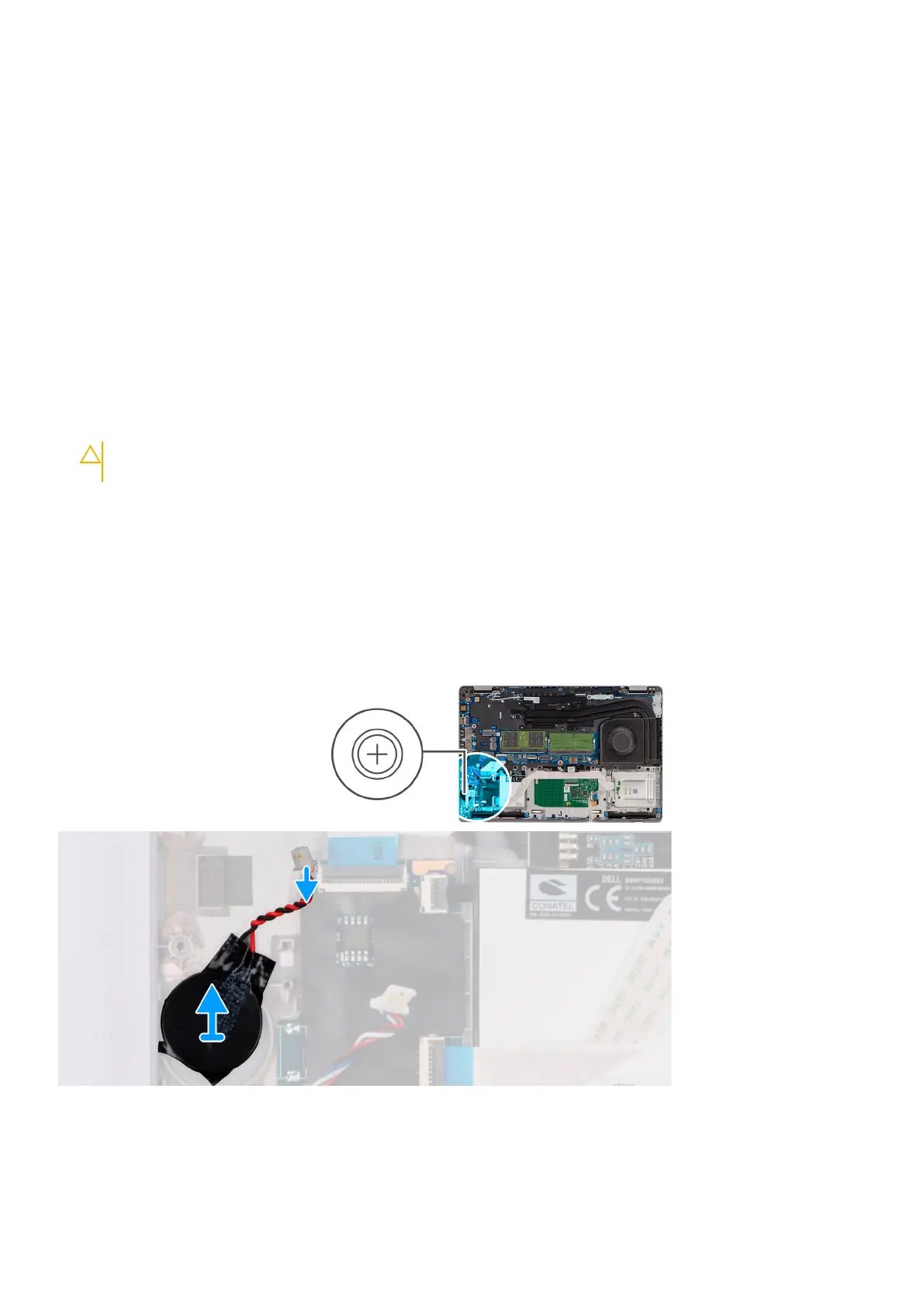
The following image indicates the location of the coin-cell battery and provides a visual representation of the removal procedure.
Steps
Pry and remove the coin-cell battery from the palm-rest assembly.
54
Removing and installing components











 To Next Page