7. Remove the wireless card.
8. Remove the heat sink heat sink.
9. Remove the assembly inner frame.
10. Remove the system board.
NOTE: The system board can be removed with the heat sink attached in order to simplify the procedure and preserve
the thermal bond between the system board and heat sink.
11. Remove the power-button board.
12. Remove the LED board.
13. Remove the smart card reader.
14. Remove the Keyboard assembly.
15. Remove the display assembly.
16. Remove the palm-rest assembly.
About this task
NOTE: For models shipped with WLAN antennas only, the dummy SIM-card slot filler is a separate service part and is not
included with replacement palm rest. As a result, the dummy SIM-card slot filler must be removed and then reinstalled when
replacing the palm-rest assembly.
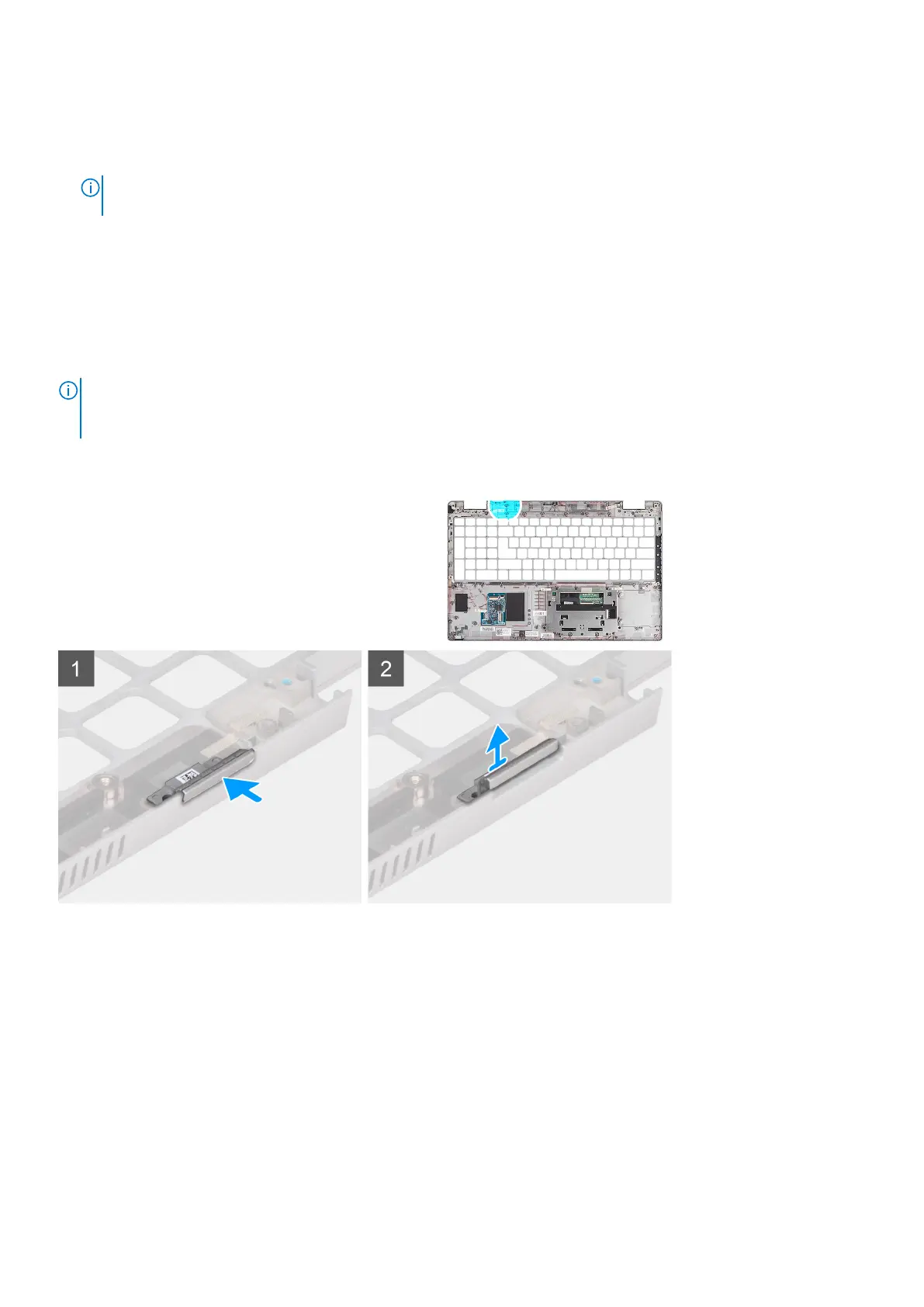
The following images indicate the dummy SIM-card slot filler and provides a visual representation of the dummy SIM-card slot
filler removal procedure.
Steps
1. Push the dummy SIM-card slot filler from the top side of the palm-rest assembly.
Removing and installing components
91










 To Next Page