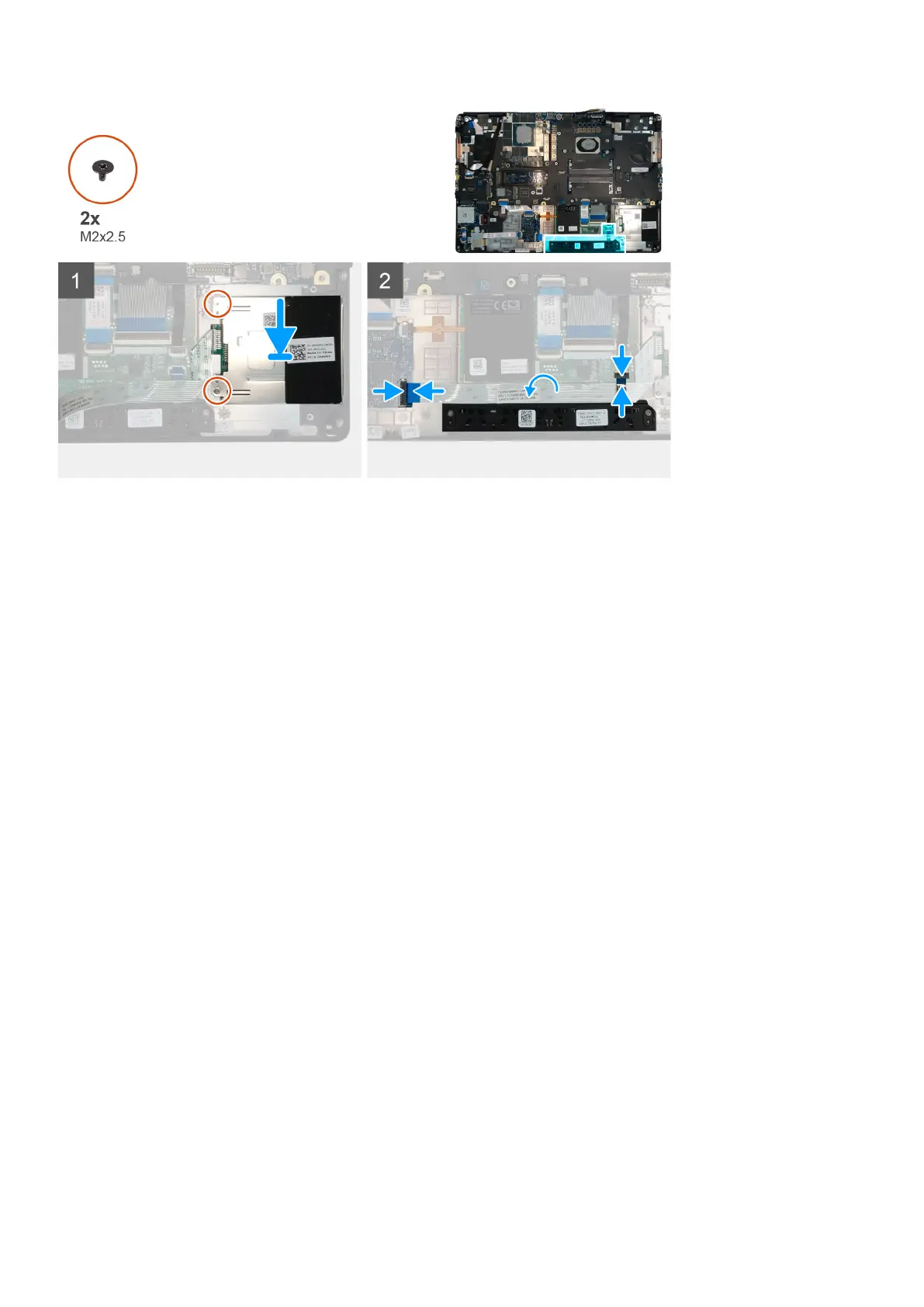
Steps
1. Align and place the smart-card reader into its slot on the computer.
2. Replace the two (M2x2.5) screws to secure the smart-card reader in place.
3. Adhere the smart-card reader cable to the touchpad.
4. Connect the smart-card reader cable to the connector on the USH daughter board.
5. Connect the touchpad button cable to the connector on the touchpad.
Next steps
1. Install the WLAN card.
2. Install the WWAN card.
3. Install the primary M.2 SSD.
4. Install the inner frame.
5. Install the battery.
6. Install the base cover.
7. Install the SD card.
8. Follow the procedure in after working inside your computer.
Touchpadknop
Removing the Touchpad buttons
Prerequisites
1. Follow the procedure in before working inside your computer.
2. Remove the SD card.
3. Remove the base cover.
4. Remove the battery.
5. Remove the primary M.2 SSD.
6. Remove the WLAN card.
7. Remove the WWAN card.
8. Remove the inner frame.
Demonteren en hermonteren
53















 To Next Page