Chapter 10 Digital KeypadCFP2000
10-32
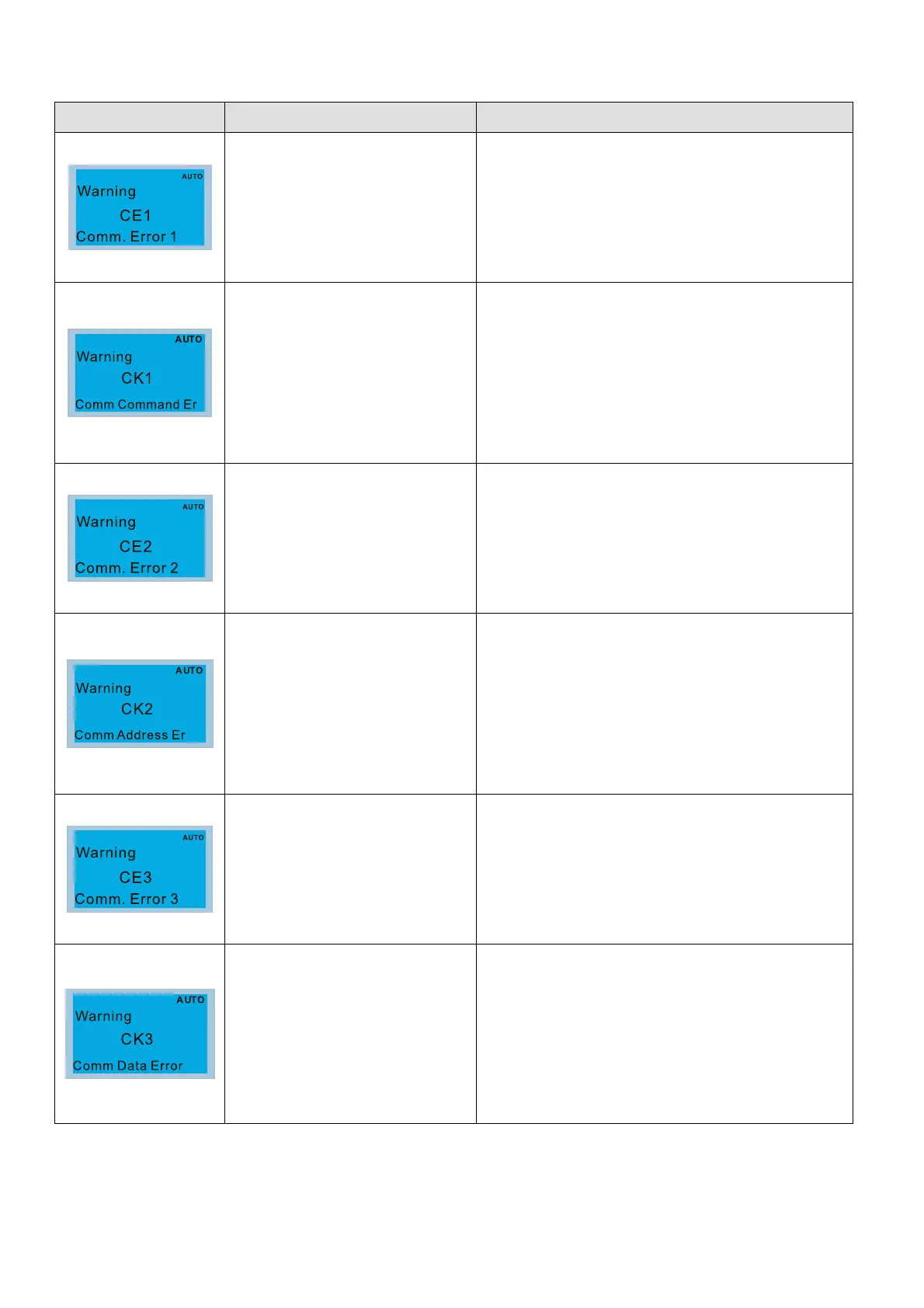
Warning Codes
LCD Display * Description Corrective Actions
Modbus function code error
Motor drive doesn’t accept the communication
command sent from keypad.
1. Verify if the keypad is properly connected to the
motor drive on the communication contact by a
communication cable such as RJ45.
2. Press RESET on the keypad to clear errors.
If none of the above solution works, contact your local
authorized dealer.
Digital keypad function code
error (The keypad automatically
detects and shown this warning)
Keypad does not accept the motor drive’s
communication command.
1. Remove the keypad and reconnect it.
2. Verify if the Baud rate = 19200 bps, and the Format
= RTU8, N, 2
3. Verify if the keypad is properly connected to the
motor drive on the communication contact by a
communication cable such as RJ45.
If none of the above solution works, contact your local
authorized dealer.
Modbus data address error
Motor drive doesn’t accept keypad’s communication
address.
1. Verify if the keypad is properly connected to the
motor drive on the communication contact by a
communication cable such as RJ45.
2. Press RESET on the keypad to clear errors.
If none of the above solution works, contact your local
authorized dealer.
Digital keypad data address
error (The keypad automatically
detects and shown this warning)
Keypad does not accept the motor drive’s
communication command.
1. Remove the keypad and reconnect it.
2. Verify if the Baud rate = 19200 bps, and the Format
= RTU8, N, 2
3. Verify if the keypad is properly connected to the
motor drive on the communication contact by a
communication cable such as RJ45.
If none of the above solution works, contact your local
authorized dealer.
Modbus data value error
Motor drive doesn’t accept the communication data
sent from keypad.
1. Verify if the keypad is properly connected to the
motor drive on the communication contact by a
communication cable such as RJ45.
2. Press RESET on the keypad to clear errors.
If none of the above solution works, contact your local
authorized dealer.
Digital keypad data value error
(The keypad automatically
detects and shown this warning)
Keypad does not accept the motor drive’s
communication command.
1. Remove the keypad and reconnect it.
2. Verify if the Baud rate = 19200 bps, and the Format
= RTU8, N, 2
3. Verify if the keypad is properly connected to the
motor drive on the communication contact by a
communication cable such as RJ45.
If none of the above solution works, contact your local
authorized dealer.



 To Next Page