EtherCAT Communication Card: CMM-EC02/ CMM-EC03
CMM-EC02/ CMM-EC03 Operation Manual
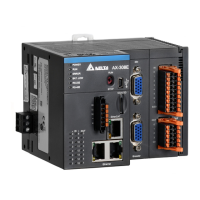
10. Right click on the CPU module image as shown below, select Communication Software then click
EtherCAT to do ECAT master / slave station settings in ECAT Builder software.
11. Click on the Network Scan button, then click Scan on the pop-up window. Then select MS300 /
MH300 (CMM-EC02/ CMM-EC03) in the Equipment Name to export to the network. If the scan
result doesn’t show MS300 / MH300 equipment, verify if the wiring is correct. Refer also to the ESI
Import Process at the end of this chapter to import ESI files of slave station and scan again.



 To Next Page