Chapter 12 Description of Parameter Settings|CFP2000 Series
12.1-09-13
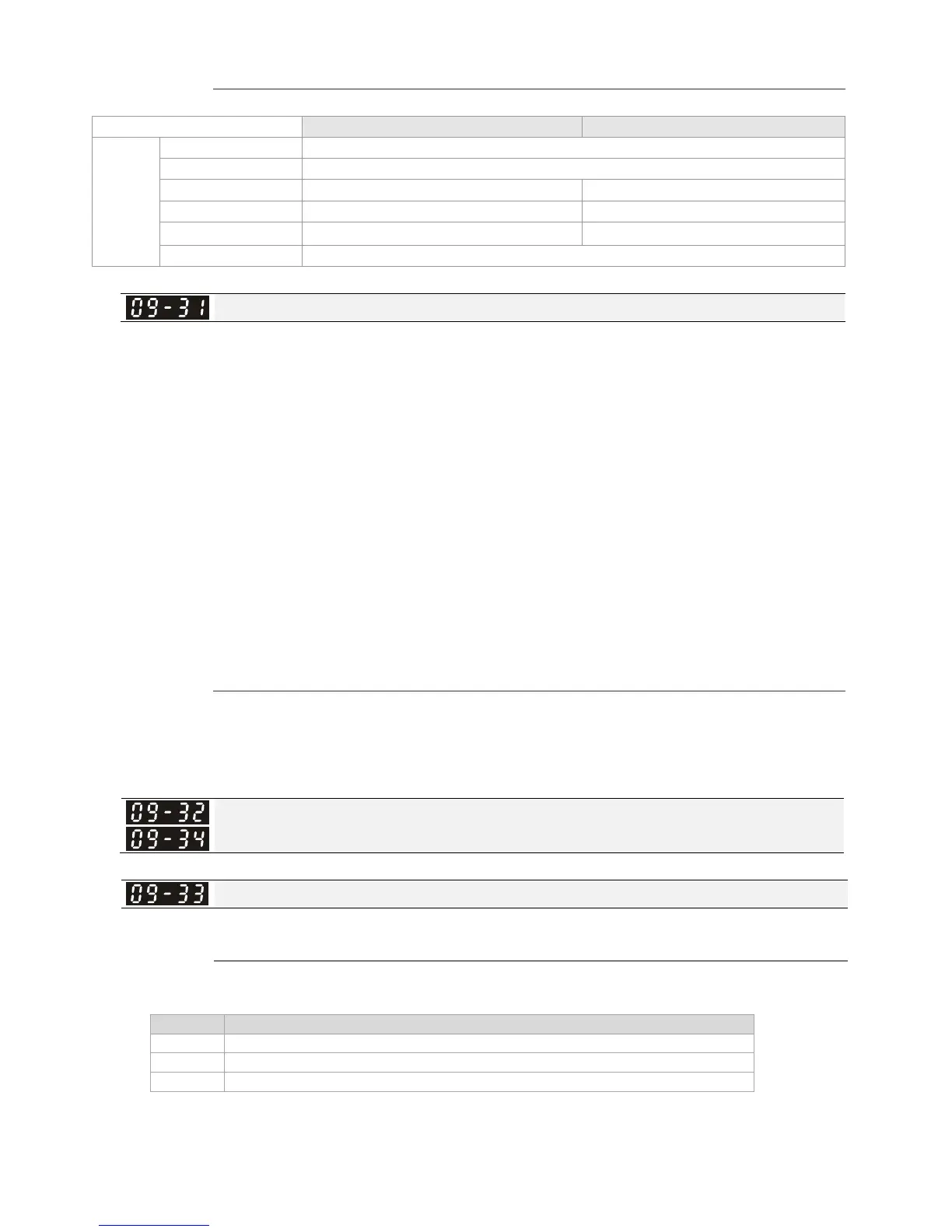
1: Decoding Method 2 (60xx)
Decoding Method 1 Decoding Method 2
Source of
Operation
Control
Digital Keypad Digital keypad controls the drive action regardless decoding method 1 or 2.
External Terminal External terminal controls the drive action regardless decoding method 1 or 2.
RS-485 Refer to address: 2000h~20FFh Refer to address: 6000h ~ 60FFh
CANopen Refer to index: 2020-01h~2020-FFh Refer to index:2060-01h ~ 2060-FFh
Communication Card Refer to address: 2000h ~ 20FFh Refer to address: 6000h ~ 60FFh
PLC PLC commands the drive action regardless decoding method 1 or 2.
Internal Communication Protocol
Factory Setting: 0
Settings 0: Modbus 485
-1: Internal Communication Slave 1
-2: Internal Communication Slave 2
-3: Internal Communication Slave 3
-4: Internal Communication Slave 4
-5: Internal Communication Slave 5
-6: Internal Communication Slave 6
-7: Internal Communication Slave 7
-8: Internal Communication Slave 8
-9: Reserved
-10: Internal Communication Master
-11: Reserved
-12: Internal PLC Control
When it is defined as internal communication, see CH16-10 for information on Main Control
Terminal of Internal Communication.
When it is defined as internal PLC control, see CH16-12 for Remote IO control application ( by
using MODRW).
Reserved
PLC command force to 0
Factory Setting:0000h
Setting
0000~FFFF
It defines the action that before PLC scans time sequence, the frequency command or speed
command needs to be cleared as 0 or not.
Bit Explanation
Bit0 Before PLC scan, set up PLC target frequency=0
Bit1 Before PLC scan, set up the PLC target torque=0
Bit2 Before PLC scan, set up the speed limit of torque control mode=0




 To Next Page