EasyManua.ls Logo

Denon AVC-3000 - Page 8

Denon AVC-3000
66 pages
Print Icon
To Next Page IconTo Next Page
To Previous Page IconTo Previous Page
Loading...
fot
mm
AVC-3000/3000G
TV
(with
video
input
Connecting
DBS
(BS)
tuner
and
output
jacks)
e
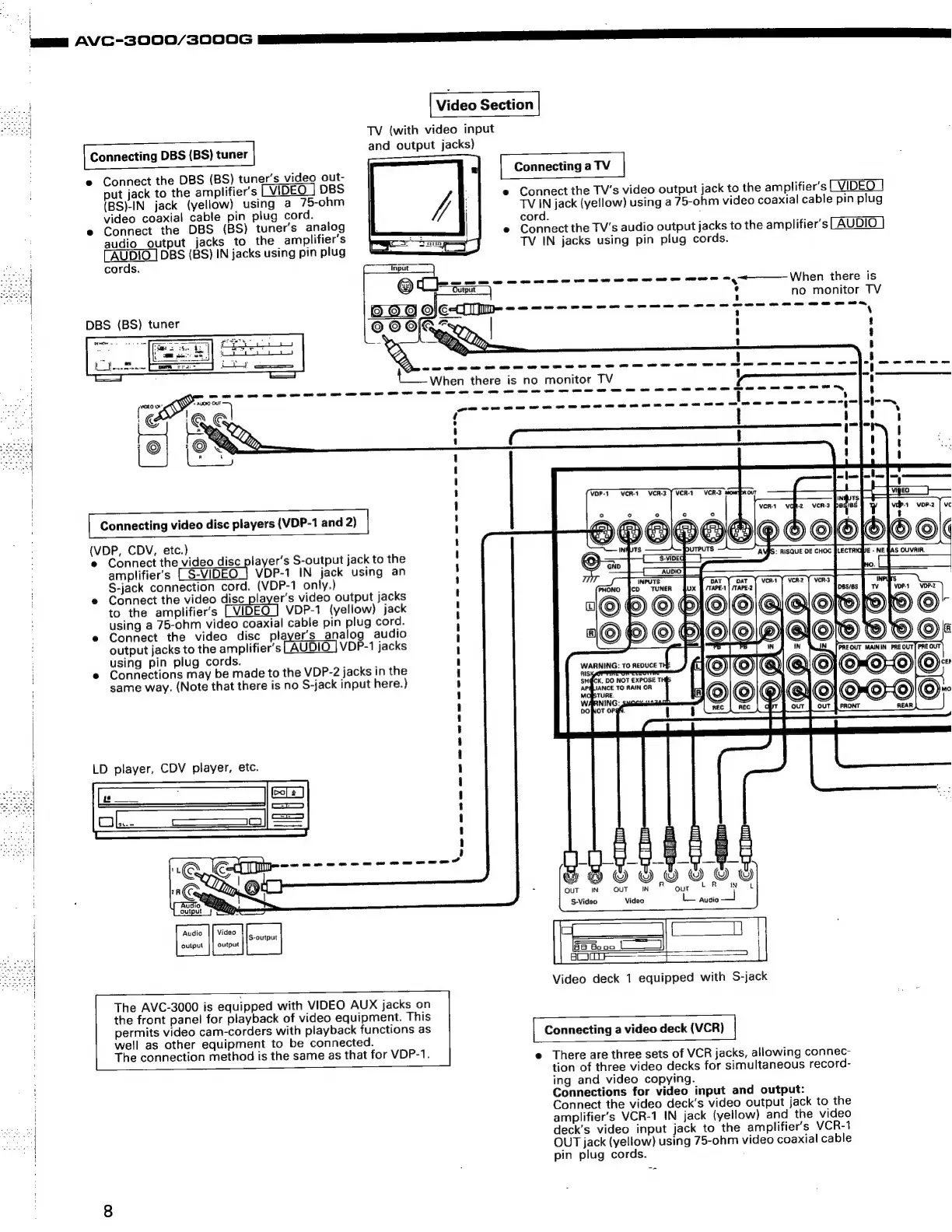
Connect
the
DBS
(BS)
tuner’s
video
out-
put
jack
to
the
amplifier’s
LVIDEO
DBS
(BS)-IN
jack
(yellow)
using
a
75-ohm
video
coaxial
cable
pin
plug
cord.
e
Connect
the
DBS
(BS)
tuner’s
analog
audio
output
jacks
to
the
amplifier’s
AUDIO
|
DBS
(BS)
IN
jacks
using
pin
plug
cords.
i
Connecting
a
TV
|
e
Connect
the
TV’s
video
output
jack
to
the
amplifier’s
VIDEO
TV
IN
jack
(yellow)
using
a
75-ohm
video
coaxial
cable
pin
plug
cord.
:
e
Connect
the
TV’s
audio
output
jacks
to
the
amplifier’s
AUDIO
TV
IN
jacks
using
pin
plug
cords.
—_
oe
ae
oe
oe ee
ee
ee
ee
ee
oe
ee
ee
oy
When
there
is
.
no
monitor
TV
©
6
OAs,
|
7
eX»
ET
ar
an
oan
ee
eee
ee
rene!
(one
renee
te
When
there
is
no
monitor
TV
ewe
maw
ewww
ewww
ew
me
weer
wwe
rer
mreowerereeneen
wee
os
on
om
ae
ee
oe
DBS
(BS)
tuner
Demos
=.
-
J
\
i
t
I
J
I
I
i]
1
J
1
'
t
' J
1
J
!
I
t
1
J
|
i
'
1
I
i)
t
t
1
-
LJ
a
|
pir
4
f
!
rte)!
VOP-1
VCR-1
VCR-3
7
VCR-1
VCR-3
monrey
|
Connecting
video
disc
players
(VDP-1
and
2)
|
wer
CDV,
eat
sed
scar
e
Connect
the
video
disc
player's
S-output
jack
to
the
amplifier’s
CS-VIDEO]
VP-1
IN
jack
using
an
S-jack
connection
cord.
(VDP-1
only.)
e
Connect
the
video
disc
player's
video
output
jacks
to
the
amplifier’s
VDP-1
(yellow)
jack
using
a
75-ohm
video
coaxial
cable
pin
plug
cord.
e
Connect
the
video
disc
player's
analog
audio
output
jacks
to
the
amplifier's
AUDIO
|
VDP-1
jacks
using
pin
plug
cords.
e
Connections
may
be
made
to
the
VDP-2
jacks
in
the
same
way.
(Note
that
there
is
no
S-jack
input
here.)
SHOW!O©
©
HOO
©
IN|
PRE
OUT]
PRE
OUT
WARNING:
To
REDUCE
T
S
S}
0)
«
>
6)
©)«
SH@CK,
DO
NOT
EXPOSE
THIS
LD
player,
CDV
player,
etc.
mo
ns
wo
me
oe
om
me
me
ee
a
ee
ee
me
ee
oe
me me
ee
ee
me me
me
ery
Cl
fim
QUT
IN
OUT
IN
S-Video
Video
2
ie
Audio
Video
output
|]
output
The
AVC-3000
is
equipped
with
VIDEO
AUX
jacks
on
the
front
panel
for
playback
of
video
equipment.
This
Video
deck
1
equipped
with
S-jack
permits
video
cam-corders
with
playback
functions
as
[
Connecting
a
video
deck
(VCR)
|
well
as
other
equipment
to
be
connected.
The
connection
method
is
the
same
as
that
for
VDP-1.
e
There
are
three
sets
of
VCR
jacks,
allowing
connec-
tion
of
three
video
decks
for
simultaneous
record-
ing
and
video
copying.
Connections
for
video
input
and
output:
Connect
the
video
deck’s
video
output
jack
to
the
amplifiers
VCR-1
IN
jack
(yellow)
and
the
video
deck’s
video
input
jack
to
the
amplifier’s
VCR-1
OUT
jack
(yellow)
using
75-ohm
video
coaxial
cable
pin
plug
cords.

Related product manuals