EasyManua.ls Logo

Denon AVC-3000 - Page 9

Denon AVC-3000
66 pages
Print Icon
To Next Page IconTo Next Page
To Previous Page IconTo Previous Page
Loading...
AVC-3000/3000G
Im
A
note
on
the
jacks
e
The
input
selector
for
the
S
inputs
and
that
for
the
us
i
1
j
————SS
oy
. .
.
. .
. .
°
Connect
th
eee
eIDEO
pin
jack
inputs
work
in
conjunction
with
each
MONITOR
OUT
jack
using
an
S-
other.
When
a
source
without
an
S
input
is
jack
connection
cord.
selected,
a
signal
is
not
output
to
the
S-jack
=
e
[
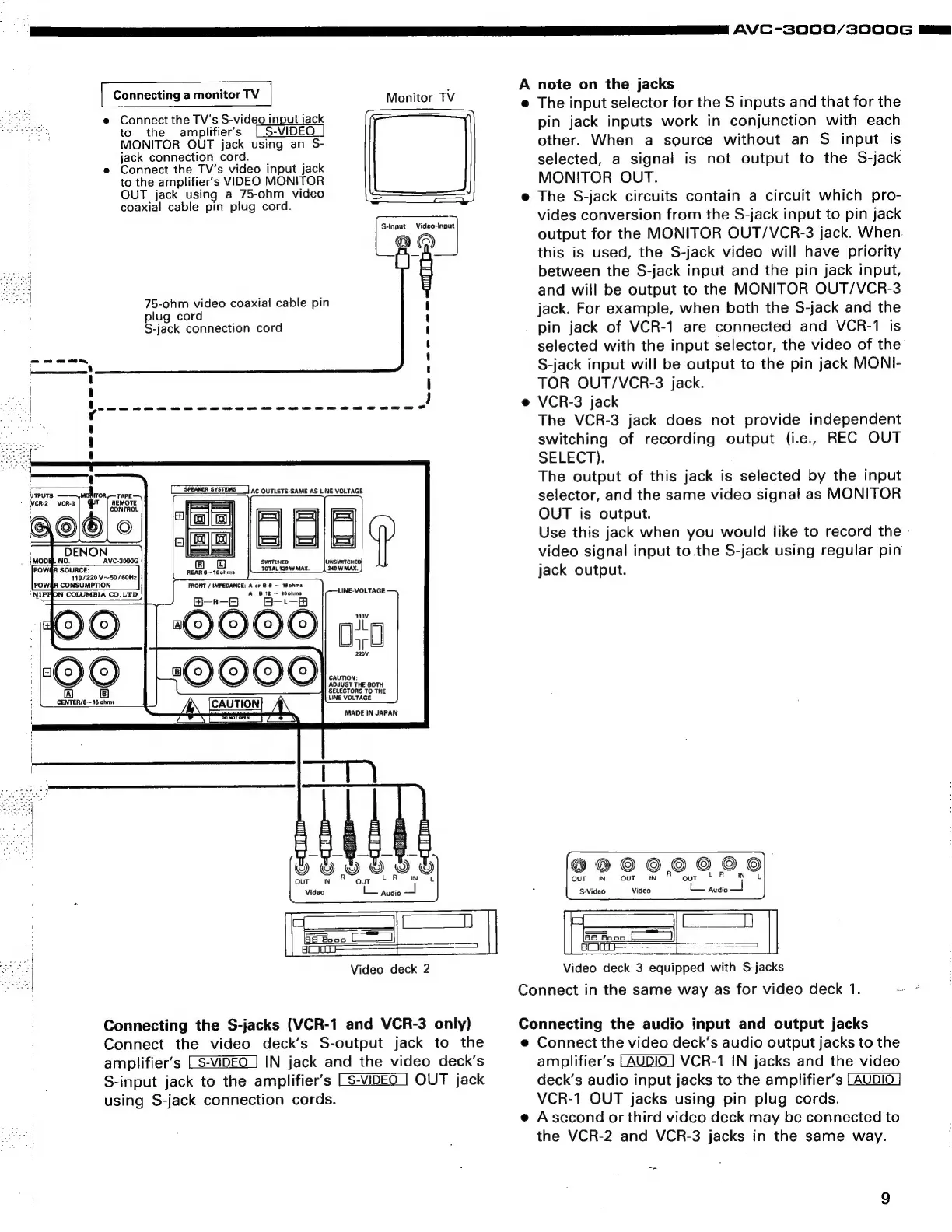
Connecting
a
monitor
TV
|
Monitor
TV
e
Connect
the
TV's
video
input
jack
MONITOR
OUT.
to
the
amplifiers
VIDEO
MONITOR
OUT
jack
using
a
75-ohm
video
The
S-jack
circuits
contain
a
circuit
which
pro-
coaxial
cable
pin
plug
cord.
E
.
:
3
ee
Singur:
\Videotnput
vides
conversion
from
the
S-jack
input
to
pin
jack
a
output
for
the
MONITOR
OUT/VCR-3
jack.
When.
this
is
used,
the
S-jack
video
will
have
priority
between
the
S-jack
input
and
the
pin
jack
input,
and
will
be
output
to
the
MONITOR
OUT/VCR-3
jack.
For
example,
when
both
the
S-jack
and
the
pin
jack
of
VCR-1
are
connected
and
VCR-1
is
selected
with
the
input
selector,
the
video
of
the
S-jack
input
will
be
output
to
the
pin
jack
MONI-
TOR
OUT/VCR-3
jack.
-
e
VCR-3
jack
The
VCR-3
jack
does
not
provide
independent
switching
of
recording
output
(i.e,
REC
OUT
SELECT).
ae
|
The
output
of
this
jack
is
selected
by
the
input
selector,
and
the
same
video
signal
as
MONITOR
OUT
is
output.
Use
this
jack
when
you
would
like
to
record
the
-
75-ohm
video
coaxial
cable
pin
plug
cord
S-jack
connection
cord
we
ee
=~)
ispuTS
ITORy—TAPE
WCR-2
VCR-3
y
AEMOTE
:
CONTROL
@
-
and
ENON
soon
-
rises
video
signal
input
to.the
S-jack
using
regular
pin
it
eae
POW@A
CONSUMPTION
FRONT
/
IMPEDANCE:
A
or
8
6
~
180hms
'NIPH
ON
COLUMBIA
CO.LTD.
A
1B
12
~
160hms
®—-rk—-B
8-'—-8
:
10)
©
a(c)
OQ
110v
ale
al
CENTER/6~
16
ohms
oi
:€4WD—
&
OUT
IN
OUT
IN
°
S-Video
Video
L—
pudio
°
c
S
Video
el
Es
a
Booo
CF
___]
ACC
=
Video
deck
2
Video
deck
3
equipped
with
S-jacks
Connect
in
the
same
way
as
for
video
deck
1.
ersoeese
UT
a
ie
Connecting
the
S-jacks
(VCR-1
and
VCR-3
only)
Connecting
the
audio
input
and
output
jacks
Connect
the
video
deck’s
S-output
jack
to
the
e
Connect
the
video
deck’s
audio
output
jacks
to
the
amplifier’s
IN
jack
and
the
video
deck’s
amplifier’s
VCR-1
IN
jacks
and
the
video
S-input
jack
to
the
amplifier’s
OUT
jack
deck’s
audio
input
jacks
to
the
amplifier’s
using
S-jack
connection
cords.
VCR-1
OUT
jacks
using
pin
plug
cords.
e
Asecond
or
third
video
deck
may
be
connected
to
sel
the
VCR-2
and
VCR-3
jacks
in
the
same
way.

Related product manuals