ASD·3N/3W
c
,
{
,
~
c
o
<
,
I
I
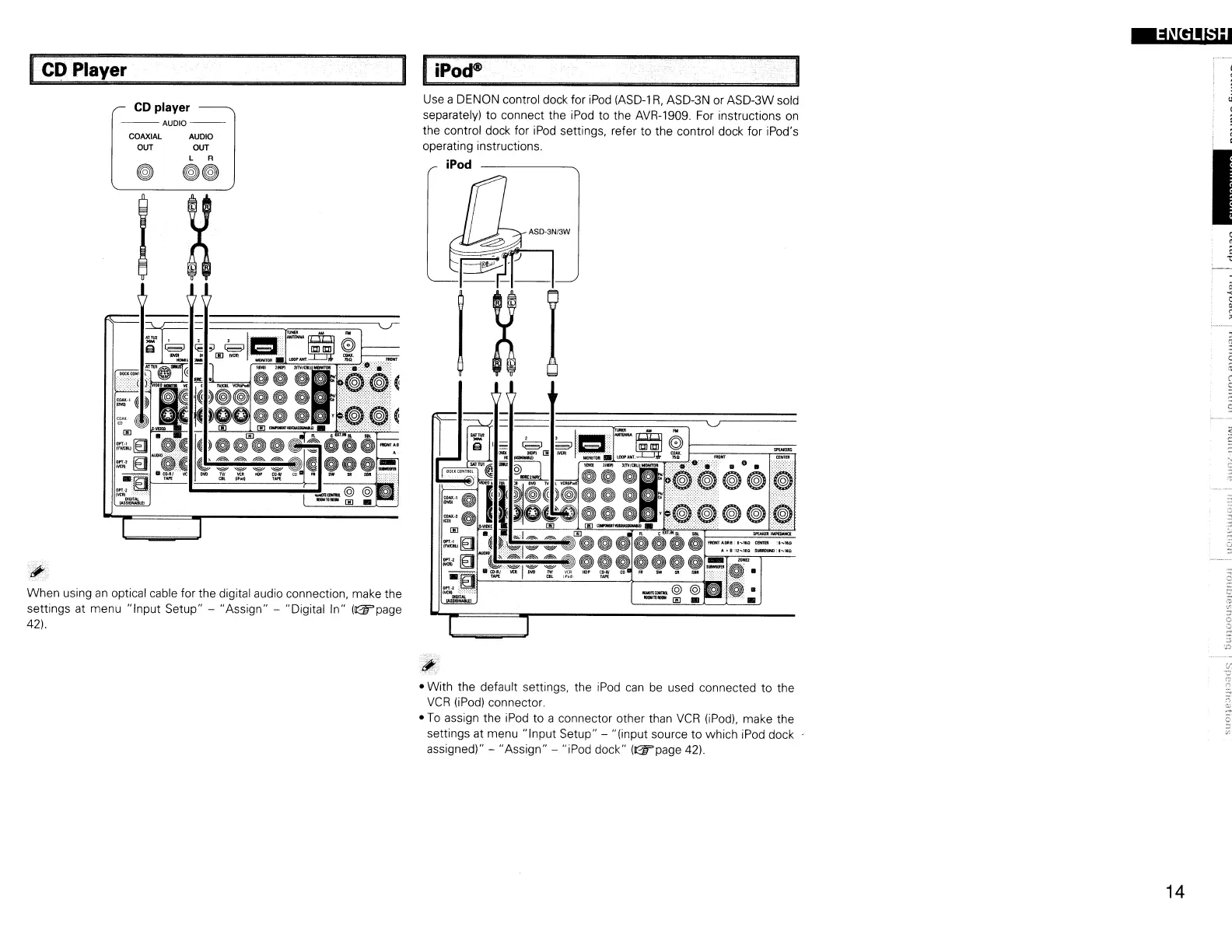
Use a DENON control dock for
iPod
(ASD-l
R,
ASD-3N or ASD-3W sold
separately) to connect the iPod to the AVR-1909.
For
instructions
on
the control dock for
iPod
settings, refer to the control dock for iPod's
operating instructions.
iPod
CD player
--AUDIO--
COAXIAL
AUDIO
OUT OUT
L R
o
00
When using
an
optical cable for the digital audio connection, make the
settings at menu "Input Setup" - "Assign" - "Digital In"
(lI:2Wpage
42).
• With the default settings, the iPod
can
be
used connected to the
VCR
OPod)
connector.
•
To
assign the iPod to a connector other than
VCR
(iPod),
make the
settings at menu "Input Setup" - "(input source to which iPod
dock·
assigned)" - "Assign" - "iPod dock"
(lI:2Wpage
42).
14



 To Next Page
 Loading...