EasyManua.ls Logo

Denon AVR-1909 - Punch through Function; Sub Remote Control Unit (RC-1107)

Denon AVR-1909
103 pages
Print Icon
To Next Page IconTo Next Page
To Previous Page IconTo Previous Page
Loading...
ENGLISH
[Front]
~.
[~l
[
],
[],
:
t8I
,------'
,@
,
[II], [
......
],
--J~i
[
~],
:~:
[
~]
~j
[SOURCE
[SOURCE
CONTROL
1]
~
~
CONTROL
2]
[Rear]
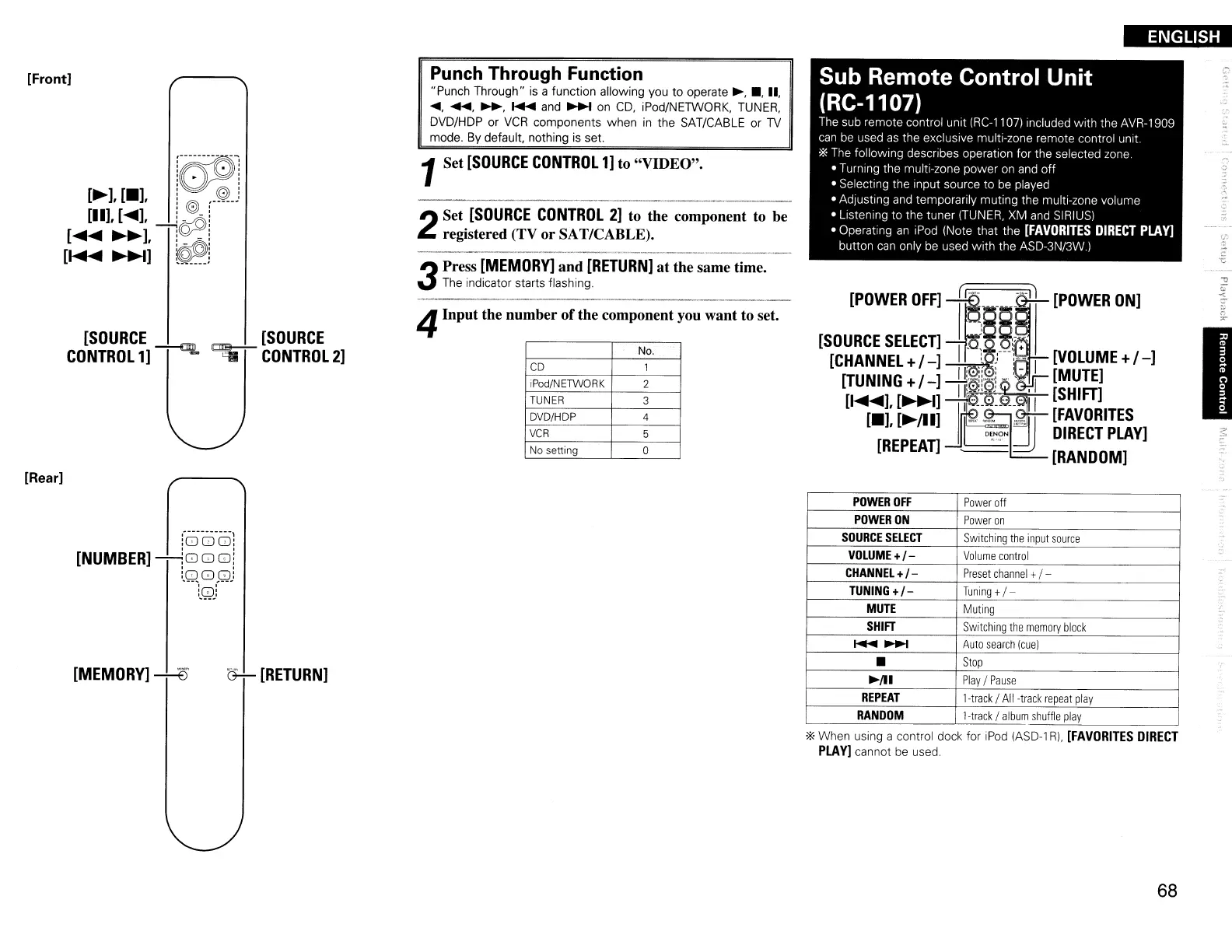
Punch Through Function
"Punch
Through"
is a
function
allowing
you
to
operate
~
.•
,
II
.
.... .......
~
........
and
~
on
CD, iPod/NETWORK. TUNER.
DVD/HDP
or
VCR
components
when
in
the
SAT/CABLE
or
TV
mode.
By
default. nothing is set.
1Set
[SOURCE
CONTROL
1]
to
"VIDEO".
2
Set
[SOURCE
CONTROL
2]
to the component to be
registered (TV
or
SAT/CABLE).
3
Press
[MEMORY]
and
[RETURN]
at
the same time.
The indicator starts flashing.
4Input the number ofthe component you want to set.
No.
CD
1
iPod/NETWORK
2
TUNER
3
DVD/HDP
4
VCR
5
No
setting
a
Sub Remote
Control
Unit
(RC-1107)
The sub
remote
control
unit
IRC·l1
07) Included With the AVR-1909
can be used
as
the
exclUSive multi-zone
remote
control
unit
'*
The
following
desCrIbes operation
for
the
selected zone
Turning
the
multi-zone
power
on and
off
Selecting
the
input
source
to
be played
Adjusting and
temporarily
muting
the
multi-zone
volume
Listening
to
the
tuner
(TUNER,
XM
and SIRIUS)
Operating
an
iPod (Note
that
the
[FAVORITES
DIRECT
PLAY]
button
can only be used
with
the
ASD-3N/3W.)
[POWER
OFF]
l'
11
[POWER
ON]
[SOURCE
SELEcn
.1
~8§;,.
[CHANNEL
+/
-]
~r-:-:-
I
[VOLUME
+
/-]
[TUNING
+/
-]
-tf".
:!w:"!
'~
[MUTE]
[
.....
],
[~I]
1'---'
.e_.
-II
[SHIFT]
[.],
[~/lI]
Ir
~"]'~!I
[FAVORITES
D\~?N
~
DIRECT
PLAY]
[REPEAT]
-------.:..-
[RANDOM]
"
-."
I
l~----------l
:000:
[NUMBER]
~G)
0
0i
tQGJ~wj
:0:
[MEMORY]
---+--8
~[RETURN]
POWER
OFF
Power
off
POWER
ON
Power
on
SOURCE
SELECT
Switching
the
input
source
VOLUME+/-
Volume
control
CHANNEL+/-
Preset
channel
+/ -
TUNING
+1-
Tuning
+
/-
MUTE
Muting
SHIFT
Switching
the
memory
block
.......
~
Auto
search
Icue)
Stop
~/Il
Play
/
Pause
REPEAT
l-track 1
All
-track
repeat
play
RANDOM
l-track 1
album
shuffle
play
'*
When
using a control dock for iPod (ASD-l
Rl,
[FAVORITES
DIRECT
PLAY] cannot be used.
68

Table of Contents

Other manuals for Denon AVR-1909

Related product manuals