EasyManua.ls Logo

Denon AVR-X5200W - Connecting a Blu-Ray Disc Player Compatible with the Denon Link HD Function

Denon AVR-X5200W
362 pages
Print Icon
To Next Page IconTo Next Page
To Previous Page IconTo Previous Page
Loading...
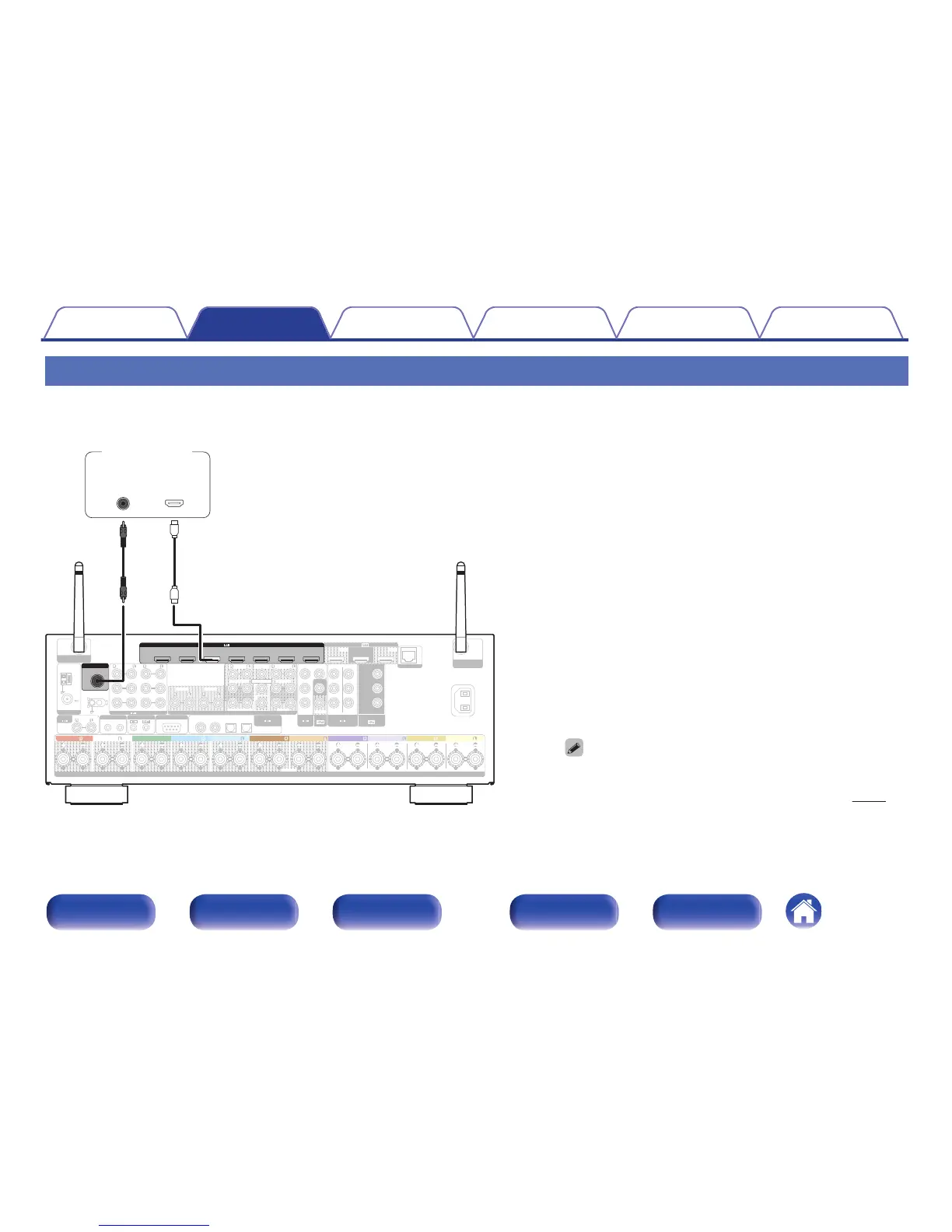
Connecting a Blu-ray Disc player compatible with the Denon Link HD function
By making a Denon Link HD connection to a player compatible with the Denon Link HD function, you can enjoy higher quality playback compared with
when only the HDMI connector connection is made.
0
Both HDMI and Denon Link HD connections are required for this
connection method.
0
Set “Input Mode” on the menu to “Auto” or “HDMI”. (v
p. 212)

1 CBL/SAT
PHONO
1
CBL/SAT
2 DVD
2
CD
1
TV
AUDIO
6 MEDIA PLAYER
2 DVD
12
3 Blu-ray
5 CD
4 GAME
1
CBL/SAT
1
CBL/SAT
2 DVD
2 DVD4 GAME
(ASSIGNABLE)
DIGITAL AUDIO
RS-232C
REMOTE CONTROL
TRIGGER OUT
AUDIO
(ASSIGNABLE)
(ASSIGNABLE)
VIDEO
COMPONENT VIDEO
VIDEO
COMPONENT VIDEO
MONITOR/ZONE2
MONITOR
ZONE23 Blu-ray
Y
P
B/CB
PR/CR
COAXIAL
OPTICAL
STRAIGHT CABLE
IR
DC12V 150mA MAX.
ZONE2 ZONE3
FRONT
SURROUND
FRONT WIDE
CENTER
HEIGHT1
SURROUND BACK HEIGHT2
1
SUBWOOFER
SIGNAL
GND
NETWORK
PRE OUT
(ASSIGNABLE)
AUDIO
2
ASSIGNABLE ASSIGNABLE ASSIGNABLE
SPEAKERS
IMPEDANCE : 416
ǡ
CLASS 2 WIRING
ANTENNA
AM
FM
Bluetooth
/
Wi-Fi
ANTENNA
Bluetooth
/
Wi-Fi
ANTENNA
AC IN
ARC
MONITOR1
ZONE2
MONITOR2
HDMI
CENTER SURROUND
SURROUND BACK
SURROUNDFRONT
SURROUND BACK
FRONT WIDE/HEIGHT2FRONT WIDE/HEIGHT2
HEIGHT1 HEIGHT1FRONT
Denon Link HD
1
CBL
/SAT
2
DVD
3
Blu-ray
6
AUX2
7
CD
4
GAME
5
MEDIA
PLAYER
(ASSIGNABLE)
HDMI
Link HD
Denon
OUT
HDMI
Blu-ray Disc
player
Contents Connections Playback Settings Tips Appendix
69
Front panel Display Rear panel Remote Index

Table of Contents

Other manuals for Denon AVR-X5200W

Related product manuals