Front panel Display Rear panel IndexRemote
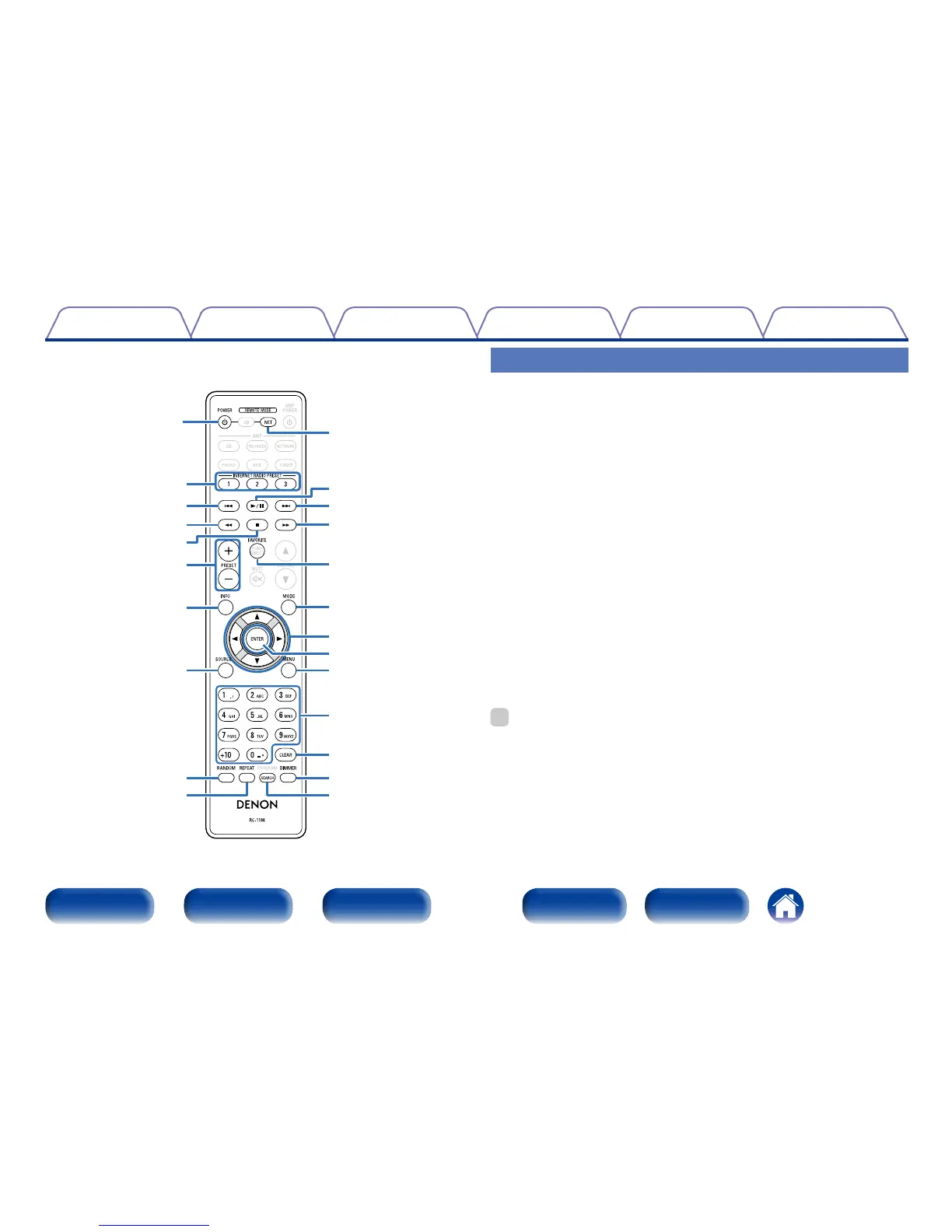
q POWER button (X)
w INTERNET RADIO PRESET
buttons (1 – 3)
e Reverse-skip/Forward-skip
buttons (8, 9)
r Fast-reverse/Fast-forward
buttons (6, 7)
t Stop button (2)
y PRESET buttons (+, –)
u Information button (INFO)
i SOURCE button
o RANDOM button
Q0 REPEAT button
Q0
o
u
i
w
e
r
t
y
q
Q8
Q9
W0
Q4
r
e
Q2
Q1
Q5
Q7
Q6
W1
Q3
Q1 Remote mode select button
(NET)
Q2 1/3 button
Q3 FAVORITE button
Q4 MODE button
Q5 Cursor buttons (uio p)
Q6 ENTER button
Q7 MENU button
Q8 Number buttons (0 – 9, +10)
Q9 CLEAR button
W0 DIMMER button
W1 SEARCH button
%
•The amplifier can be operated with the amplifier operation buttons even
when the remote control mode is NET.
•The included remote control unit can be used to operate Denon network
audio players.
•When using it, also refer to the operating instructions of the other
devices.
Network audio player operation
To operate network audio player, press REMOTE MODE NET button to
switch the remote control to the NETWORK operation mode.
•REMOTE MODE NET button lights for approximately two seconds.



 To Next Page