20
4.1.7. Connecting to Power Supply
Power-supply voltage is as shown in the table below:
Power
Supply
24V DC±10% 1A MAX
(motor power supply)
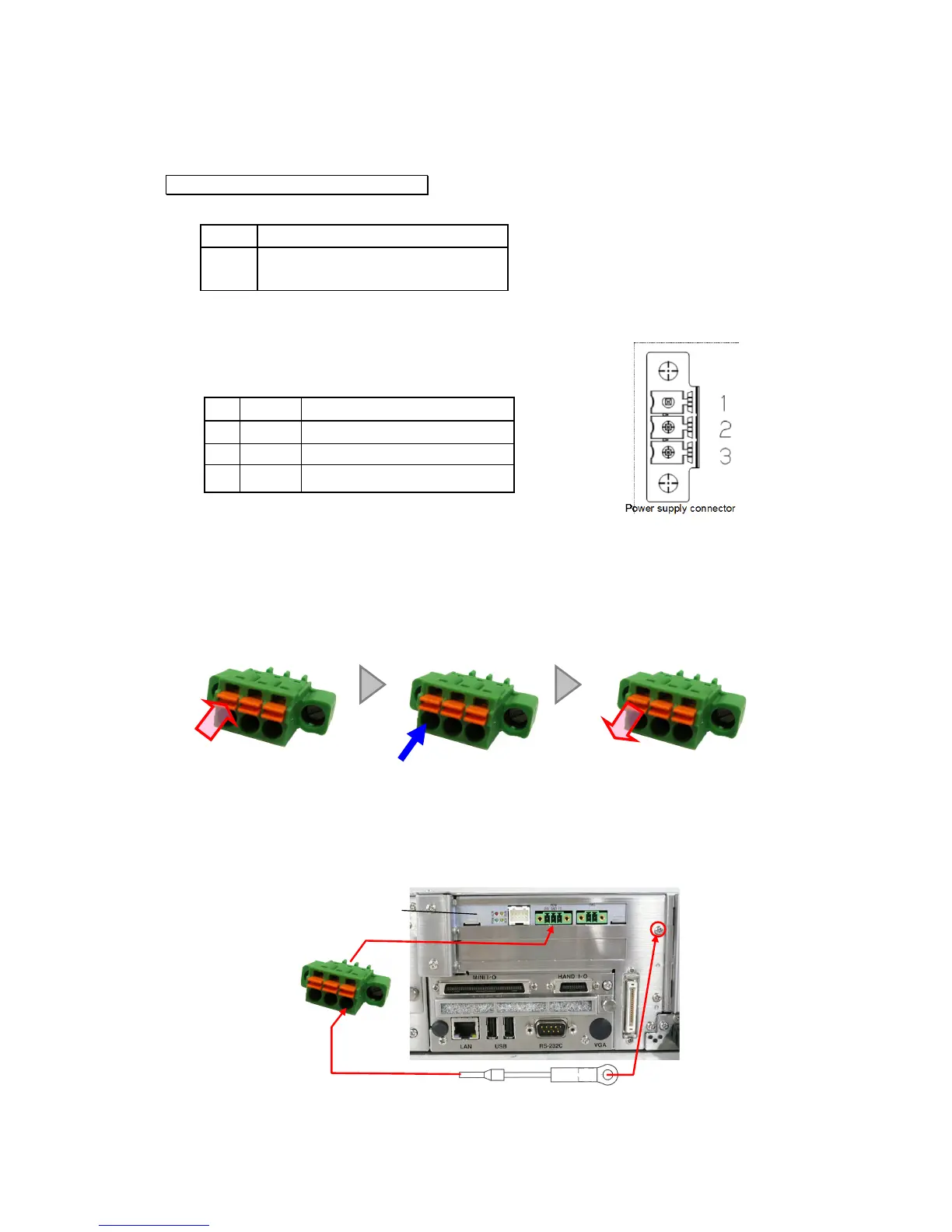
Disconnect the connector from the electric gripper control board and connect the power
supply wire.
■Power supply connector
No. Symbol Function
1 +24V Motor power supply
3 FG
Frame ground (for grounding)
Applicable power supply cables: AWG28 – 16
Refer to the procedure shown below for details on how to connect the power supply
to the connector.
Step 1
Push in the orange part with a minus driver, etc
Step 2
Fully insert the lead wire.
Step 3
Return the orange part to its original position.
Always use the ground wire provided, and connect FG to the robot controller front panel as
shown below.
Tightening torque: 0.6 N⋅m
Robot controller front panel
Electric gripper control board



 To Next Page