23
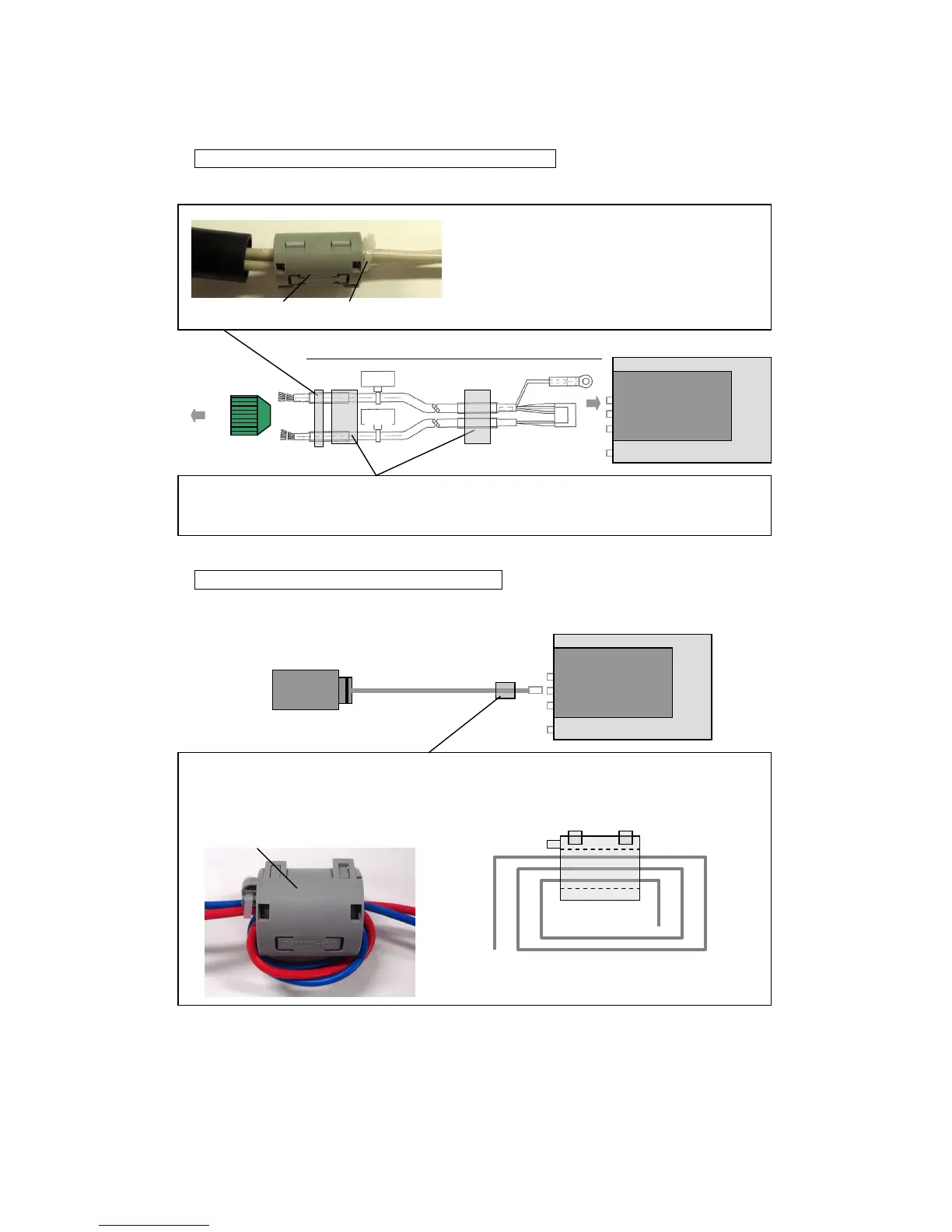
Attaching a ferrite core to the B, C connection cable
Attach the ferrite core as shown in the diagram below.
Electric gripper
control board
Attach the ferrite core (large) provided as close as possible to the electric gripper control board.
The installation method is same as the A connection cable. Refer to "Attaching a ferrite core to the
A connection cable" for details.
Electric gripper connection cable (B, C connection)
Attach the ferrite core (small) provided as close as
possible to the connector connected to the robot
without trapping the cable, and then secure it with one
of the tie bands (small) provided.
Attaching a ferrite core to the power cable
Attach the ferrite core as shown in the diagram below.
24 VDC power supply (prepared by customer)
Electric gripper
control board
Attach the ferrite core (medium) provided as close as possible to the electric gripper control board
without trapping the cable. Wind the fe
rrite core (medium) 2
times.
Schematic diagram when winding the electric gripper
connection cable 2 times



 To Next Page