Shenzhen Dericam Technology Co., Ltd. User Manual V1.0.7
Email: support@dericam.com Website: www.dericam.com
46
Before you start to use the email alarm of Dericam camera, something you need to be noted as
below.
Firstly, there may have some limitations for the smtp sever to allow the Dericam Camera to
access it, take the Gmail and Yahoo as an example, you need to allow the third-part app to access
your email account first before you let the Dericam camera to access your email, or you may get
continuous fail while you configuring and test your email settings in Dericam camera. Please see
below in detail.
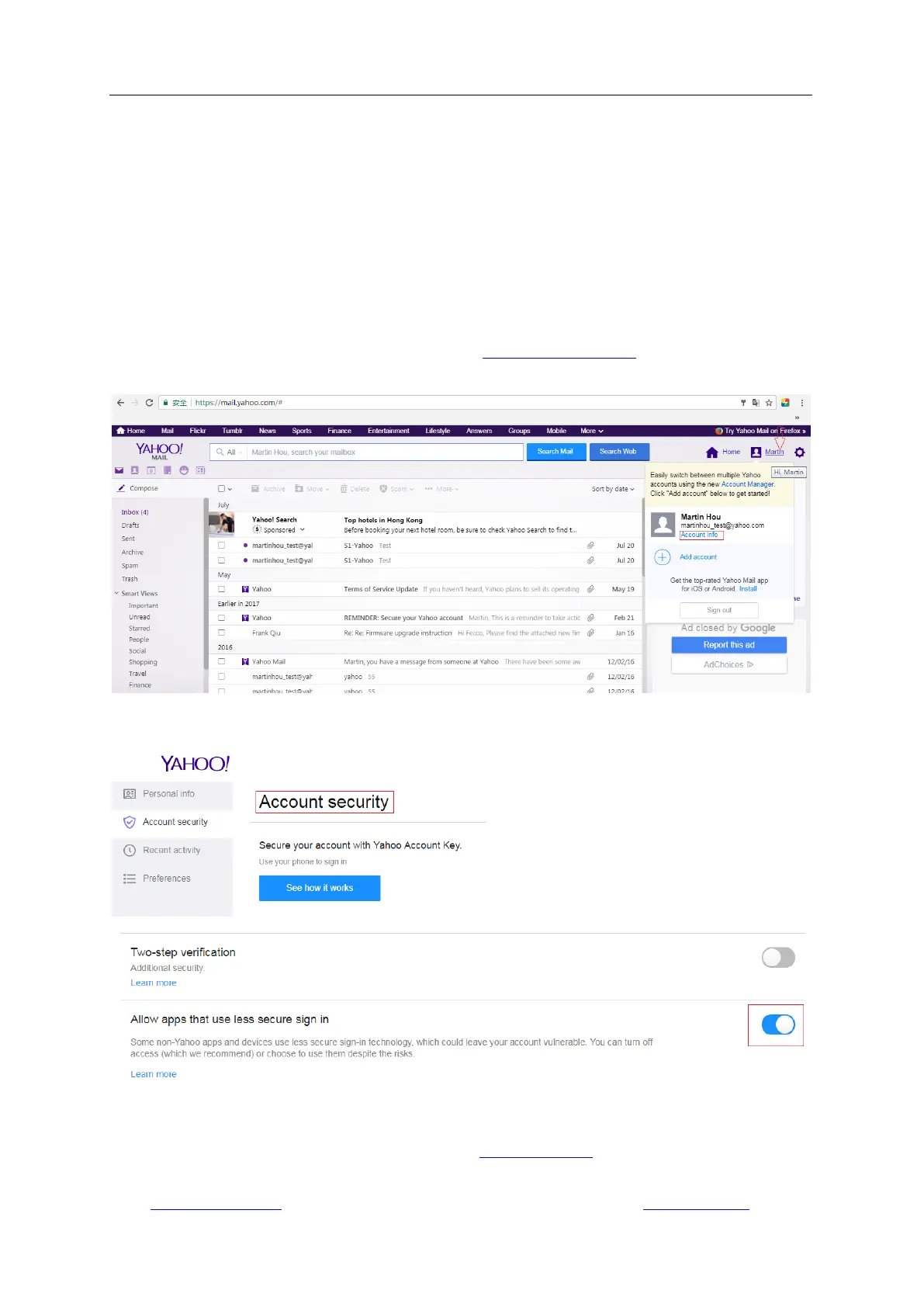
For the Yahoo account:
4) Sign in your Yahoo account via web browser at www.mail.yahoo.com.
5) Go to your Account Info setting page.
6) Find the Account security sheet and enable the button “Allow Apps that use less secure sign
in”.
For the Gmail Account:
5) Sign in your Gmail account via web browser at www.gmail.com.
6) Click the button “My Account” at the top-right corner.



 To Next Page