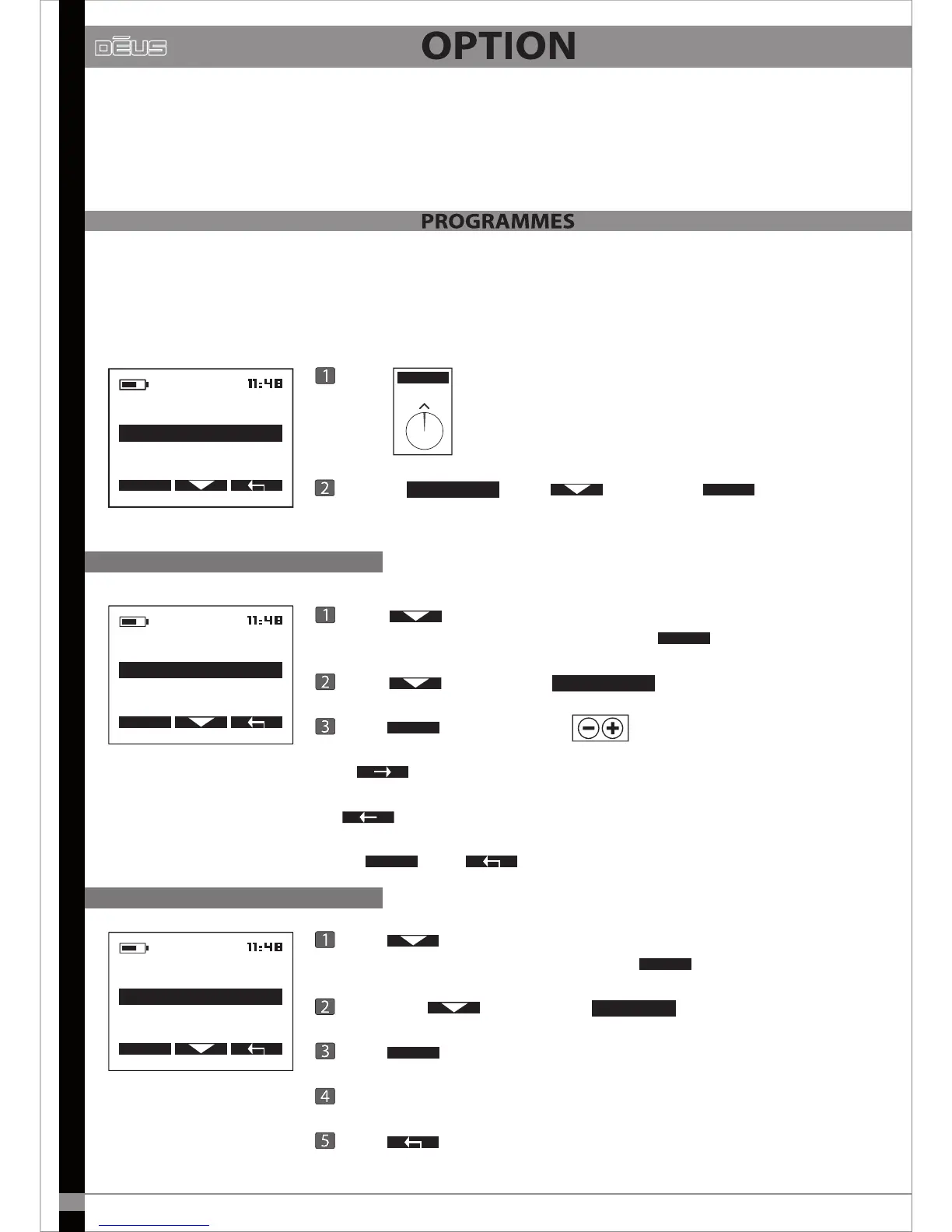
These enable you to save your settings, create new programmes and congure your equipment’s
basic parameters.
22
Listed here are the nine detection programmes which were pre-congured at the factory.
You can modify the name of a programme, save modications made to a programme or restore a
factory programme.
OPTION
CONFIGURATION
COIL
SELECT
Press
OPTION
PROGRAM
Choose
PROGRAM
with then press
SELECT
Modify the name of a programme
Press to scroll through the menu and stop on the
programme you wish to modify, then press
OPTION
Press and stop on
EDIT NAME
Press
SELECT
and scroll with
And to advance to the next data entry zone
Or
to delete the previous character.
Press
VALID
and X2 to return to the main menu.
PROGRAM
RESTORE
SAVE
EDIT NAME
SELECT
Save a modied programme
PROGRAM
EDIT NAME
RESTORE
SAVE
SELECT
Press to scroll through the menu and stop on the
programme you wish to save, then press
OPTION
Scroll with and stop on
Press
SELECT
to save.
Choose either YES or NO to conrm.
Press
RESTORE
X2 to return to the main menu.


 To Next Page