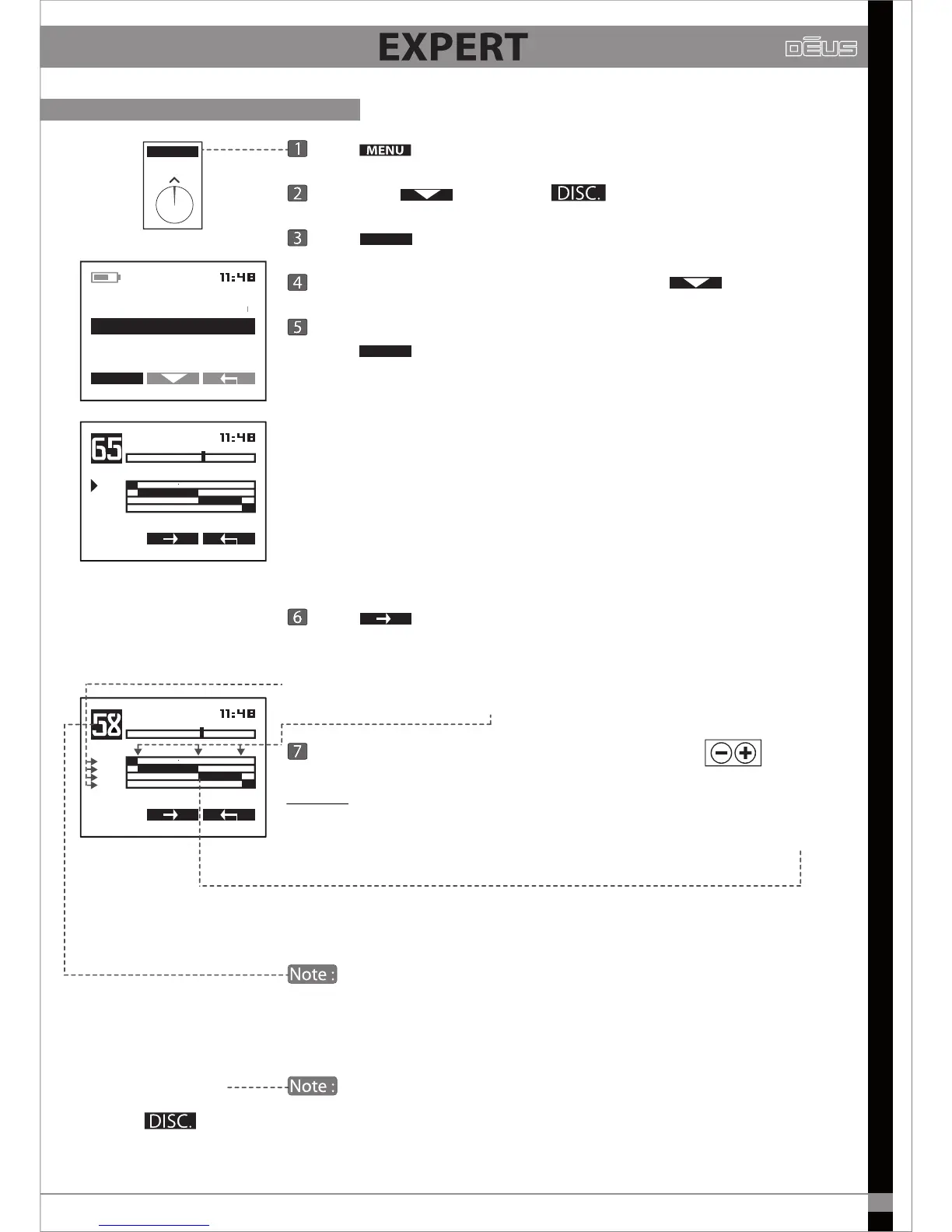
Press
Scroll with
and select
Press
Choose 2 tones - 3 tones - 4 toens - Pitch with
Once you have selected the number of tones (for example: 4 tones)
Press
You have the option of customising the sound partitioning of the
discrimination range.
A sound frequency (comparatively low- or high-pitched) is assigned to
each part of the discrimination range. In this example, a low-pitched
sound (202 Hz) is assigned to the signals from 0 to 6.8, a higher-pitched
sound (518 Hz) is assigned to the part from 6.8 to 60, then 644 Hz is
assigned to 60 to 87 and lastly a very high-pitched sound (757 Hz) is
assigned to the part from 87 to 99.
Press in order to move the cursor (black triangle) from one
setting zone to another.
Note that the cursor rst moves up and down to indicate the sound
frequencies used, then from left to right to indicate each threshold.
Adjust the sound frequencies and thresholds with
Example: If a coin type, which your device registers as 58 on the conductivity
index, signals as “medium low” (518 Hz) and you wish it to be signalled
as “medium high” (644 Hz), you simply lower the threshold from 60 to 57
or less.
Now, all coins with this conductivity value will register at 644 Hz.
The black bar showing the index of the target is displayed in the
top left of the screen (black bar) for help. This enables you to directly
adjust the sound responses for targets you select as references.
The threshold 1 separating the low-pitched tone (tone 1) from
the medium tone (tone 2) is the same as the Discrimination value.
These are the same settings.
MENU
EXPERT
EXPERT
MULTI TONES
PITCH
2 TONES
4 TONES
EXPERT
3 TONES
4 TONES
202
518
644
757
TONE1 202 HZ
THRESH 1T / 2T
=
4 TONES
202
518
644
757
THRESH. 2T/3T 57
MULTI TONES, Thresholds and Tones
37


 To Next Page