40
These partially discriminated iron objects often generate a few audible
remnants of broken, inconsistent signals (crackling).
Depending on your abilities and preferences, you may wish to remove
this crackling using the Silencer.
When you increase the value of the silencer you are applying a lter which
eliminates the crackling caused by iron.
Level 2 represents a good compromise, but if you have diculty
distinguishing iron from non-iron, then use a higher level such as 2, 3 or 4.
The Reactivity menu takes precedence over the silencer,
so if you change the reactivity value this automatically imposes an
appropriate silencer value. This is designed to avoid the silencer being
set to a value that could reduce the eectiveness of the reactivity setting.
Press
Scroll with and select
NOTCH
Press
EXPERT
and go to NOTCH screen.
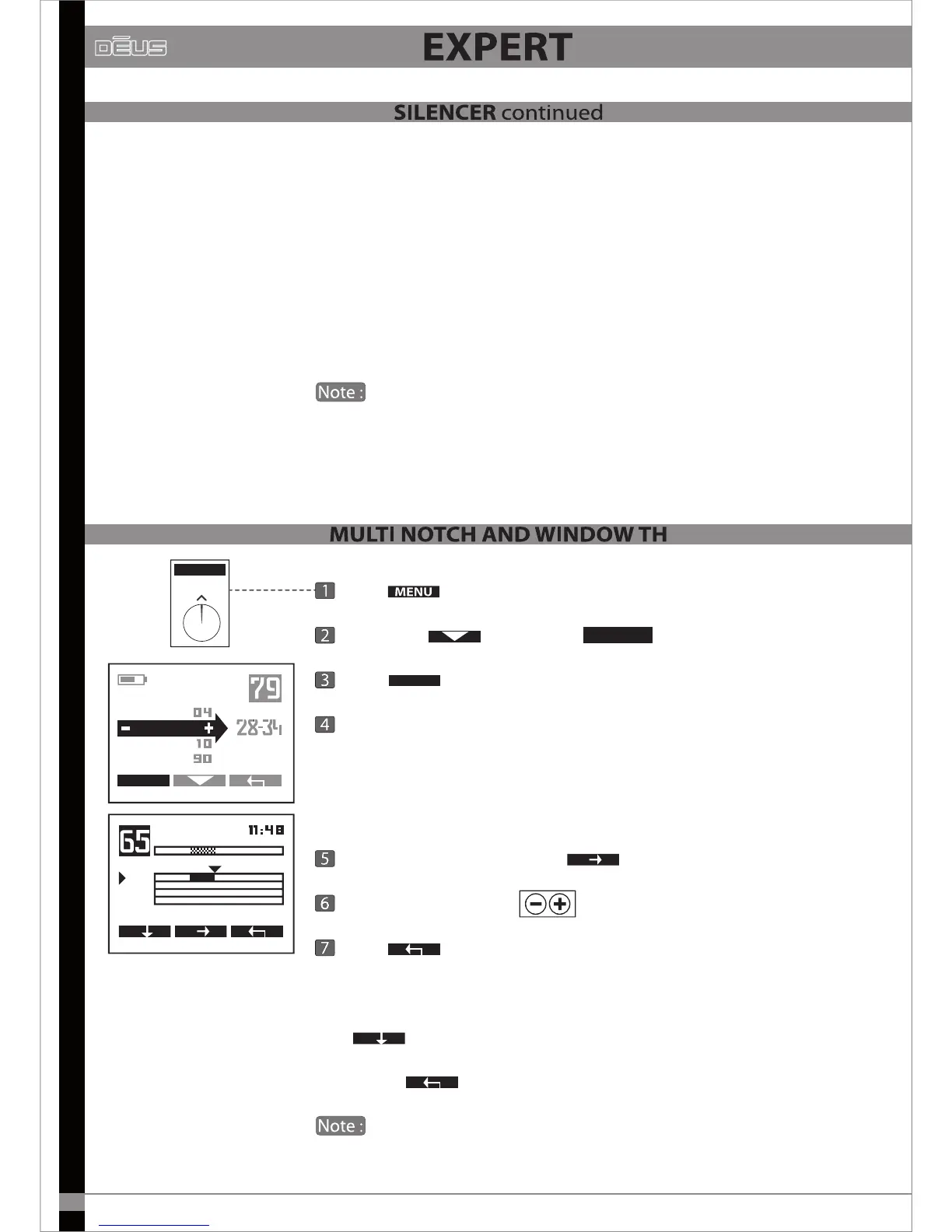
This advanced notch function enables you to widen the rejection
window in the event that the undesirable target(s) have a wider conductivity
range than the standard 6-point window.
For example, if the undesirable target is generating a signature ranging
from 28 to 46, you can use this option to lower the value of Threshold
1 to 28 and increase Threshold 2 to 46.
Select threshold 1 or 2 with
Adjust the values with
Press
X2 to return to the main menu.
If several targets with dierent conductivity levels are bothering you, you
can activate two other notches: N2 and N3
Use
to select N2 or N3, and adjust as for N1.
To exit use
You will note that the notched zones are greyed out in the
conductivity bar on the main page.
MENU
AUDIO RESP.
MENU
DISC.
NOTCH
EXPERT
SENS.
NOTCH
N 1
46
28
THRESH 1
46
THRESH 2


 To Next Page