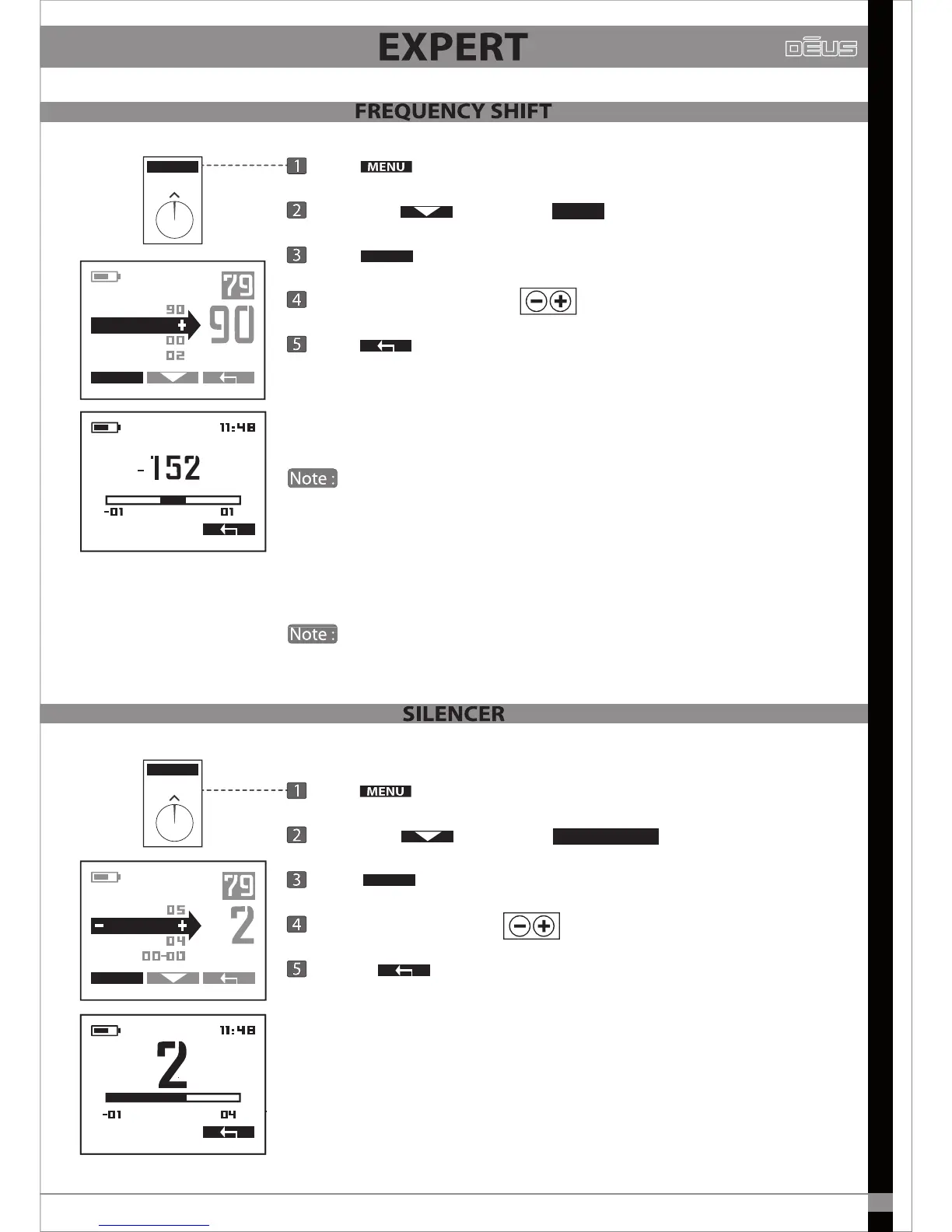
Press
Scroll with and select
Press
Adjust the frequency with
Press
x2 to return to the main menu.
You can shift your operational frequency slightly to avoid occasional
interference, particularly that generated by another detector nearby.
Starting from the central frequency, two other frequencies are available.
Wherever possible, remain on the central frequency, which is more
closely attuned to the emitter coil.
During a rally or other group event, if you suer from any interference
do not hesitate to shift the frequency.
You can also simply change the basic frequency (4, 8, 12, 18kHz) to avoid
interference from your team mate’s detector
4kHz frequency is xed and cannot be shifted.
MENU
EXPERT
FREQ
MENU
EXPERT
SENS.
IRON VOL.
REACTIVITY.
FREQ.
DECAL FREQ
HZ
MENU
EXPERT
REACTIVITY
Press
Scroll with and select
Press
Adjust the Silencer with
Pressez
x2 to return to the main menu.
Iron is more easily discriminated than other metals because of its unique
signature which is related to its ferromagnetic properties.
However, large iron objects or certain unusual shapes are often more
dicult, or even impossible, to discriminate.
SILENCER
EXPERT
MENU
IRON VOL.
AUDIO RESP.
NOTCH.
REACTIV.


 To Next Page