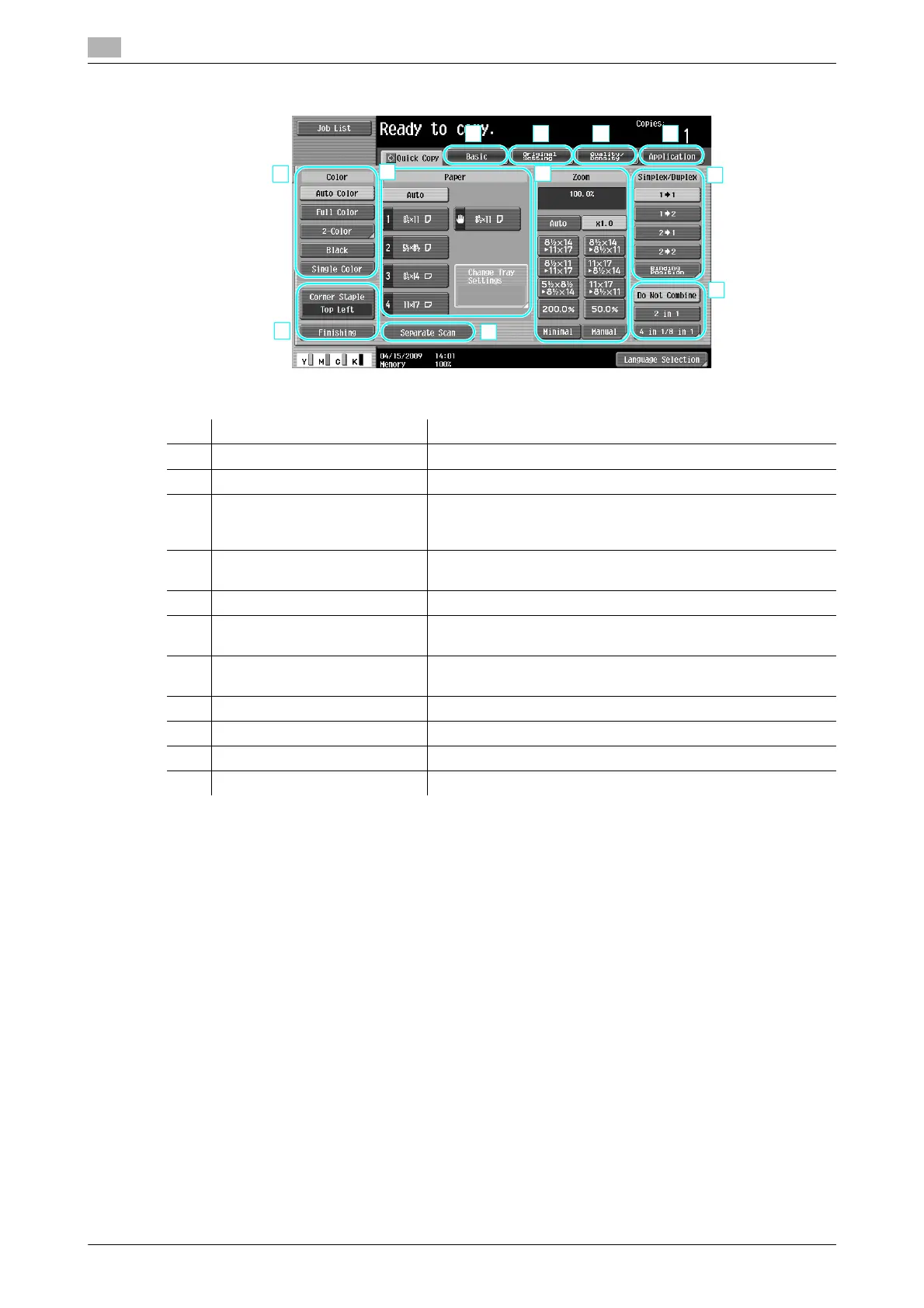
Specifying basic settings for quick copying
3
3-4 ineo+ 220/280/360 (Version 3)
3.1
d Reference
For details, refer to chapter 6 of the [User's Guide Copy Operations].
No. Item Description
1 Color settings Select the print color.
2 Paper settings Select the type and size of paper to be copied.
3 Zoom settings The zoom ratio can be set in order to make a copy on paper
with a size different than the document or to enlarge or reduce
the size of the copy image.
4 Simplex/Duplex settings Select whether the document and copy is single-sided or dou-
ble-sided.
5 Combine settings Select the setting for combining document pages in copies.
6 [Separate Scan] key Select whether a document scanned in different batches is to
be treated as a single copy job.
7 Finishing settings Select the settings for sorting, grouping, offsetting, stapling, or
hole punching.
8 Basic tab Press to display the Basic screen.
9 Original Setting tab Press to display the Original Setting screen.
10 Quality/Density tab Press to display the Quality/Density screen.
11 Application tab Press to display the Application screen.









 To Next Page