4-8 ineo+ 360i/300i/250i
Name of each component (main unit)
4
4.2
Side/rear
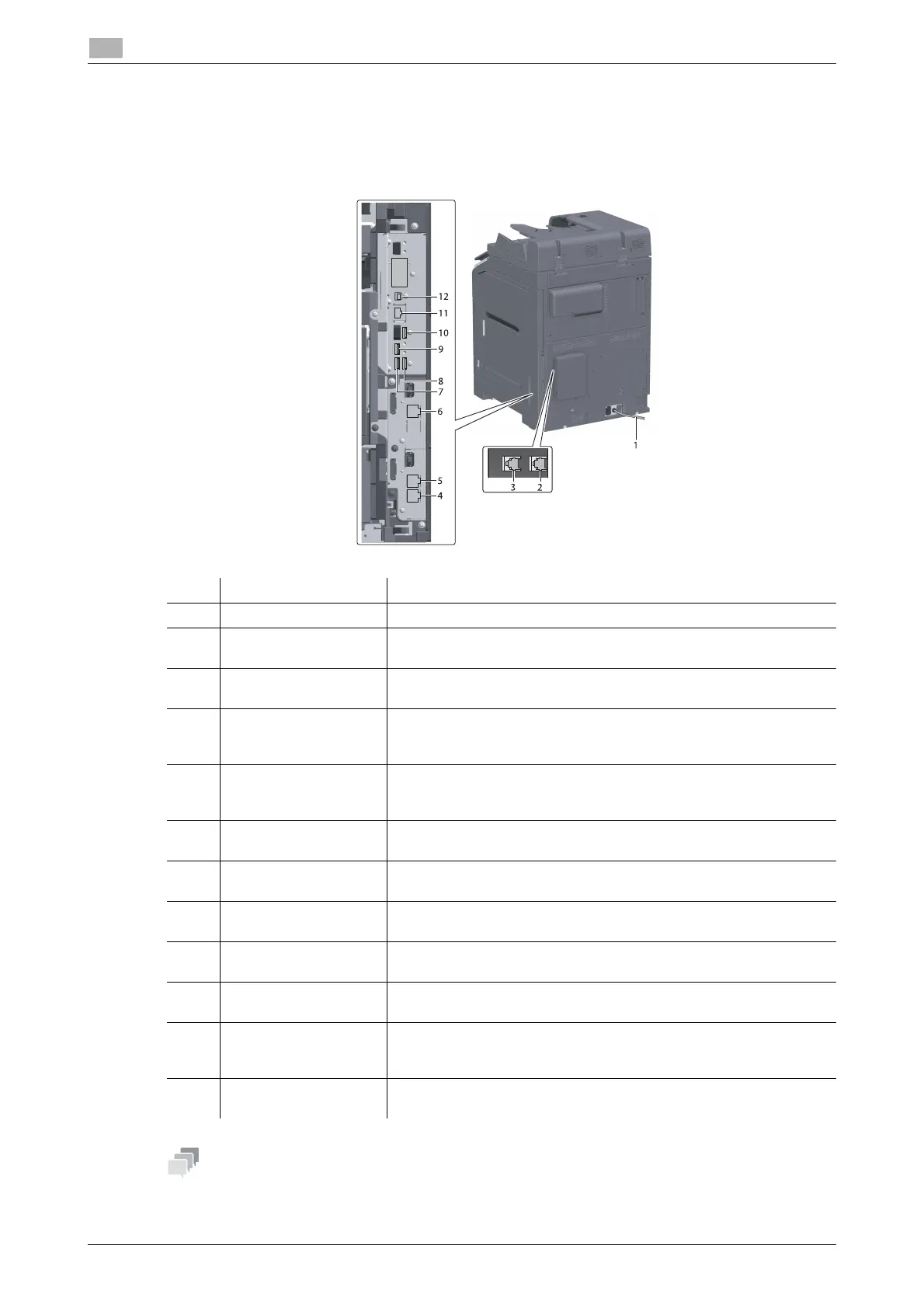
The illustration shows the main unit with Reverse Automatic Document Feeder DF-714, Fax Kit FK-514,
FAX Kit FK-515, and Fax Mount Kit MK-742.
(FAX Kit FK-515 and Fax Mount Kit MK-742 can be used in North America and Hong Kong.)
- The network port of this product is following No.11 and No.12. A port is activated when a network port
inserts a cable.
No. Name Description
1 Power Cord Used to supply power to this machine.
2 Telephone Jack 4
(LINE PORT4)
Used to connect a general telephone subscriber line.
3 Telephone Jack 3
(LINE PORT3)
Used to connect a general telephone subscriber line.
4 Jack for connecting a
telephone (TEL
PORT1)
Used to connect a telephone cord.
Connect the cord to this connector even when using multiple lines.
5 Telephone Jack 1
(LINE PORT1)
Used to connect a general telephone subscriber line.
Connect the cord to this connector when using only one telephone
line.
6 Telephone Jack 2
(LINE PORT2)
Used to connect a general telephone subscriber line.
7 USB Port (Type A)
USB2.0/1.1
Used to connect the FAX1 line (option).
8 USB Port (Type A)
USB2.0/1.1
Used to connect the FAX2 line (option).
9 USB Port (Type C)
USB3.0
Used to connect the Wireless LAN Interface Kit (option).
10 USB Port (Type A)
USB2.0/1.1
Used to connect the Authentication Unit (option).
11 Network Connector
(10Base-T/100Base-
TX/1000Base-T)
Connect to this port when using this machine as a network printer or
network scanner.
12 USB Port (Type B)
USB2.0/1.1
Connect to this port when using this machine as a USB-connected
printer.











 To Next Page