ineo+ 360i/300i/250i 4-9
4.3 Power supply
4
4.3 Power supply
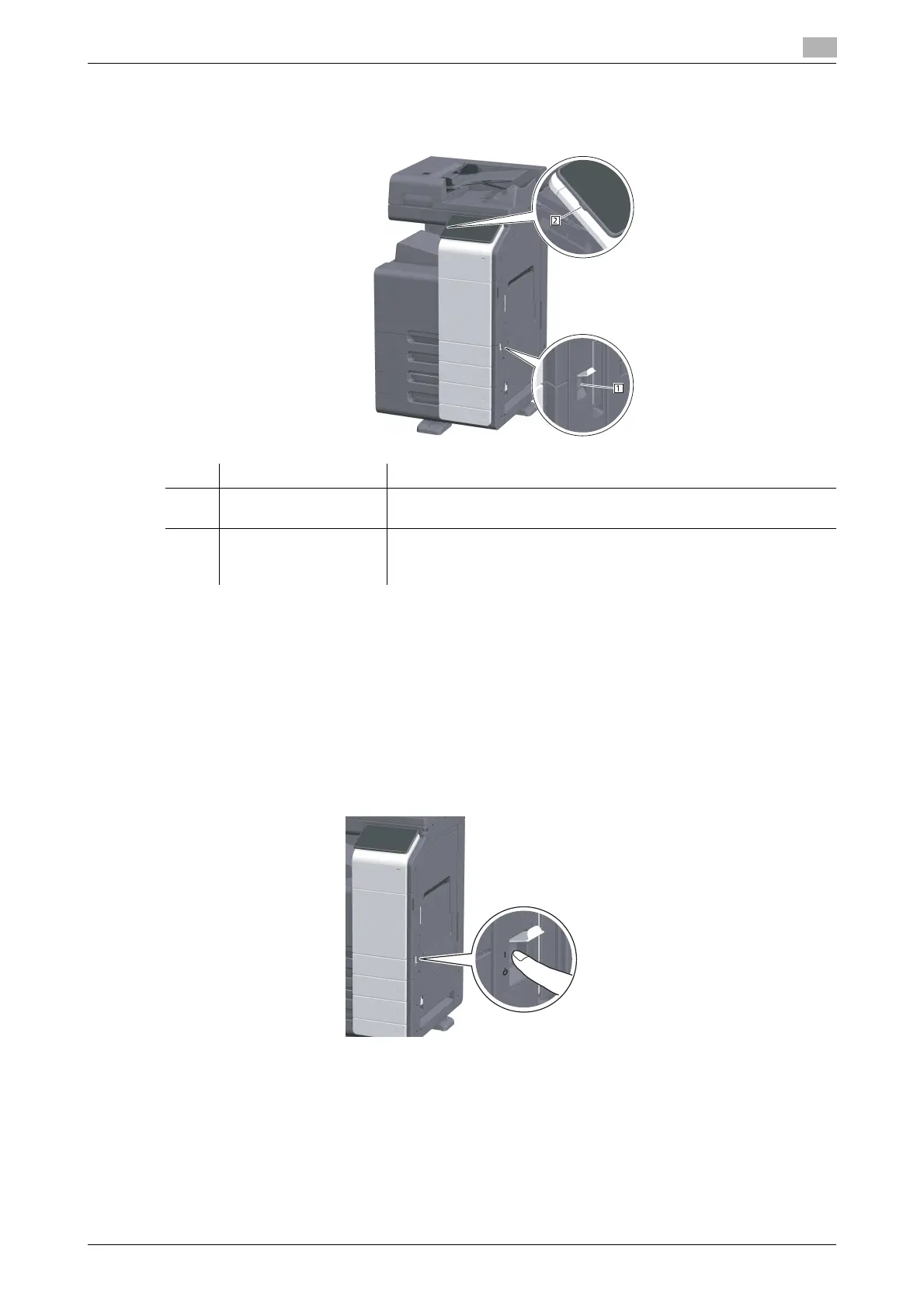
This machine provides the Main Power Switch and Power key.
NOTICE
While printing, do not turn the Main Power Switch off or press the Power key. Otherwise, it may lead to a
paper jam.
If the Main Power Switch is turned off or the Power key is pressed while this machine is running, the system
deletes the currently loaded data or communicating data as well as queued jobs.
Turning the power on and off
1
When turning the main power on, open the Main Power Switch Cover, and press n of the Main Power
Switch.
The Power Indicator on the Control Panel lights up, and the start screen is displayed on the Touch
Panel.
2
When turning the main power off, open the Main Power Switch Cover, and press r of the Main Pow-
er Switch.
NOTICE
When restarting this machine, turn the Main Power Switch off and on again after 10 or more seconds
have passed. Not doing so may result in an operation failure.
No. Name Description
1 Main Power Switch Turns the main power of this machine on or off. For details on how to
turn the main power on or off, refer to page 4-9.
2 Power key Switches this machine to the Power Save mode. This function reduc-
es power consumption and has a greater power saving effect. For de-
tails on how to use the Power key, refer to HTML User's Guide.











 To Next Page