5
5-26 ineo+ 224/284/364/454/554
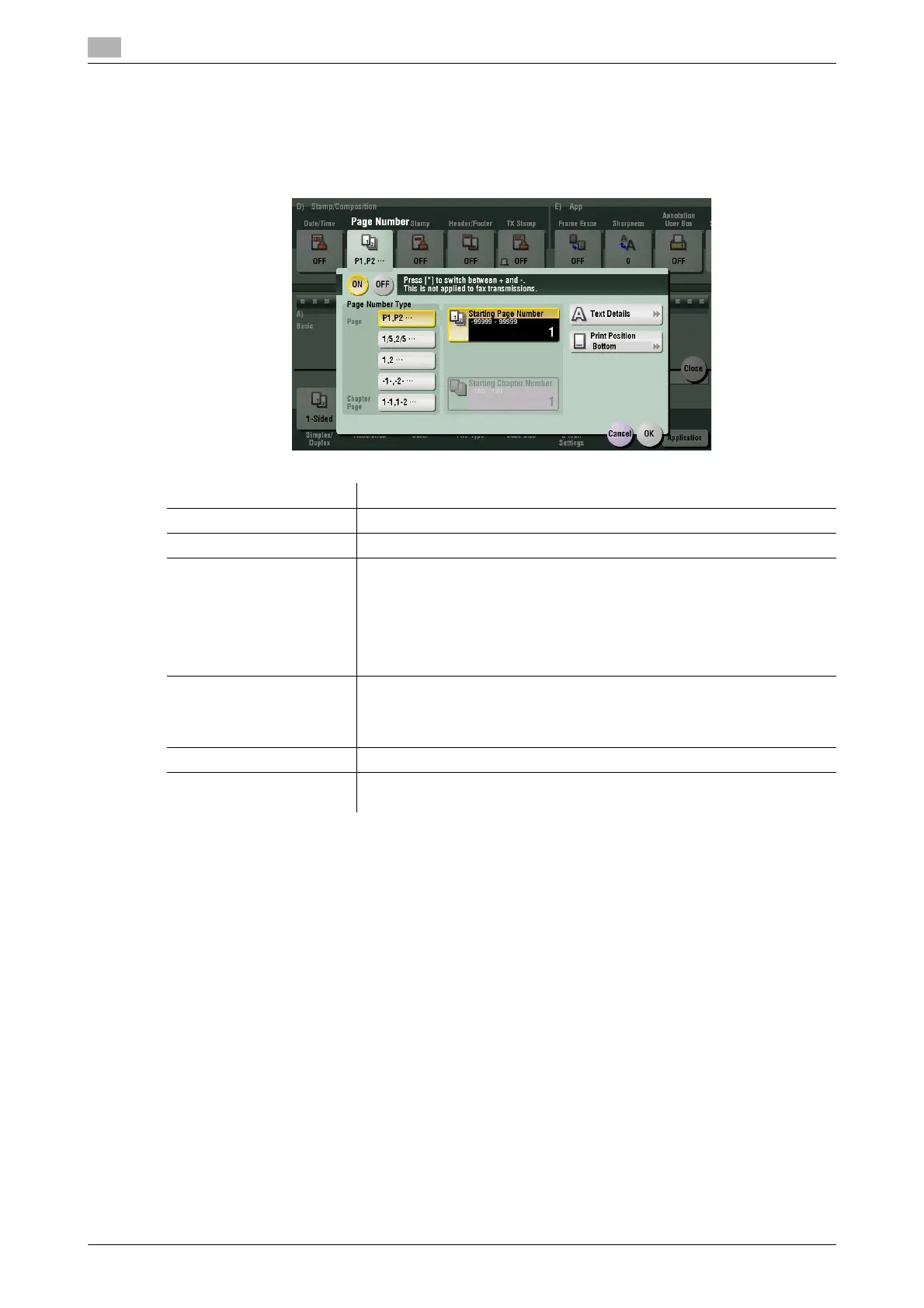
[Page Number]
To display: [Scan/Fax] - [Application] - [Stamp/Composition] - [Page Number]
Select the stamping position and format, and add page and chapter numbers. Page and chapter numbers
are printed on all pages.
Settings Description
[ON]/[OFF] Select [ON] to print page numbers.
[Page Number Type] Select the format of the page number.
[Starting Page Number] Enter the starting page number to be printed on the first page. For exam-
ple, to print page numbers from the third page of the original, enter "-1".
The first page of the original as "-1", the second page as "0", and the third
page is counted as "1". In [Starting Page Number], a page number is print-
ed on pages 1 and later. If "2" is entered, a page number is printed from
the first page of the original as "2, 3" in order. "-" (minus sign) changes to
+ each time you press *.
[Starting Chapter Number] Enter the starting chapter number if an original is divided into chapters, and
you want to print chapter numbers from the second chapter. You can
specify chapter numbers only when you have selected [Chapter Page] in
[Page Number Type].
[Text Details] If necessary, select the print size, font, and text color.
[Print Position] If necessary, select the print position of the text. You can adjust the print
position in [Adjust Position] more finely.



 To Next Page