27
Chapter 2 Hardware Installation
Chapter 2
Important:
The 5V_standby power source of your power supply must support ≥720mA.
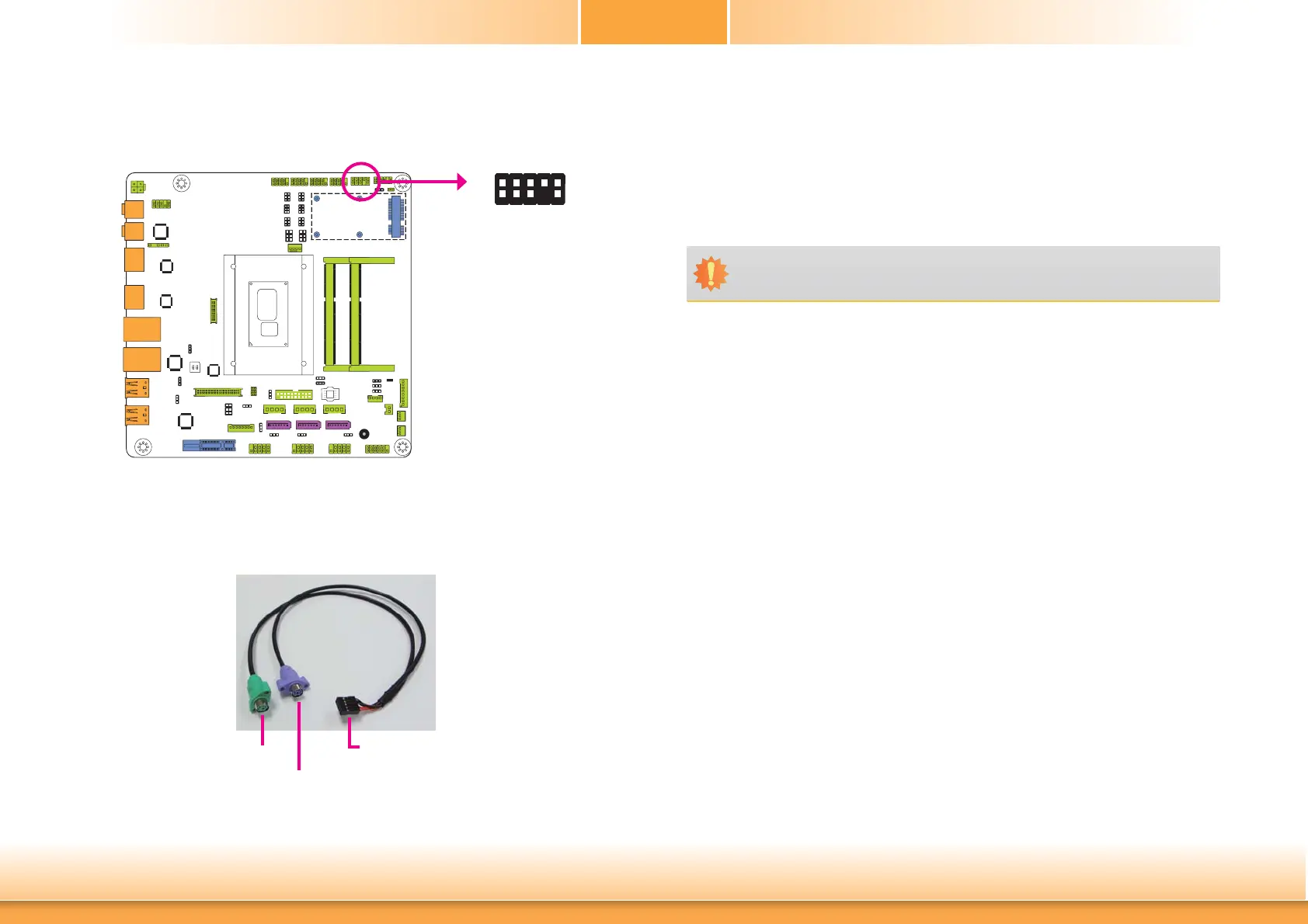
PS/2 Keyboard/Mouse Connector
The Keyboard/Mouse connector is used to connect PS/2 keyboard and PS/2 mouse by means
of a PS/2 cable.
Connect one end of the cable to the Keyboard/Mouse connector. The other
ends are used to connect a PS/2 keyboard and a PS/2 mouse.
PS/2 keyboard port
PS/2 mouse port
Connect to the board’s Keyboard/Mouse
connector
Wake-On-PS/2 Keyboard/Mouse
The Wake-On-PS/2 Keyboard/Mouse function allows you to use the PS/2 keyboard or PS/2
mouse to power-on the system. To use this function:
• Jumper Setting
JP2 must be set to “2-3 On: 5V_standby”. Refer to “PS/2 Keyboard/Mouse Power Select”
in this chapter for more information.
1
10
KB CLK
GND
NC
MS CLK
MS DATA
CHASSIS GND
GND
+5V_STB
KB DATA
+5V_STB
2
9
PS/2
KB/MS



 To Next Page