28
Chapter 2 Hardware Installation
Chapter 2
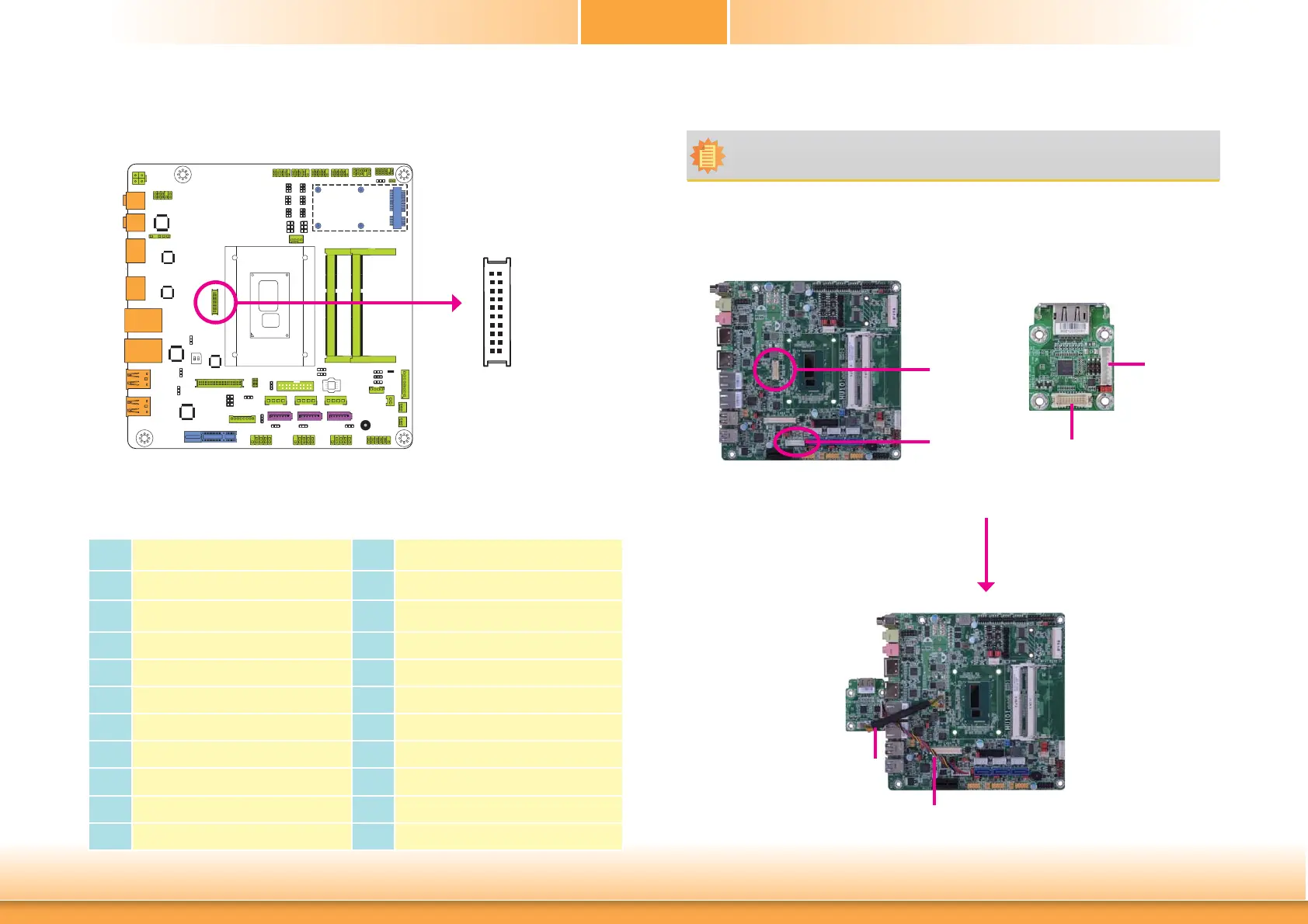
eDP Connector (optional)
Connecting the EXT-DP Card to the HU101 Motherboard
Note:
The system board used in the following illustrations may not resemble the actual one.
These illustrations are for reference only.
The EXT-DP card is connected to the HU101 motherboard via two cables. The photos below
illustrates how to connect the extension module to the motherboard.
HU101
eDP
EXT-DP
Cable
Cable
EXT-DP
Pins Pin Assignment Pins Pin Assignment
1
DP_OUT1N
2
DP_OUT2N
3
DP_OUT1P
4
DP_OUT2P
5
GND1
6
GND4
7
DP_OUT0P
8
DP_OUT3N
9
DP_OUT0N
10
DP_OUT3P
11
GND2
12
GND5
13
DP_AUXP
14
DP_CLK
15
DP_AUXN
16
DP_DATA
17
GND3
18
GND6
19
DP_HPD
20
POWER2
The eDP connector is an embedded displayport which has advanced power-saving features
to connect a display device to transmit digital communication of audio and video signals. The
table below indicates the pin fuctions of the eDP connector.
eDP
21
1920
LCD/Inverter
power
eDP
LCD/Inverter
power



 To Next Page