www.dfi .com
57
Chapter 4 Supported Software
Chapter 4
Intel HD Graphics Drivers
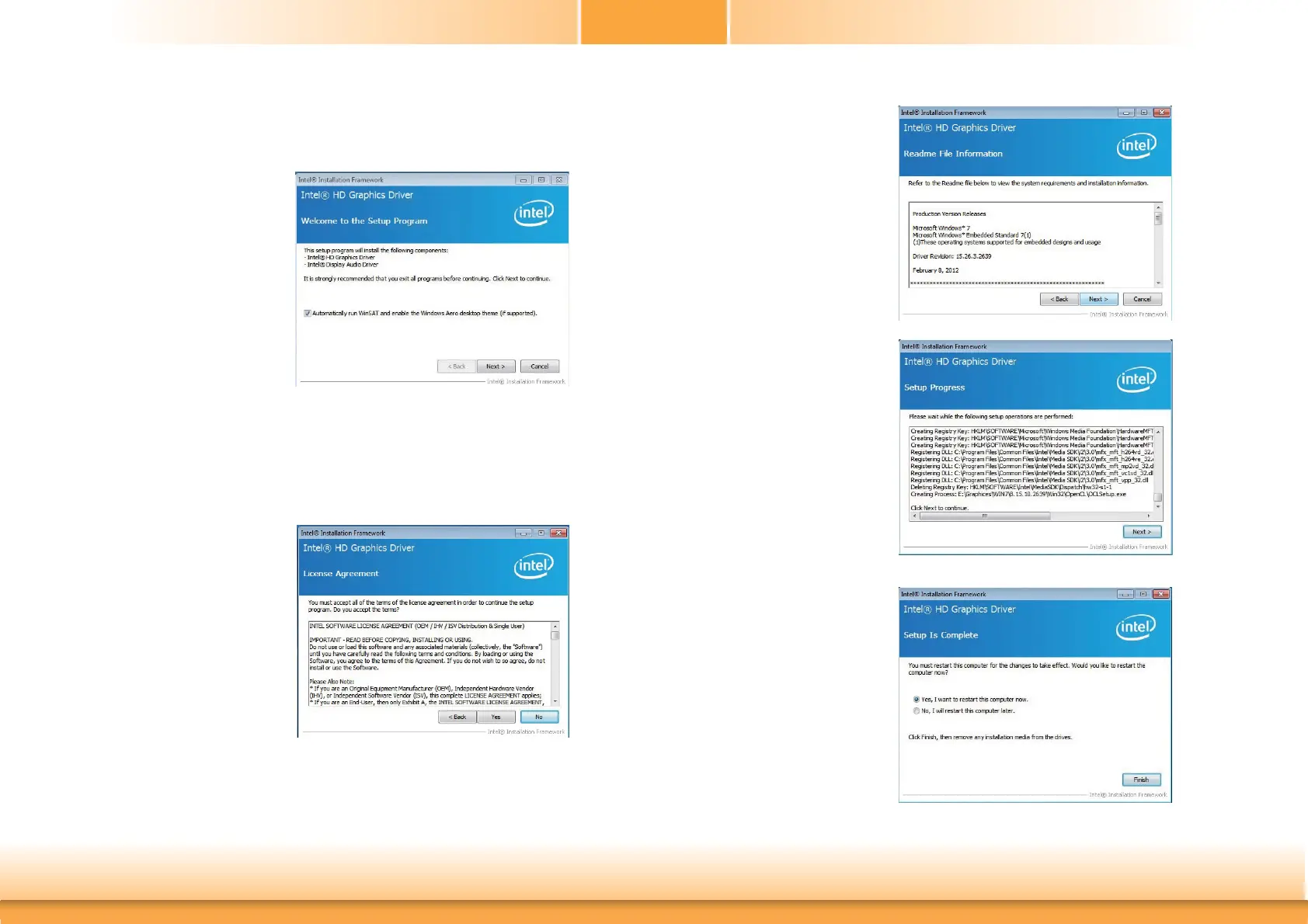
To install the driver, click “Intel HD Graphics Drivers” on the main menu.
1. Setup is now ready to
install the graphics driver.
Click Next.
By default, the “Automatically run WinSAT and enable the Windows Aero
desktop theme” is enabled. With this enabled, after installing the graphics
driver and the system rebooted, the screen will turn blank for 1 to 2 minutes
(while WinSAT is running) before the Windows Vista desktop appears. The
“blank screen” period is the time Windows is testing the graphics perfor-
mance.
2. Read the license agreement
then click Yes.
4. Setup is now installing the
driver. Click Next to con-
tinue.
3. Go through the readme
document for system re-
quirements and installation
tips then click Next.
5. Click “Yes, I want to restart
this computer now” then
click Finish.
Restarting the system will
allow the new software
installation to take effect.



 To Next Page