910SrOwner’sManual
13
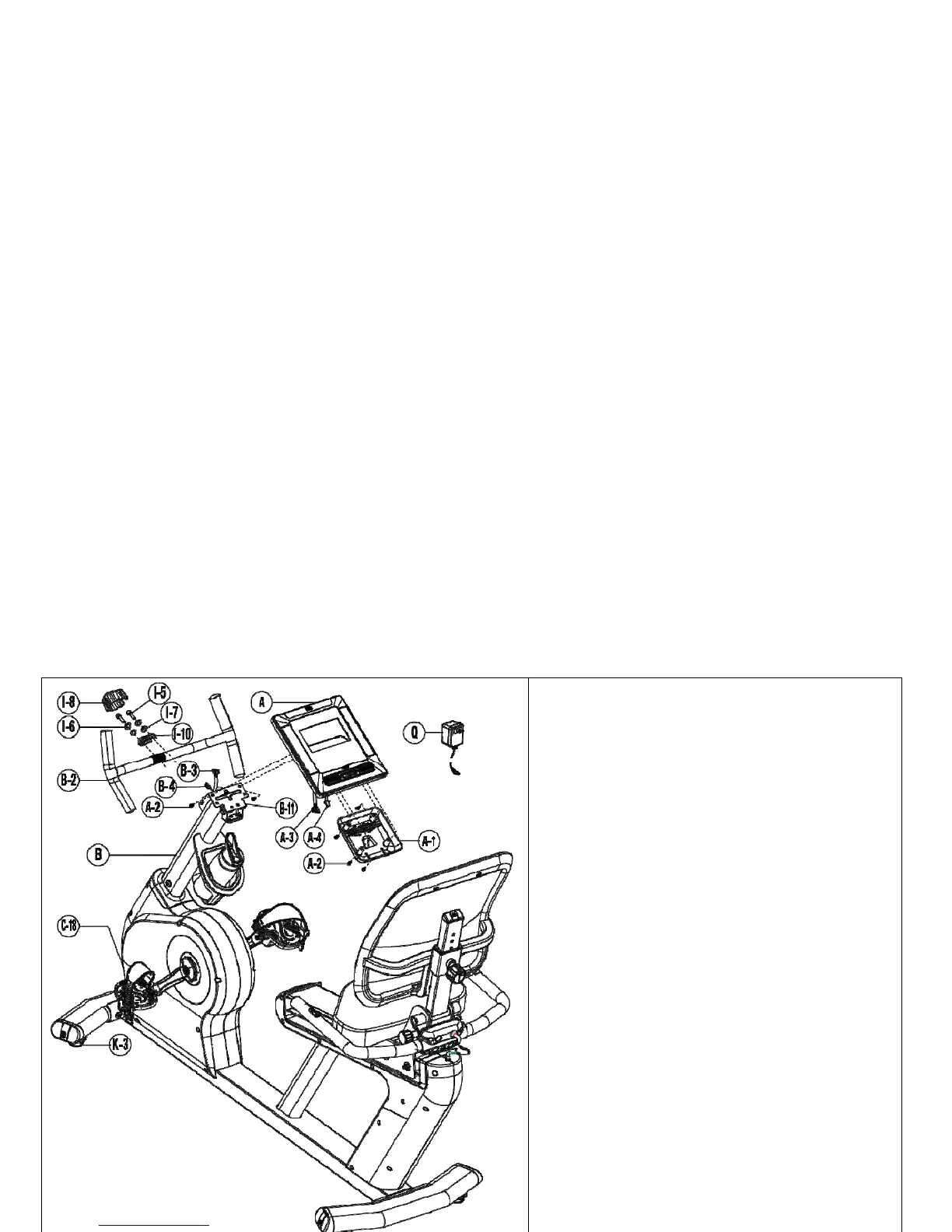
1. Removethesix(6)Phillipsscrews(A‐2)fromthe
backsideoftheconsole(A)andsetaside.
2. FeedwireconnectorsB‐3&B‐4throughthe
backsideoftheconsolehingecover(A‐1).While
supportingtheconsole(A),joinconnectorsA‐3
withB‐3.JoinconnectorsA‐4wit
hB‐4.Ensure
thatallconnectionsarefirm.
3. Tilttheconsolemountingplate (B‐11)towardthe
rearoftheunit.Installtwo(2)Phillipsscrews(A‐
2)throughtheundersideoftheconsolemounting
plateandintothebacksideofthecons
ole.The
screwsmustbeinstalledinthetwouppermost
holesasshown.
4. Aligntheconsolehingecover(A‐1)withthe
mountingholesonthebacksideoftheconsoleby
slidingthecover’sslotsoverthebaseofthehinge
mount.Itmaybeneces
sarytotuckanyextra
cablesintotheconsolemast.
5. Re‐installthefour(4)remainingPhillipsscrews(A‐
2)throughthebacksideoftheconsolehinge
cover(A‐1)andtightenfirmly.
6. Alignthehandlebarassembly(B‐2)infrontofthe
clampnearthetopofthecons
olemast(B).Install
thetwo(2)Allenbolt,lockwasherandflatwasher
assemblies(I‐5,I‐6&I‐7)throughthehandlebar
clamp(I‐10)andintotheconsolemast.Withthe
providedAllenwrench,alternatetighteningthe
two(2)A
llenbolts(I‐5)sothegapsbetweenthe
consolemastclampandthefrontclampare
equal.Alignandpressthehandlebarclampcover
(I‐8)intoplace.


 To Next Page