19
Turn the to WEEKLY/CYCLIC mode.
Press the
button and program A appears first with above the active valves
with the word OFF and the
. To select program X, press until program X
appears with word OFF. To activate program X, use the same method to activate
any other program. First select the days of the week to operate, then the start time,
then the duration time.
Note: X program can be programmed only when the last valve on has not been
used with any of the programs.
19. VALVE TESTING
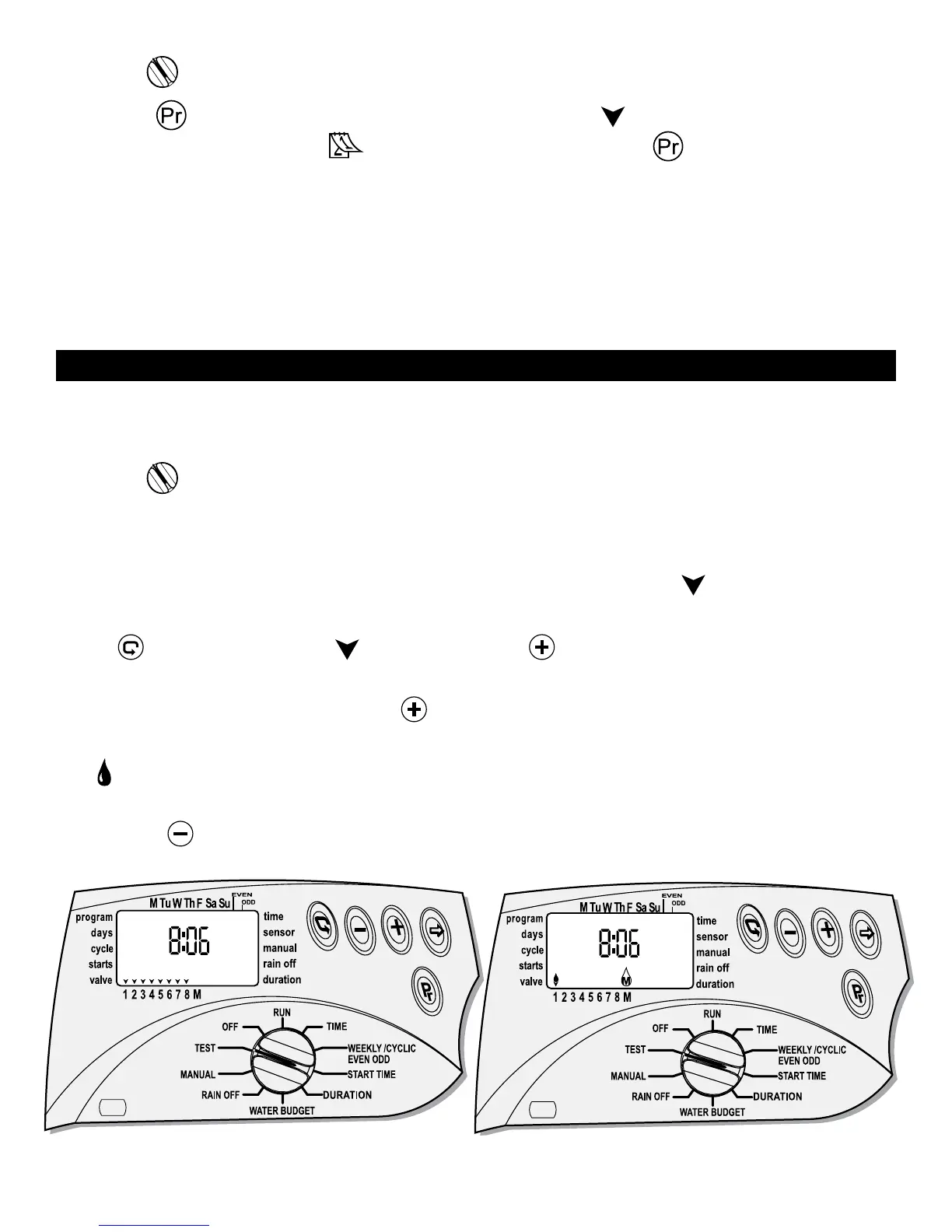
This feature allows the user to physically test any valve at any time for malfunction
of open or short circuit or for testing the system.
Turn the
to TEST mode.
A number that represents the number of valves appears at the center to the right
of the screen (with 4 for four station, 6 for six station and 8 for eight station). The
controller version number appears on the right side, as all the
above each valve,
identifying the controller number of valves.
Press
and the first valve will blink. Press and the master valve will open
immediately and the irrigation start with valve # 1 open. To stop valve number 1
and move to the next valve, press
again and valve # 2 will open. If there is no
irrigation you may have a malfunction in this valve and it should be investigated. If
the
symbol flashes above a valve #, there is a short in the valve or in the wires
leading to it. The valve should be disconnected and the short repaired. To stop the
test, press
and the valve will close.


 To Next Page