4
3. MOUNTING THE CONTROLLER
Before installing the controller, make sure you have a Phillips screwdriver, one 9-volt battery
18-gauge color-code, multi-strand, direct burial wire and WATERPROOF SPLICE CONNECTOR.
1. Select an indoor location near a 120 VAC outlet. The location should be protected from
moisture and sunlight.
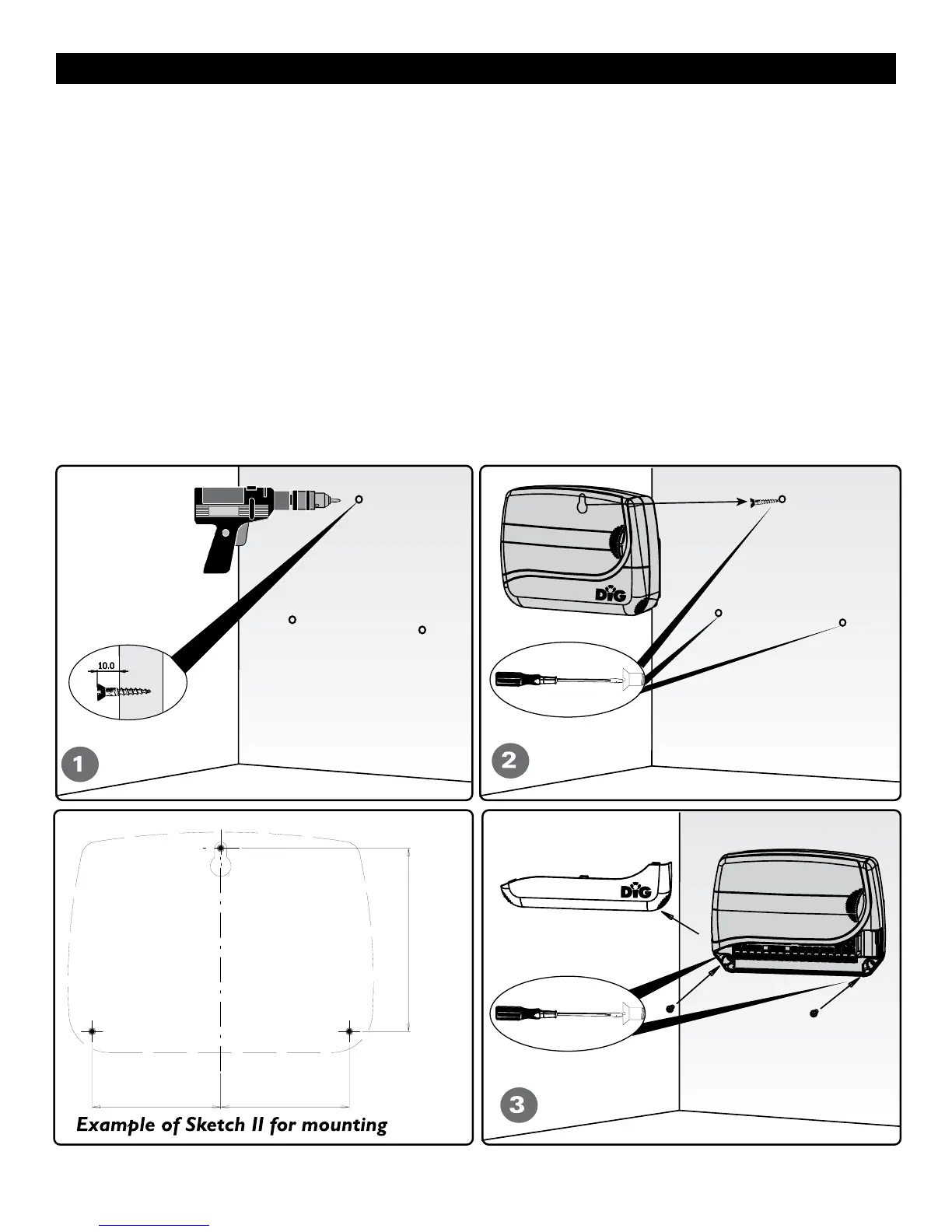
2. Place the controller slightly below eye level, see example of mounting sketch. Mount the
controller to the wall with #6 or #8 screws (not included).
Note: If installing on drywall, install screw anchors (not included). (see figure 1 – 2)
3. Slide the controller down into position on the screw, then insert two screws on the bottom
corners. (see figure 3)
Note: If the controller is installed outdoors, use a water-resistant cabinet.
DO NOT PLUG THE TRANSFORMER INTO POWER SOURCE UNTIL THE CONTROLLER IS
MOUNTED AND ALL VALVES HAVE BEEN CONNECTED.
3 1/8” 3 1/8”
4 1/2”


 To Next Page