EasyManua.ls Logo

Dimplex EDL170-520RF - 9 Control App; 9.1 Home Screen Features; 9.2 Holiday Mode App; 9.3 Schedule Control App

Dimplex EDL170-520RF
36 pages
Print Icon
To Next Page IconTo Next Page
To Previous Page IconTo Previous Page
Loading...
28
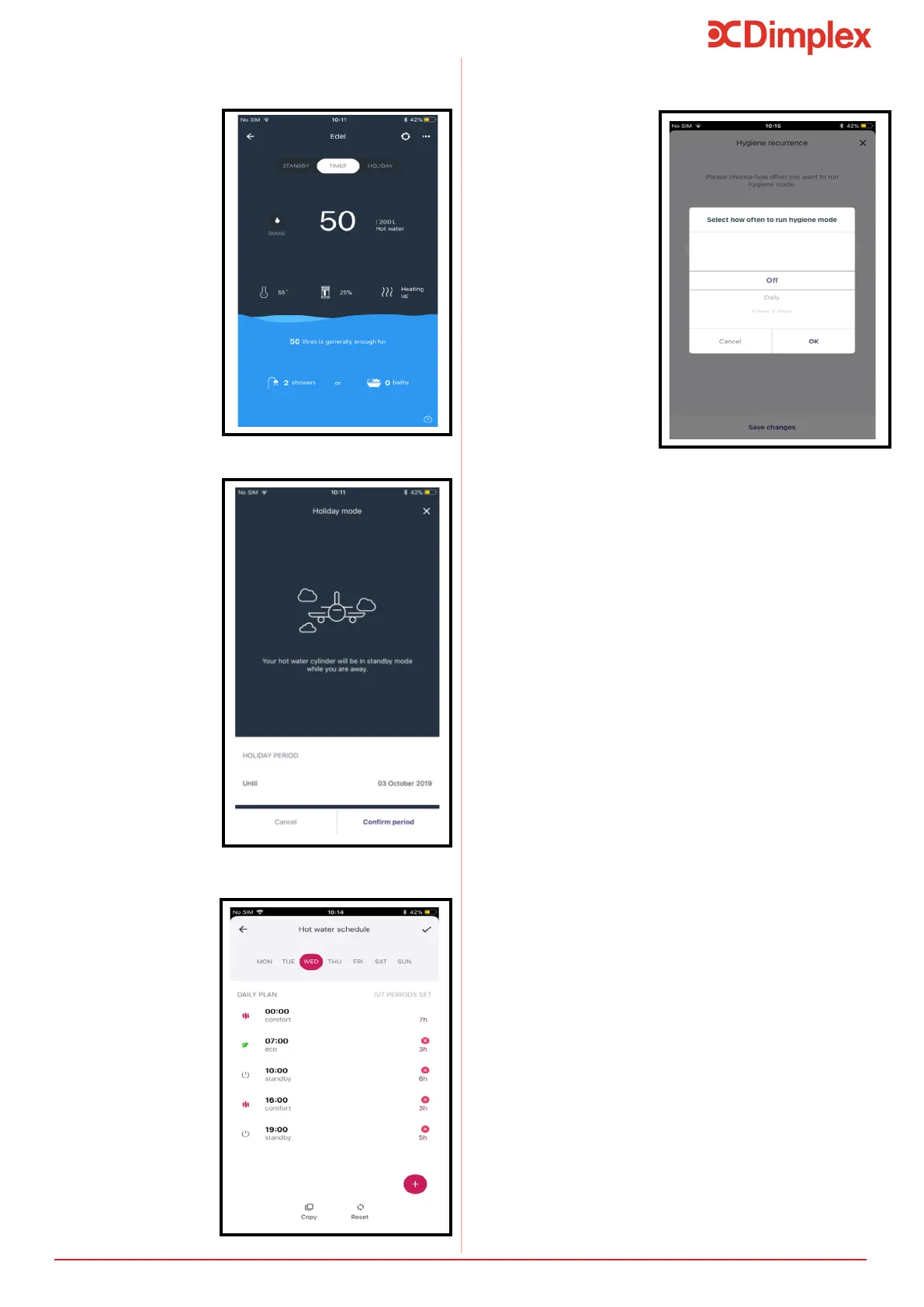
Select mode
that the Edel is
operating in.
Use boost
function for
immediate hot
water.
Overview of
the cylinder
charge and
available hot
water.
To access
more settings
9.1 Home Screen
Ensure the
cylinder doesn’t
charge when
away, and that
there will be hot
water upon your
return.
Select a date in
the future when
the Holiday
period will
conclude.
Turn cylinder
back into
Timer mode at
any point by
pressing “TURN
ON NOW”.
9.2 Holiday Mode
Select to run
hygiene mode
on the app,

frequency of
hygiene mode
up to 99 days.
9.4 Hygiene Mode
Create individual
schedules for
each day to suit
the customer.
Copy a schedule
to any day of
the week.
Allows control
over your
appliance to
ensure that
you always
have hot water
and are not
unnecessarily
using energy.
9.3 Schedule Control
9 Control App
Control App

Table of Contents

Related product manuals