12
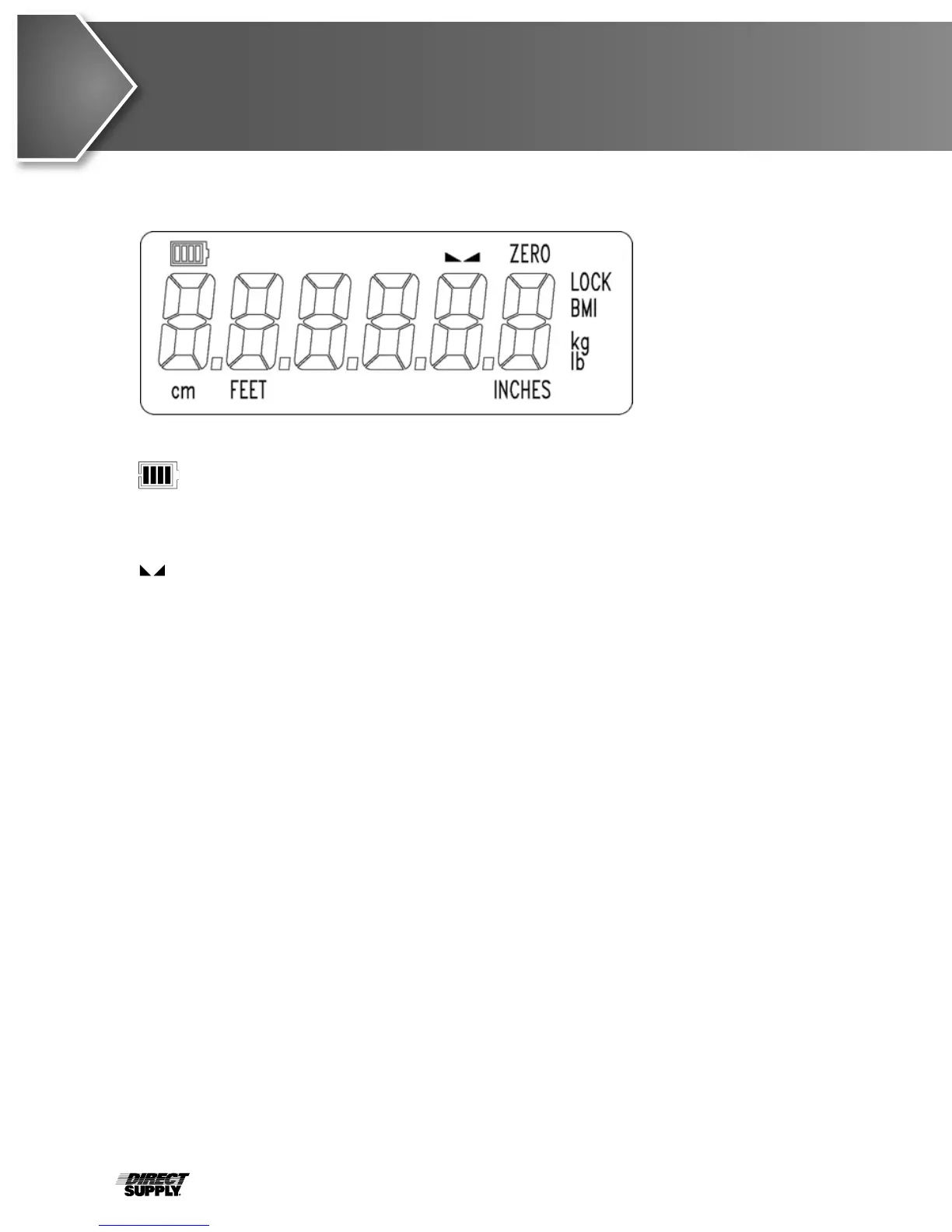
The annunciators are turned on to indicate that the display is in the mode corresponding to
the annunciator label or that the status indicated by the label is active.
The low battery annunciator is located in the upper-left corner of the display. It is used
to indicate the battery status. Refer to the Power Connection section of this manual for
more details.
(STABLE)
This annunciator is turned on when the weight display is stable. When off, it means
that the change in successive weight samples is greater than the motion limits selected
during setup.
ZERO
This annunciator is turned on to indicate that the weight displayed is within +/- 1/4 division
of the center of zero.
LOCK
This annunciator is turned on to show that the indicator is locked onto the displayed weight.
In operation, after obtaining a stable weight, pressing the LOCK/RELEASE key will cause
the indicator to lock onto the weight and turn on the annunciator. Pressing the key again
(or dropping below the Auto Lock reset value) will unlock the display and turn off the
annunciator. NOTE! The lock feature must be enabled during setup.
BMI (Body Mass Index)
This annunciator is turned on when displaying the calculated body fat.
kg
This annunciator is turned on to indicate that the displayed weight is in kilograms.
lb
This annunciator is turned on to indicate that the displayed weight is in pounds.
cm
This annunciator is turned on when the displayed height measurement is in centimeters.
FEET INCHES
These annunciators are turned on when the displayed height measurement is in feet
and inches.
Annunciators
Figure No. 11



 To Next Page