9
1-800-245-9917
Battery Installation/Replacement
To install or remove the batteries, the following steps
should be followed:
1. Make sure the AC power adapter is unplugged.
2. Remove the indicator from the scale mounting
bracket. (Referring to Figure No. 3, pull the spring
plunger down and slide the indicator away from
the bracket.)
3. Turn the indicator over so that the display is
facing away from you.
4. Locate the rectangular panel on the back of
the indicator.
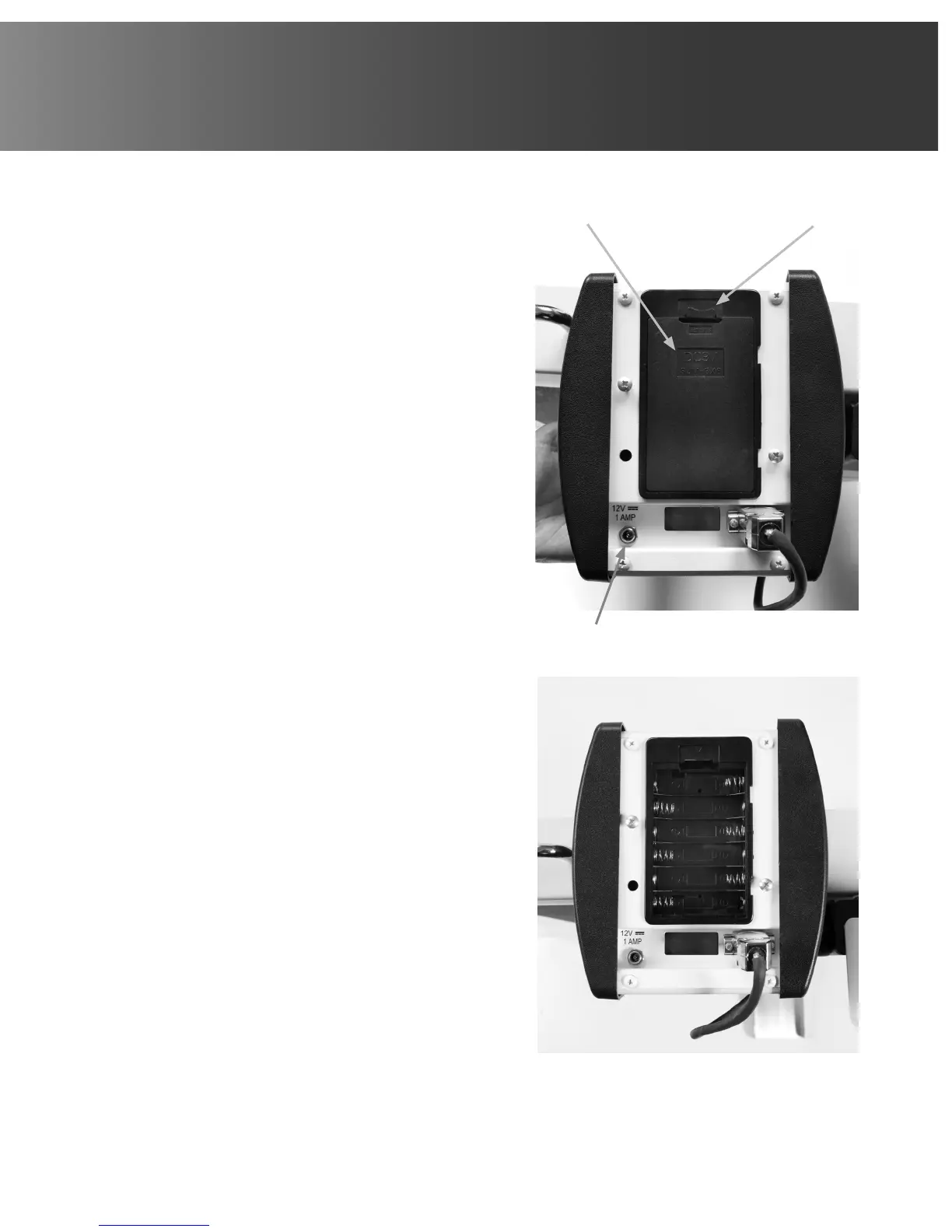
5. To install or replace the batteries, first remove
the battery holder cover by pushing in on the tab
and lifting it up. Refer to Figure No. 8.
6. If installing new batteries, proceed to step 7. If
replacing the batteries, remove all 6 batteries
from the battery holder and then proceed to
step 7.
7. Install the 6 new AA size batteries in the battery
holder, noting the polarity markings located in the
battery holder. Refer to Figure No. 9.
8. After placing all 6 batteries in the holder, replace
the battery cover.
9. Turn the indicator over (display facing up) and
press the ON/OFF key.
10. If display turns on, batteries have been installed
correctly. If not, remove panel and check for one
or more improperly positioned batteries.
11. Return the indicator to the scale mounting bracket.
12. The indicator is now ready for operation.
Figure No. 8
Figure No. 9
AC Power Adapter
+ -
+ -
+ -
- +
- +
- +
Battery
Cover
Push in and
lift here



 To Next Page