15
1-800-245-9917
Setup & Calibration
Your Attendant Bluetooth Weight Indicator has been thoroughly tested and calibrated
before being shipped to you. If you received the indicator with a scale, calibration
is not necessary. If the indicator is being connected to a scale for the first time or
recalibration is necessary for other reasons, proceed as indicated.
Calibration of the indicator is accomplished entirely by the keypad. To enter setup and
calibration, the calibration switch must be pushed in and held while turning on the indicator.
Begin Setup and Calibration:
1. With power off, remove the 2 screws from the
left end cap (as viewed from indicator front) and
remove the end cap.
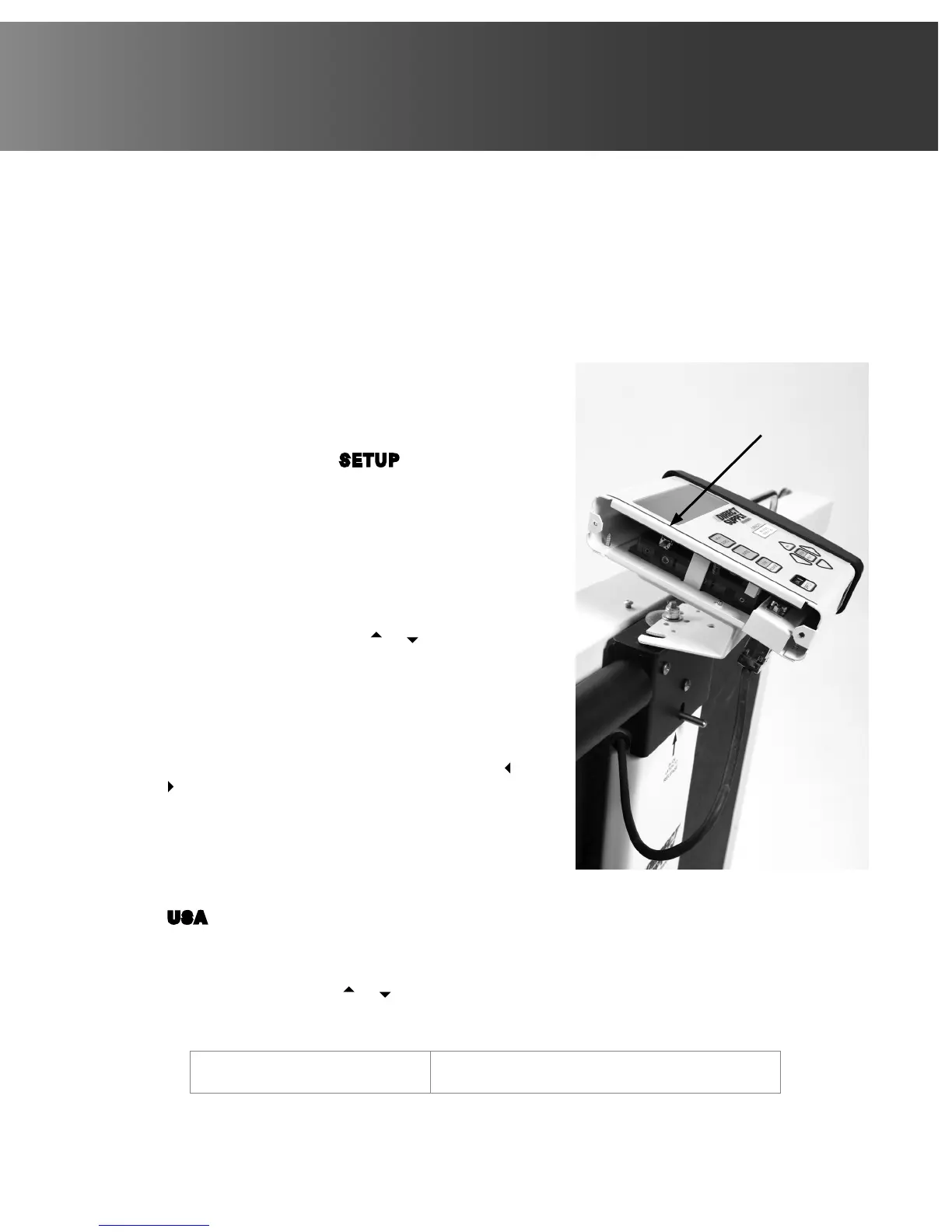
2. Locate the calibration switch on the circuit
board and push it in. See Figure No. 12.
3. With the switch held in, press the ON/OFF key.
4. When display shows SETUP, release the
calibration switch. The indicator is now ready
for setup and calibration.
During setup and calibration it is necessary to
enter values using the indicator’s keypad. When
a prompt is displayed on the indicator, press the
ENTER/PRINT key to view the current setting. To
retain the current setting and proceed to the next
prompt, press the ENTER/PRINT key again. To
change a setting, press the or (up or down
arrow) key to scroll through and select a new
value. After a new value has been selected, press
the ENTER/PRINT key to save it and advance to
the next prompt. Note that some setup prompts
have values with 2 or more digits. The blinking
character is the position to be changed and can be
advanced to the next position by pressing the or
(left or right arrow) key.
CAUTION: DO NOT operate the keypad with
pointed objects (pencils, pens, etc).
Damage to keypad resulting from this practice
is NOT covered under warranty.
US A= (INTERNATIONAL or DOMESTIC)
This is the prompt to select whether the indicator is used in the USA (domestic) or
outside the USA (international). Press the ENTER/PRINT key to view the current
setting. If the value displayed is acceptable, press the ENTER/PRINT key again.
Otherwise, press the or keys to scroll through and select a new value and then
press the ENTER/PRINT key to save it and proceed to the next prompt. Allowable
values are: 0 or 1.
0 = +/- 4% Zero Limit
(International)
1= No Zero Limit (Domestic)
Figure No. 12
Calibration
Switch



 To Next Page