Chapter 11
90
Connecting the Phone Line
Phone System Setup
You must also set up the receiver for your telephone system (touch tone or rotary). If you
need a prefix to make an outside call, set a telephone number prefix.
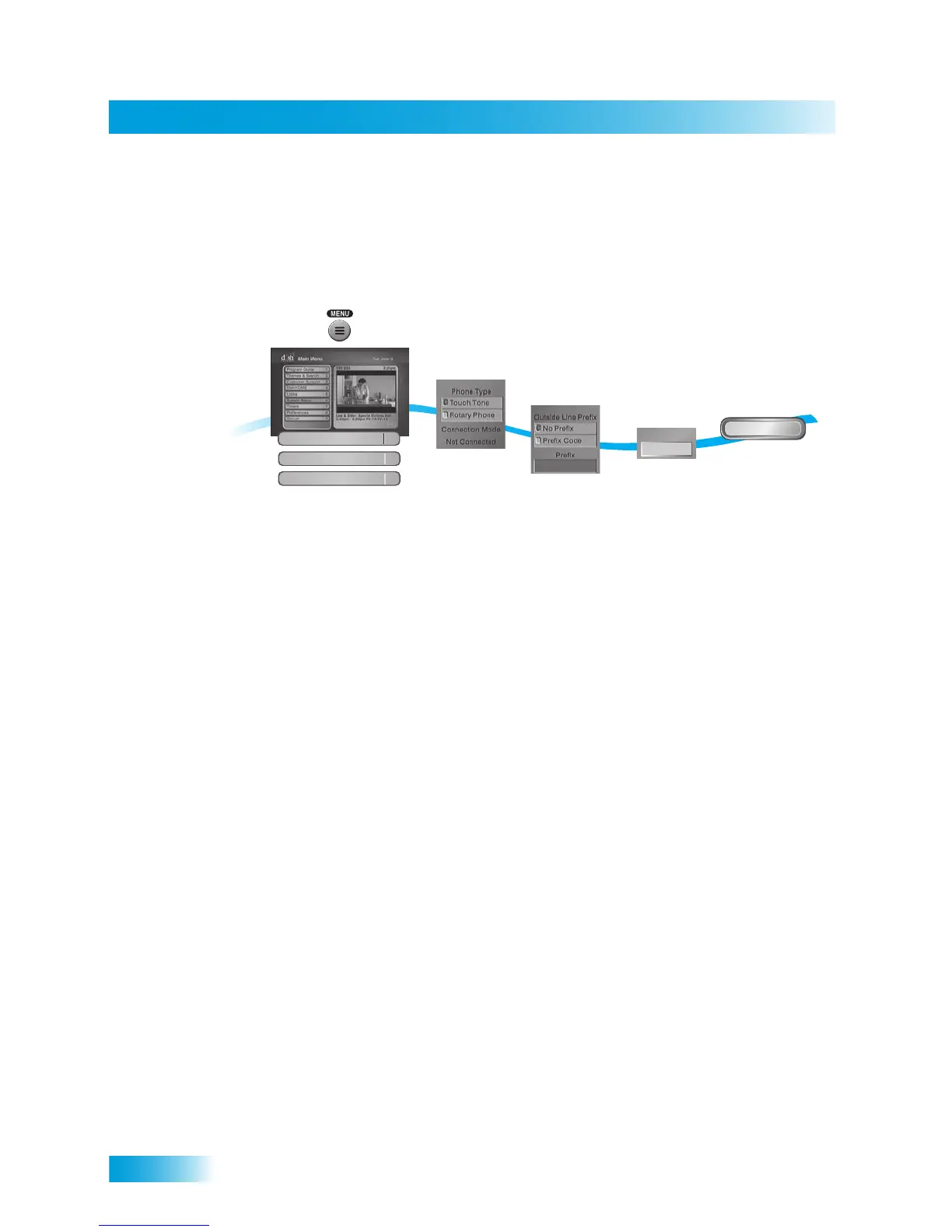
1 Press MENU on the remote control, then select System Setup, Installation, and then
Phone System.
2 Select the Prefix Code option under Outside Line if you need to dial a prefix to make
outside calls. Otherwise, leave this setting on No Prefix.
Note: Usually, you need a telephone number prefix only for business installations. For
most residential installations, all you need to do is set the telephone system type. The
default setting of No Prefix will allow correct dialing. If this is the case, select the Save
option to save the above setting, and stop here. If you do need to set a prefix, then instead
of selecting the Save option, go on to step 5.
3 If you selected No Prefix, select Done.
4 Select the Touch Tone or Rotary Phone option in the Phone Type list.
5 If you selected Prefix Code, the receiver highlights the box where you must enter the
exact sequence you dial to reach an outside line.
6 Select Done.
1
2
3-4
5
6
Press MENU and
select System Setup,
then Installation,
then Phone System
Select either
No Prefix or
Prefix Code
Done
Select Done
9
Prefix
Select phone
type
If your phone
system needs a
prefix code for an
outside line, enter
it under Prefix
Installation
1
Phone System
4
System Setup
6













 To Next Page