FSG 7016
3 Programming
16 D10011 November 2009
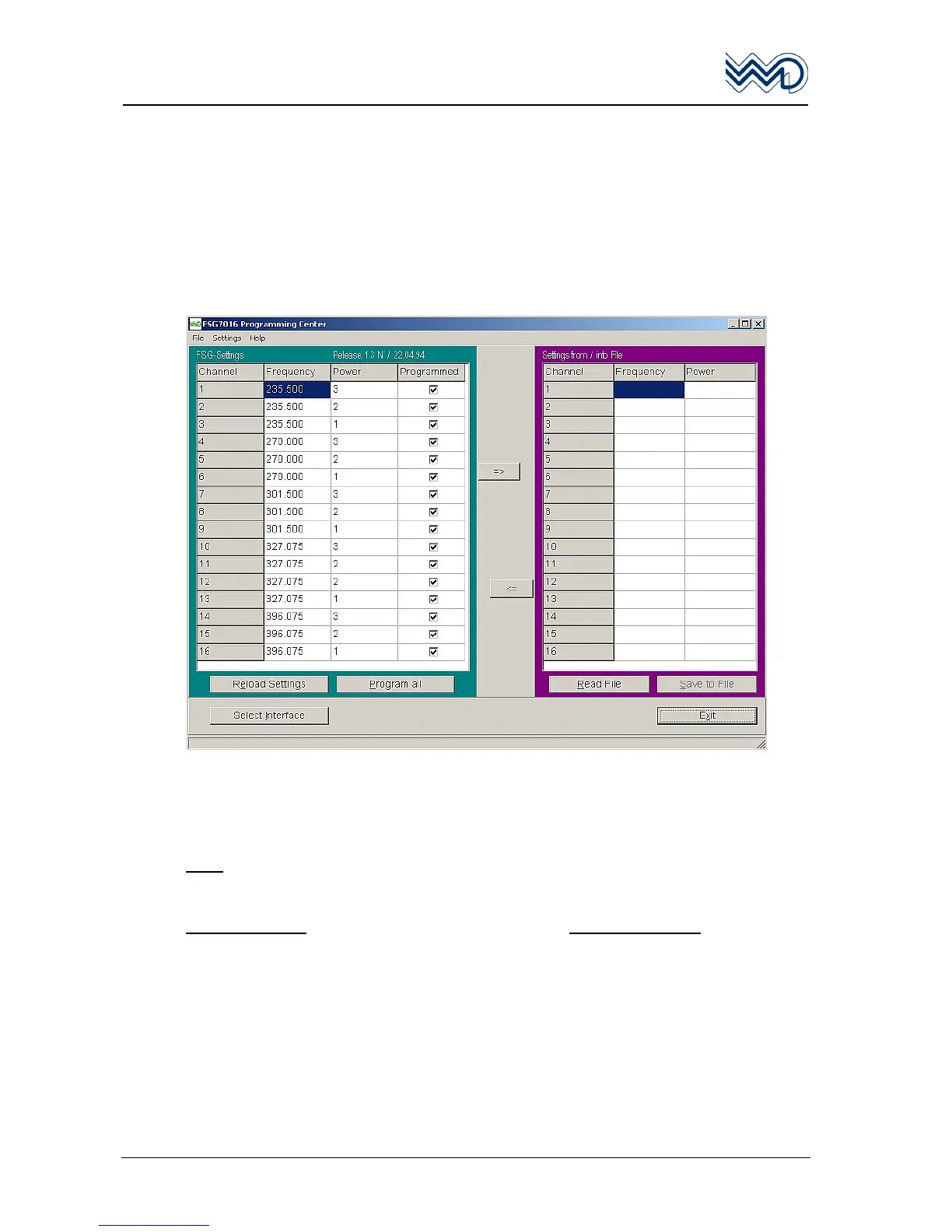
Two Window Control Panels
• Monitoring of communications to / from FSG 7016.
• Menu to select “Language”.
• Menu to select Communications COM port Interface.
• Automatic communications failure warning.
• Two headline indications: FSG 7016 Firmware read-out, and setting file name.
• Help: FSG 7016 Firmware version, FSG 7016 Prog control program version.
• Exit the program.
Select operating language
Menu: Settings or Menu: Einstellungen
Select Language or Select Sprache
Select English or Select Deutsch
Note
• Last language setting is used automatically while the program is started again.
LEFT WINDOW
RIGHT WINDOW
FSG 7016 Actual Unit Status Automatic Read-out Customised settings area.
Edit individual settings temporarily Create new pre-setting files.
Program present settings into FSG 7016 Use available pre-setting files.


 To Next Page