FSG 7016
3 Programming
18 D10011 November 2009
3.5 Edit individual settings temporarily
On the left window (actual status) table, double click into white fields Frequency
or Power of the channel concerned. This opens the Setting window.
• New channel setting(s) will change the actual function of this channel
accordingly, but only temporarily as long as the COM link to the FSG 7016
remains active.
• Any setting change removes the “Programmed” status confirmation mark.
• Dark blue numbers indicate the actual channel setting status.
• Successful communications response from FSG 7016 is required and shown by
bright blue numbers.
• Only allowed frequency steps (±10 MHz, ±1 MHz, ±25 kHz), and RF power
levels / Mode (3 = 1 Watt, 2 = 0.4 Watt, 1 = 0.1 Watt, 0 = Receive only) may be
entered.
• “OK” confirms this channel setting change, but only temporarily.
3.6 Programming the new Setting(s)
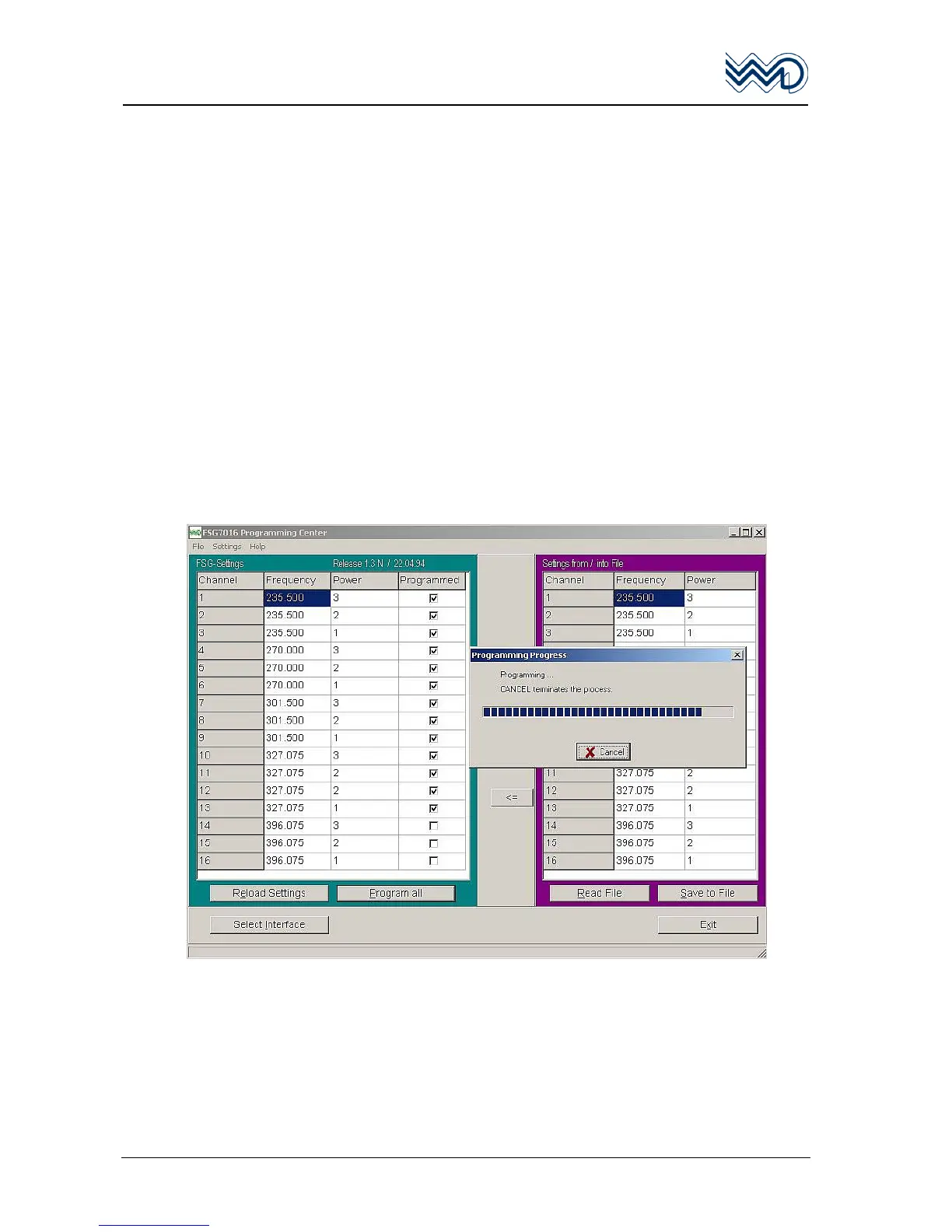
Click to “Program all”. The windows “Programming … “ appears to show the
programming status activity bar, followed by the window “All channels programmed
successfully”.
3.7 Finishing the Reprogramming
To check all actual unit entries; verify this by clicking onto “Reload Settings”. Then
verify all settings.
“Exit” closes the program.
• Switch OFF the FSG 7016.
• Disconnect the programming cable from FSG 7016 (and PC if required).


 To Next Page