CM170407AMA
The rest of the screen is organized as the Leak Screen (FIG 7); the displayed values have
the same meaning.
NOTE: AoA display is always enabled in the Multiple Isolator Screen.
Touch the upper buttons or press the 1 – 4 keys, to close or open a single port. Closed
(isolated) ports are displayed in red, open ports are green.
The display shows a free running leak test, as described in paragraph 7.2.1.The orange
button Time starts a timed test.
To leave the Multiple Isolator Screen, open all isolated ports and press SHIFT + 000.
10.9.2 “SPECIAL” MULTIPLE ISOLATOR FUNCTION
The “special” Multiple Isolator function enables the Operator to generate different pressure
values behind every port.
CAUTION The pressure behind closed ports is not controlled nor monitored by the
MPS49. Leaks may damage the instruments under test! Make sure there
are no leaks before using the special Multiple Isolator function.
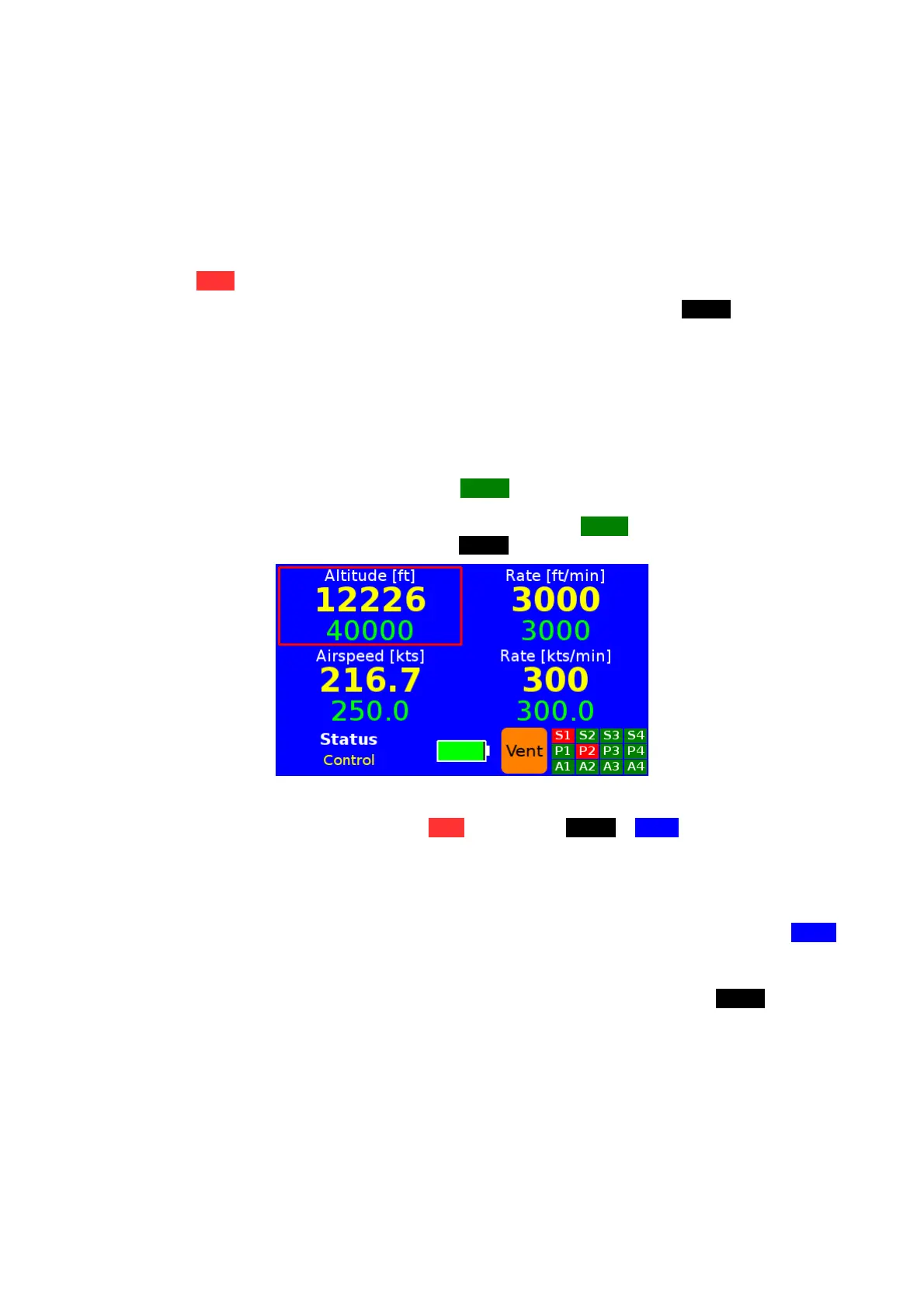
After closing (isolating) a port, press the MEAS key; the display will be as in FIG 20. The
MPS49 switches into MEASURE mode and the buttons in the upper part of the screen
disappear. Enter the new commanded values and press CNTR to enter CONTROL mode.
To close or open a pneumatic port, press SHIFT + 000.
FIG 20 THE SPECIAL MULTIPLE ISOLATOR SCREEN
At any time, touch the orange button Vent or press the SHIFT + LEAK keys to safely open
all closed ports and return to ambient pressure.
NOTE: when opening a port, the MPS49 checks the difference between the current
pressure and the pressure that was isolated behind the port. If the difference is too
big, as evident on the UUT versus the MPS49 display, the MPS49 actions an
automatic return to the isolated pressure levels before opening the port. The VENT
function does this for all closed ports and then returns to ambient pressure.
To open all isolated ports simultaneously, ignoring any difference among the current and
isolated pressures, from the Multiple Isolator Screen (FIG 19) press the SHIFT + 3 keys
and select “Open all”.
10.9.3 USAGE EXAMPLE
This paragraph describes the procedure to generate:
• 1,000 feet (28.856 inHg) at port S1 and 150 knots (29.947 inHg) at port P1;
• 2,000 feet (27.821 inHg) at port S2 and 200 knots (29.780 inHg) at port P2;
• 3,000 feet (26.817 inHg) at port S3 and 300 knots (31.351 inHg) at port P3.
D.Marchiori Copyright 40


 To Next Page