Dobot MG400 User Guide
Issue V1.5 (2023-03-20) User Guide Copyright © Yuejiang Technology Co., Ltd
23
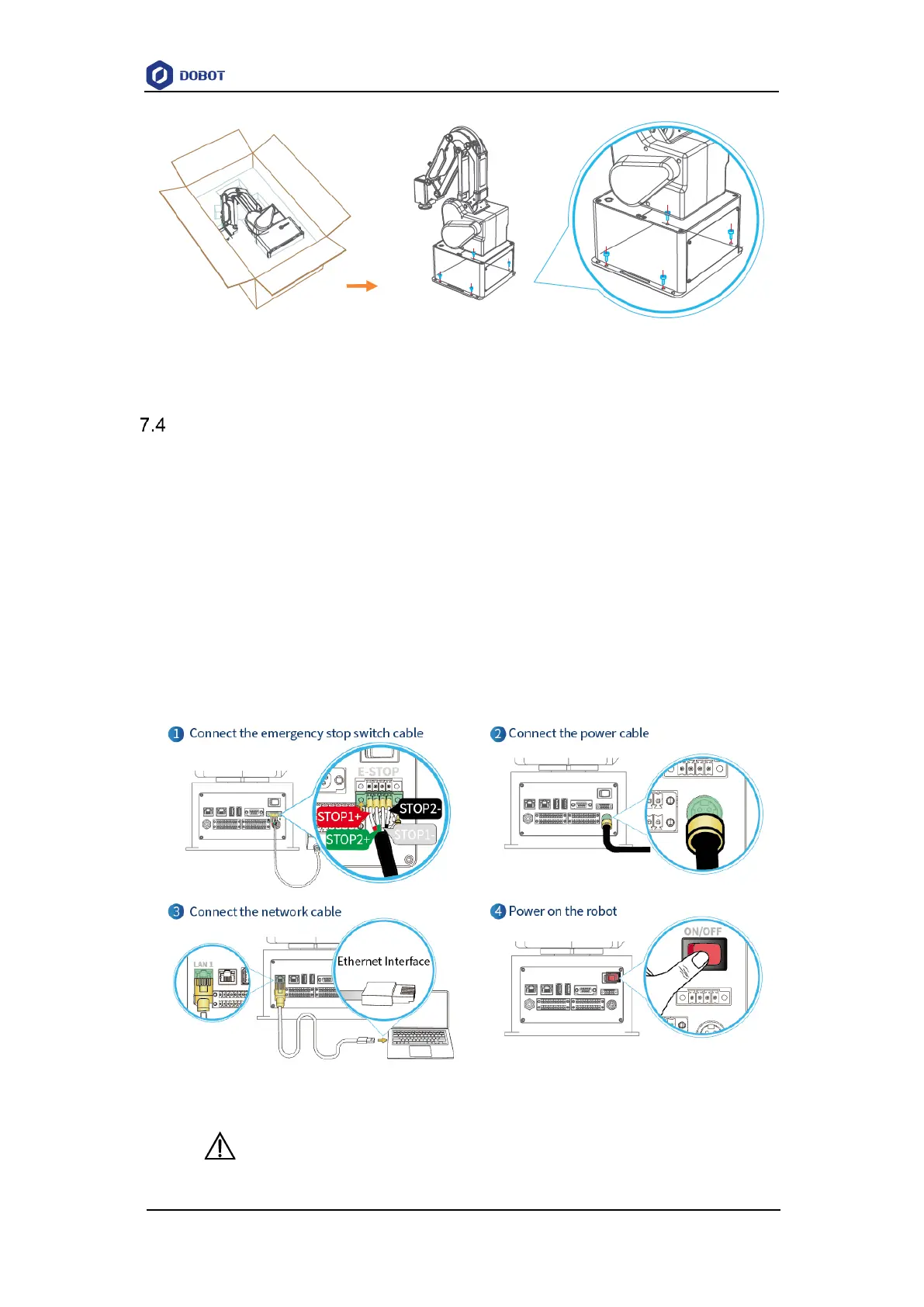
Figure 7.1 Robot base size
Wiring and powering on
1. Connect the emergency stop switch cable using wiring terminals, as shown below.
2. Connect the power cable. The other end of the power cable is connected to an external
power supply via a power adapter.
3. Connect the base LAN1 interface using a network cable to the computer for debugging.
If you have purchased a WiFi module, you can also plug the WiFi module into the base
USB interface and connect wirelessly.
4. Press the power switch. After the robot is turned on, you can debug the robot arm using
the control software (DobotStudio Pro or Dobot CRStudio). See the corresponding user
guide for details.
Figure 7.2 Robot connection
NOTICE



 To Next Page