3
2 CONTROL ELEMENTS
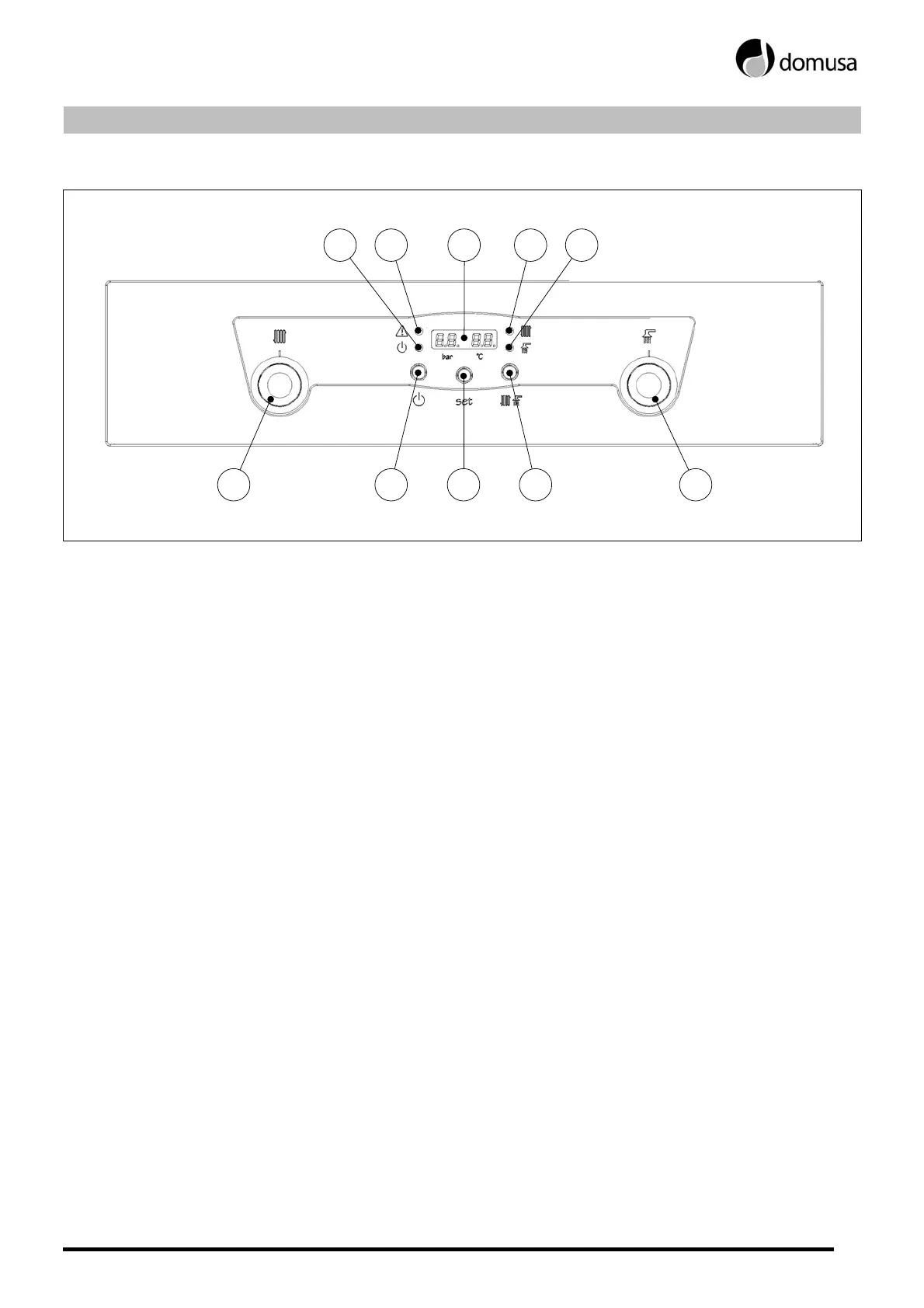
2016 18 1917
1211 151413
11. On/Off pilot light:
When this pilot light comes on, it indicates
that the boiler is switched on.
12. Alarm warning pilot light:
When this pilot light flashes, it indicates that an
alarm or boiler functioning cut-out has
occurred.
13. Digital display:
This is the boiler’s main operating display. It
shows the different boiler temperatures, the
installation pressure and the various alarm
codes.
14. Heating pilot light:
When this pilot light is on, it indicates that the
heating mode has been selected, and the boiler
is in winter mode.
15. Hot water pilot light:
When this pilot light is on, it indicates that the
hot water mode has been selected (it will only
light up if an optional storage heater has been
installed with the boiler). When only this pilot
light is on, the boiler is in summer mode.
16. Boiler temperature selector:
The boiler set point temperature can be
selected at any time. The temperature selector is
a push-in dial button. To use it, push the button
in to release it, and then push it in again to
conceal it.
17. On/Off button:
This button switches the boiler on and off.
18. Set button:
By pressing this button, the different
temperatures of the boiler can be viewed on the
digital display.
19. Mode select:
This button is for selecting the different boiler
operating modes: heating + hot water (winter
mode), or hot water only (summer mode). The
hot water function can only be selected if an
optional storage heater is installed on the boiler.
20. Hot water temperature selector:
This is used to select the hot water set point
temperature at any time (it will only switch on if
an optional storage heater is installed on the
boiler). It is a push-in dial button. To use it, push
the button in to release it, and then push it in
again to conceal it.



 To Next Page