D439E Service Manual 5. Service Tool
316
1) Change the data item in graph mode using “Item List”
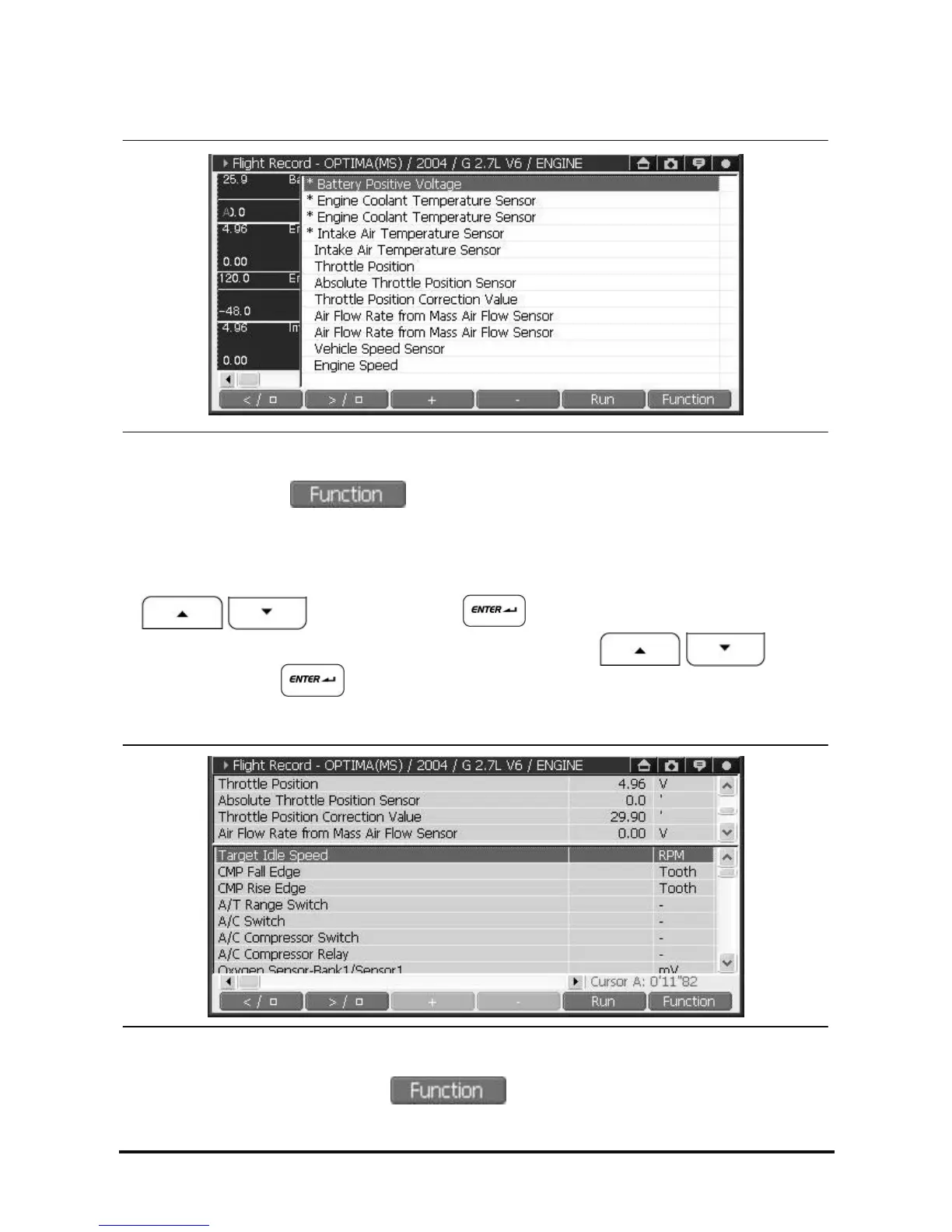
<Figure 17: Change item to display in graph>
① In graph mode, select and select “Item List” to be seen as <Figure 17>.
(The item having “*” mark in front of item name in the List is currently shown in graph.)
Note: In graph mode, Maximum 4 items can be selected and shown at one time.
② Select the item in the list you want to deselect which is currently shown in graph by using
buttons and pressing button, or using the stylus pen.
③ For the item you want to show in graph mode, select it in the list using
buttons and pressing button, or using the stylus pen to mark “*” in front of item name.
2) Switching Record Data Output mode using “Text/Graph”
<Figure 18: Change to text mode>
Among the function menu after selecting in graph mode, select “Text/Graph”, and then the
graph mode screen will be changed to the text mode as shown in <Figure 18>.



 To Next Page