DORAN MFG. LLC 2851 Massachusetts Ave Cincinnati, OH 45225 866-816-7233
Doranmfg.com
10
this mode (see Figure 2-7 for screen display).
NOTE: to skip this section and go directly to the Programming the Date and Time for
Stored Alarm History Information just press the P button briefly 1 time. The display should
look like Figure 2-10. Anytime during this mode you can escape out to the next program
mode by pressing the P momentarily.
The baseline pressure has been set in the factory at 100-psi for all wheel positions.
We recommend that you set the baseline pressure at the same pressure as your
recommended Manufacturers’ Operating Tire Pressures for each vehicle’s tire being
monitored. If you want to change the baseline pressure, or a new sensor is programmed,
then follow the procedure below.
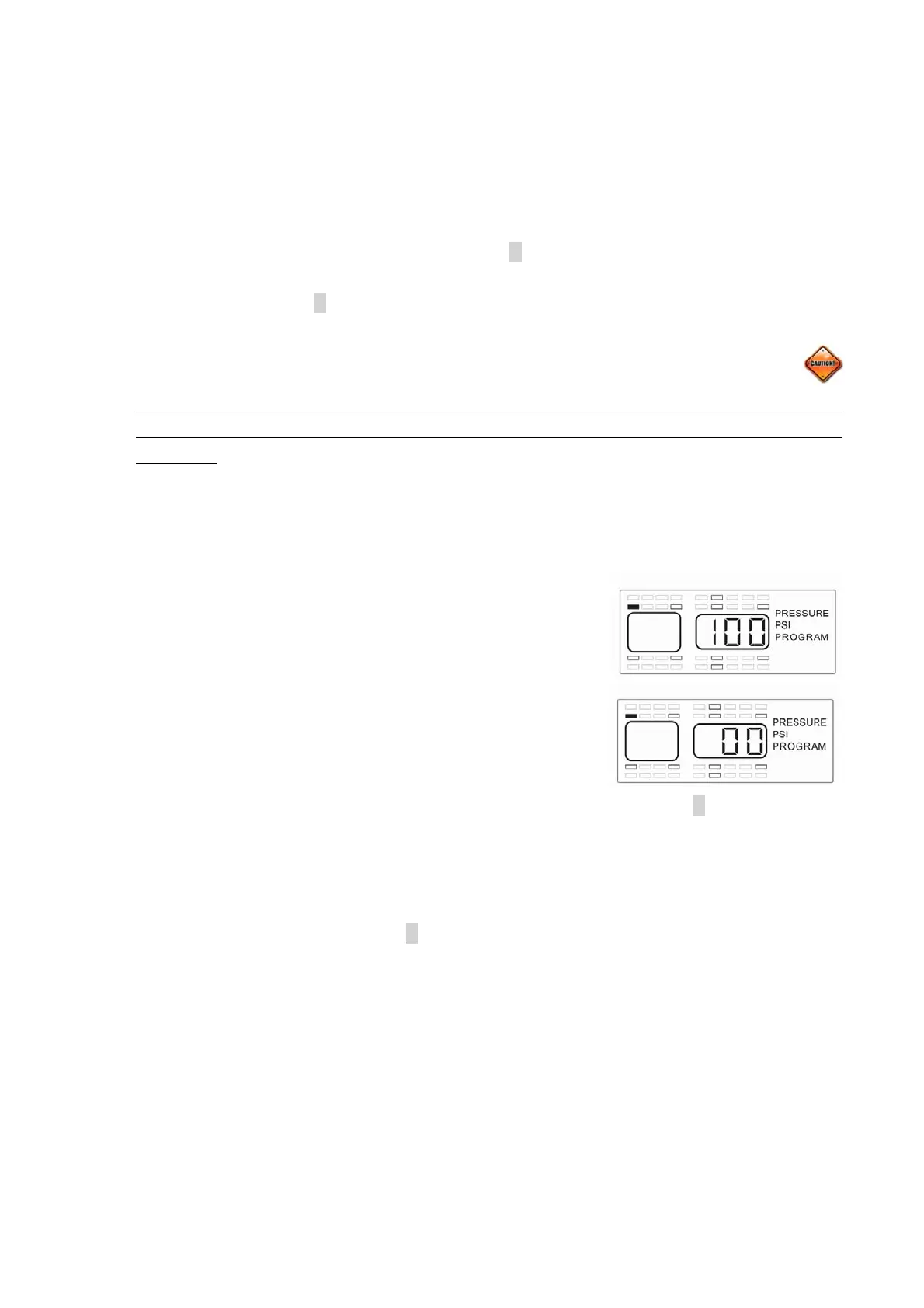
The monitor should now be displaying the wheel positions available to program, the words
PRESSURE, the unit of measure (PSI, Bar, or kPa) and PROGRAM will be displayed as
well as the baseline pressure for the selected wheel
position (see Figure 2-7). The positions that already have
sensors programmed to the monitor will be highlighted at
this time (see Figure 2-8). You can program the air
pressure from 10 PSI to 188 PSI, depending on your
needs. Each wheel position can be set with a different
baseline air pressure if this is what is needed. The monitor
has been pre-programmed for 100 PSI at each wheel
position. If this is the baseline air pressure that you need
then you will not have to do anything in this mode and can press the P button and go to
the next step. If you need to change the baseline air pressure for a wheel position,
continue with steps 1-4 below:
1) Using the same procedure as done previously, use the arrow buttons to select a
wheel position and press the S button for 3 seconds. This will cause the first dash or
number to blink (see Figure 2-9) of a three-digit baseline pressure number that will
need to be entered for the tire position selected.
2) The first digit of the three dashes will automatically start to flash. To adjust the air
pressure for the first digit press the up or down arrow button to change the number.
For a number less that 100 you will need to start your number with a 0. For air
pressure of 95 PSI, the number for the baseline pressure would be entered as “095”.
Fi
ure 2-8
Figure 2-9


 To Next Page