DORAN MFG. LLC 2851 Massachusetts Ave Cincinnati, OH 45225 866-816-7233
Doranmfg.com
9
5) Using the up and down arrow buttons, change the first
digit to the first corresponding digit of the sensor ID
number that you want to program. When you have
selected the correct digit press the right arrow button
to move to the next digit in the display.
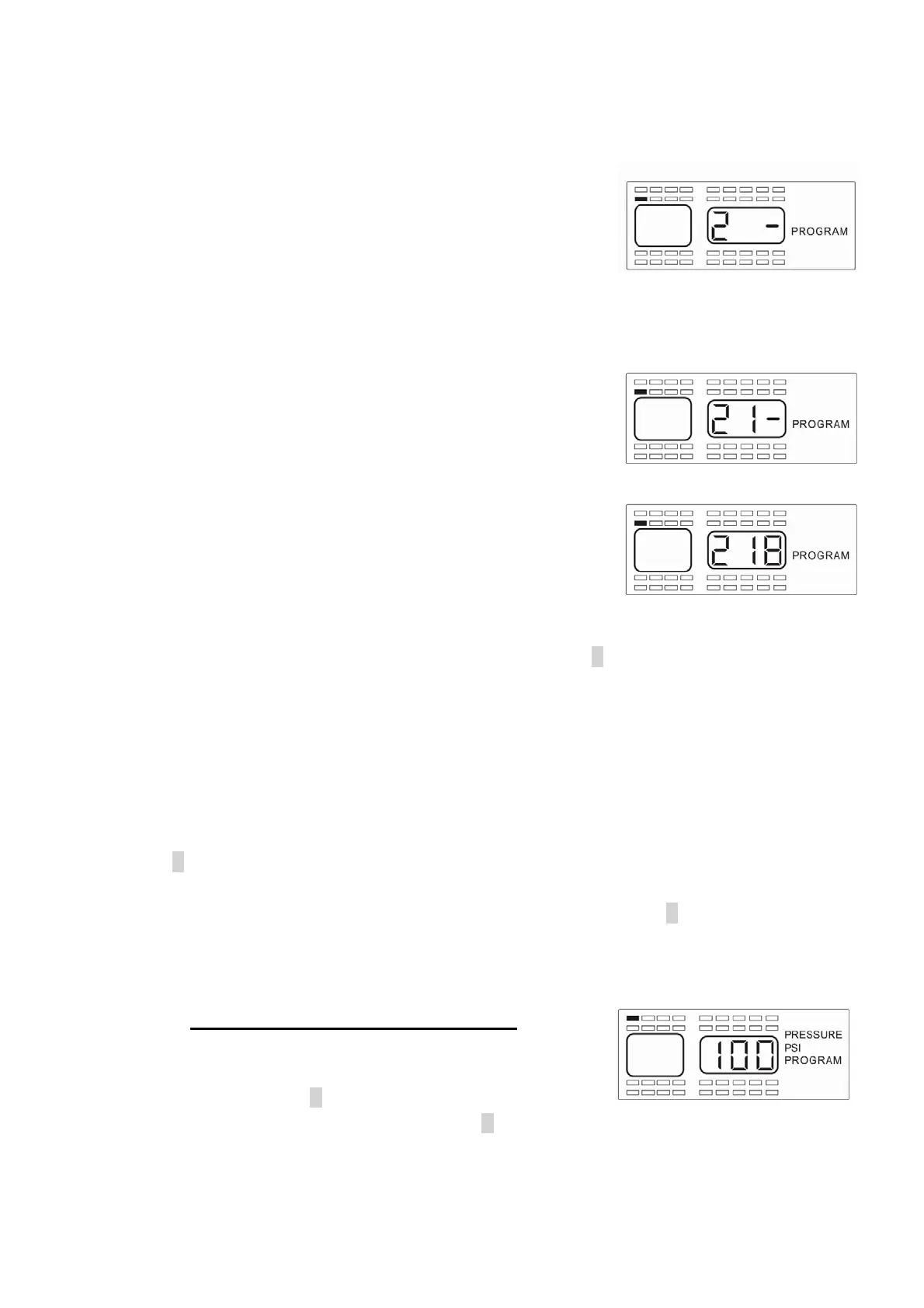
6) The center dash (-) of this digit will now blink (see Figure 2-5). Use the up and down
button to change this digit to the number needed for the second digit of the sensor.
When you have selected the correct number for the
center section of this number press the right arrow
button so the remaining dash (-) begins to flash of the
three-digit number (see Figure 2-6).
7) Adjust this position with the up and down button until
you have the correct number displayed. Pressing the
right or left arrow button will allow you to change one of
the numbers that you have previously selected if
needed.
8) If you have the correct number displayed, press the S button for 3 seconds until the
number flashes twice and you hear a beep twice to signify that the sensor ID number
was successfully input to the monitor (see Figure 2-6a).
9) A new position will be highlighted to input another serial number. If you wish to
program another sensor repeat the above steps 4 through 8 in Section A.
10) Once you have completed the sensor programming sequence for all tires, press the
P button momentarily to move to the next step. This will be the Baseline Pressure
Programming. The monitor will display as shown in Figure 2-7. If you are completely
done with all of the programming operations you can press the P button for 5 seconds
and the monitor will return to the normal mode of operation. This can be done at the
end of any section of the program mode when the programming is completed.
B. Baseline Pressure Programming
NOTE: To enter directly into this program mode you will
need to press the P button for 5 seconds until the
“PROGRAM” is displayed. Then press the P button again briefly to enter
Fi
ure 2-5
Fi
ure 2-6
Fi
ure 2-6a
Fi
ure 2-7


 To Next Page