DORMA AUTOMATICES, Inc. 924 Sherwood Drive Toll-Free: 877-367-6211 Subject to change without notice
DL3463-050 08/2016 Lake Bluff, IL 60044 Fax: 847-249-3999
ED100 / ED250 SERVICE MANUAL
—
34
Operator unit LED status
Green LED
ON – Indicates internal 24VDC power on.
OFF – Indicates internal 24VDC power off.
Yellow LED
Maintenance interval indicator. When illuminated, it is an
indication that operator system should be serviced.
Maintenance interval is adjustable by DORMA service.
Red LED
Blinking codes are used to indicate "ln __" information or
certain error codes "E _ _".
Details on each display code, or LED status, can be found in
the troubleshooting chart starting on the next page.
Red LED status User interface
display
Description
Steady flashing
Control unit has detected
error – Emergency mode
has been activated
On steady ln 11
Hold-open device was
triggered
Flashing 2 times E 02 Locking device error
Flashing 4 times
E 04
Safety sensor test error
Flashing 5 times E 25
SVP Power Reserve
(PR) DCW module test
negative
Flashing 5 times E 51, E 52, E 53
Incremental encoder
error
Flashing 6 times
E 62
Second system has
firmware version
incompatible with double
door system operation
Flashing 6 times
E 63
Second system has
incompatible fire
protection setting
Flashing 7 times
E 71
System error 1 (test)
second shutdown option
Flashing 7 times E 72
System error 2 (test)
current measuring circuit
Flashing 7 times E 73
System error 3 (test)
braking circuit
Flashing 12 times E 12 EEPROM error
Flashing 13 times
E 13
Motor overcurrent
Flashing 15 times E 15 Fautly learning cycle
Error message memory
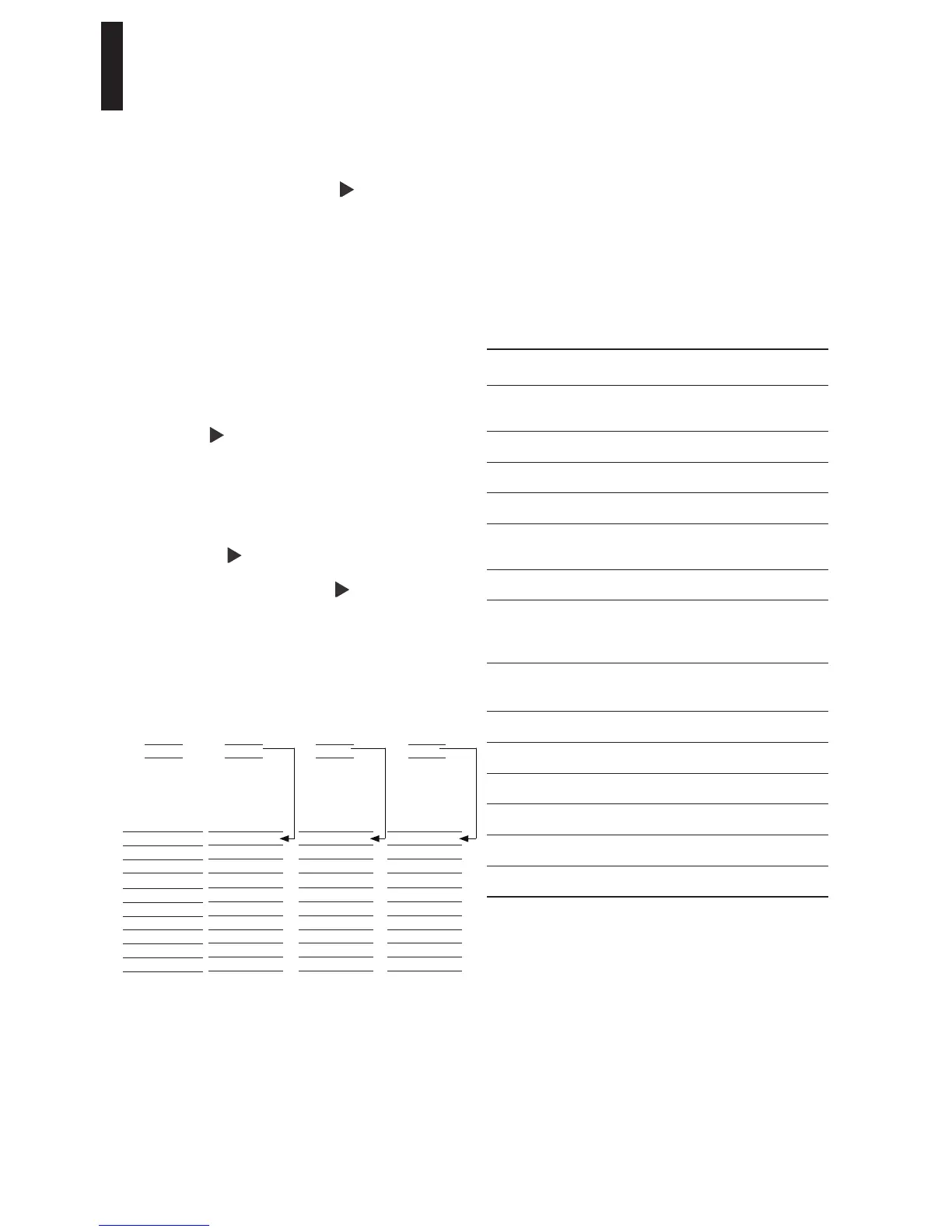
There are ten error message memory locations, "E0" through
"E9".
To access error messages, briefly press to display error
messages contained in E0 to E9 memory.
Latest error message is always stored in error message memory
"E0".
As soon as another error occurs, or after existing "E0" error
has been reset, the former "latest" error in "E0" will be moved
to error message memory location "E1".
A maximum of nine errors can therefore be stored in "E1"
through "E9" memory locations. Identical error messages
which occur one after the other are not saved again.
Example:
If error E 15 occurs, and it is the first error, it will be stored in
the current (latest) error memory location "E0".
By briefly press , the first error to be displayed will be E 15.
If a second error occurs before first error has been "Reset "
(11.3):
E 04 has occured, as an example.
E 15 will be moved to error memory location "E1", and E 04
will be stored in current (latest) memory location "E0".
By briefly pressing to call up error messages memory
locations E0, the first message to be displayed will be
E 04 (the latest error), briefly pressing again will display
the next message, E 15.
A maximum of nine errors can therefore be saved in E1 – E9
error memories.
Memory
location
Error
message
E0
E1
E2
E3
E4
E5
E6
E7
E8
E9
No Error
messages
New Error
message
E 15
Memory
location
Error
message
E0 E 15
E1
E2
E3
E4
E5
E6
E7
E8
E9
New Error
message
E 04
Memory
location
Error
message
E0 E 04
E1 E 15
E2
E3
E4
E5
E6
E7
E8
E9
New Error
message
E 71
Memory
location
Error
message
E0 E 71
E1 E 04
E2 E 15
E3
E4
E5
E6
E7
E8
E9


 To Next Page