DORM
ED400 In Floor
Controller Manual
25
DORMA AUTOMATICS, Inc. 924 Sherwood Drive Toll-Free: 877-367-6211 DL3128-010
Lake Bluff, IL 60044 Fax: 877-423-7999 10/1/2007
E-mail: automatics@dorma-usa.com Subject to change without notice
Set-up:
• Program the two controllers identically. However, in particular situations you may wantto program them
slightly differently, so that one door opens and/or closes first.
• Let the openers do a learn cycle (it’s easier if you do them separately). Tip to stagger the opening of the
doors during the learn cycle:
o place both controllers in “Learn”;
o open one door;
o as it’s closing, flip the Program switch from Off to Auto;
o the door that was still closed will start a learn cycle,
o the one that you opened will first finish closing and then start a learn cycle.
o this will give you a chance to stop the first door at Back-Stop, and then walk to the second
door and stop it at Back-Check when it gets there a while later.
• When both openers are ready, trigger an automatic opening, and, as the doors are opening, block one of doors.
When they start moving again, block the other one. This will let each opener tell the other of having detected
an obstacle, so that each will knowof the presence of a second door. Knowing that, the openers will extend the
Hold-Open time after an obstacle, to ensure that both doors remain in synchronization afterwards.
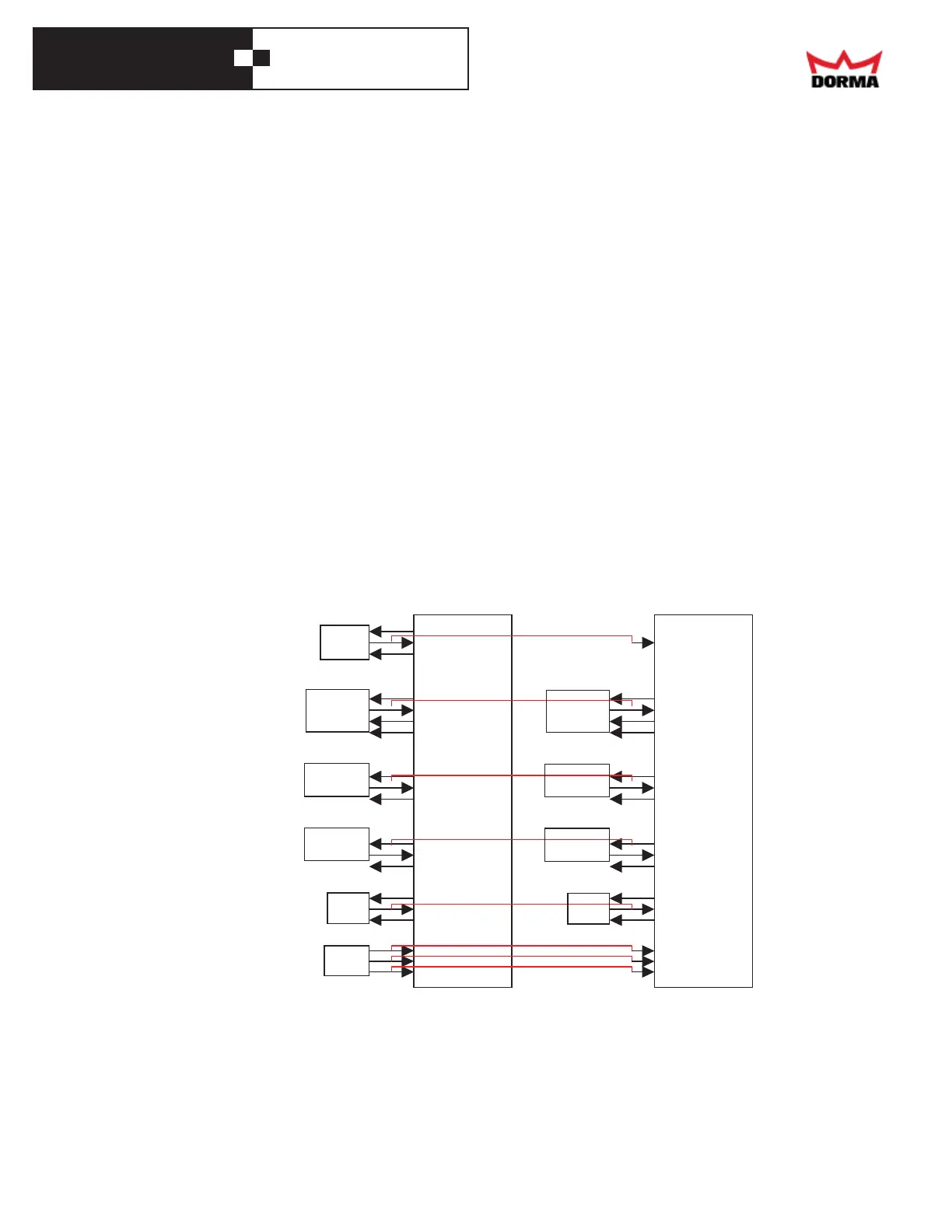
Semi-independent doors
The doors open and close at the same time. However, if one opener reacts to a presence or an obstacle, the other door
continues as nothing happened, so the two doors become un-synched. The door return to being synched only after there's no
traffic long enough for both doors to return home. For coordinated doors (one must close first) it's possible that the doors will
close in the wrong order. To let the door operate independently:
• Program the two controllers identically (for coordinated doors - one must close first - increase slightly the
Closing Delay of the controller for the door that must close last)
• Connect the grounds of the two controllers together
• Connect one door's presence sensors just to the controller for that door
• Connect the motion sensor to both controllers, in parallel
• Let each controller power its presence sensors (either controller can power the motionsensor)
• Connect a single Program Switch to both doors, in parallel
• Power the controllers from the same AC power source
OFF
GND
H.O.
Mode
Switch
Motion
Sensor
+24V
TRIGGER
COM
+24V
HEADER
DATA
COM
+24V
SWING
COM
+24V
APPR.
COM
+24V
BEAM
COM
C
O
N
T
R
O
L
L
E
R
1
OFF
GND
H.O.
+24V
TRIGGER
COM
+24V
HEADER
DATA
COM
+24V
SWING
COM
+24V
APPR.
COM
+24V
BEAM
COM
C
O
N
T
R
O
L
L
E
R
2
Header
Presence
Swing
Presence
Approach
Presence
Safety
Beam
Header
Presence
Swing
Presence
Approach
Presence
Safety
Beam



 To Next Page