49
ED50/ED100/ED250 09-2021DL4617-003
dormakaba ED50/ED100/ED250 OHC Header
Setup and Troubleshooting Instructions
Chapter 20
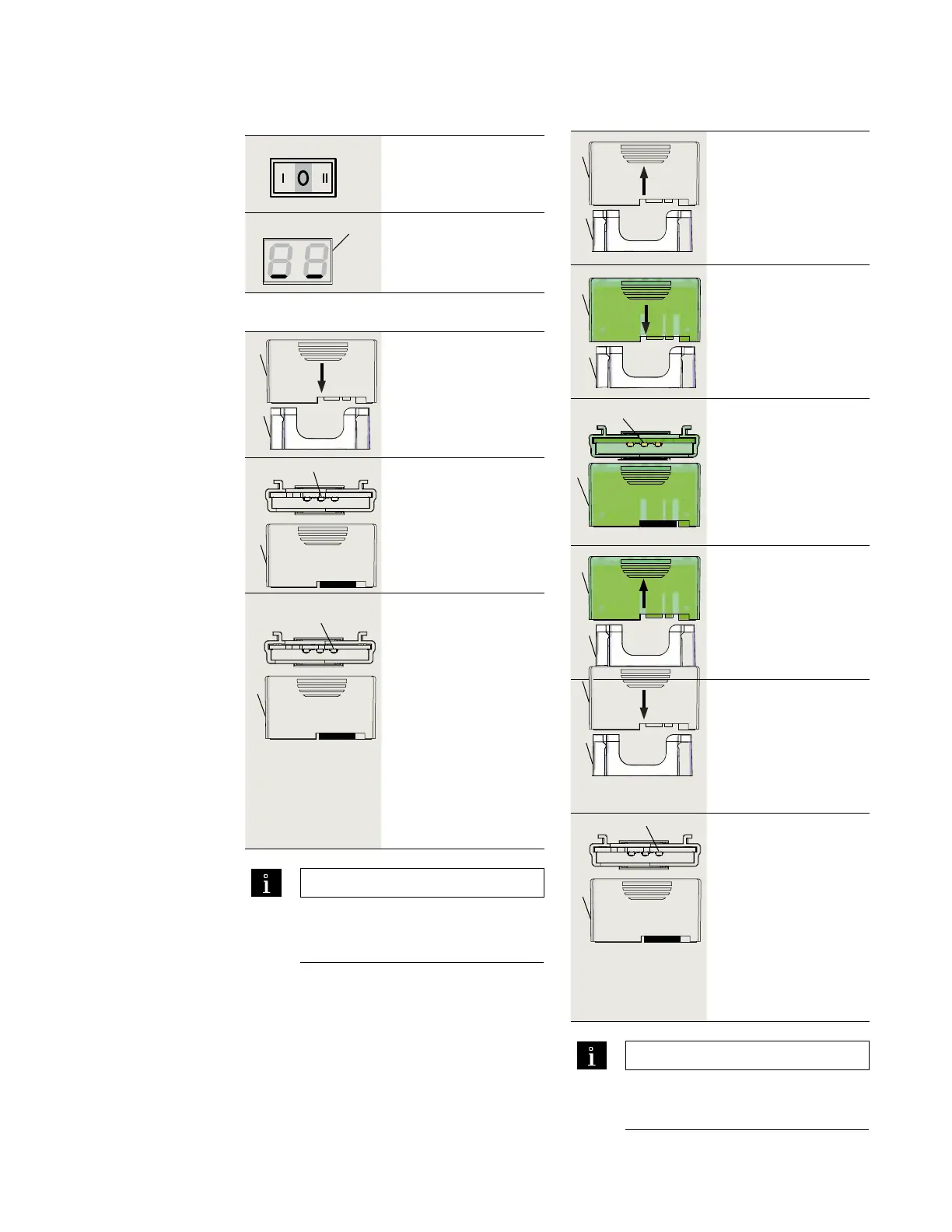
. Insert first upgrade
card into upgrade
card slot.
. This card will become
container module.
. Yellow LED flashes
on and off once
during card insertion.
. Green LED slowly
flashes on and off
indicating
communication
between card and
control module.
. Upgrade card
becomes container
module, green LED
continues to slowly
flash on and off.
• Upgrade card function
is now available.
. Installing upgrade cards
.. Installing first upgrade card.
.. Set program switch to CLOSE.
Set Mode switch to Close.
9
Horizontal bars indicate
controller in stand by
mode.
1 Upgrade card slot
3 Green LED
7 Container module
TIPS AND RECOMMENDATIONS
Container module can be configured
using applicable parameter (F - F) for
card. Reference Chapter , Parameters.
. Remove container
module from upgrade
card slot.
6
1
. Insert next upgrade
card into upgrade
card slot.
• Card function is copied
to control module;
upgrade card is then
invalidated.
• Yellow LED indicates
procedure is complete.
1
. Remove upgrade card
from upgrade card
slot.
. Reinsert container
module into upgrade
card slot.
• Control unit recognizes
container module;
container module
stores new functions.
• Green LED slowly
flashes on and off
indicating successful
operation.
• New card functions
are now available.
.. Installing additional upgrade cards.
3 Green LED
7 Container module
TIPS AND RECOMMENDATIONS
New upgrade card can be configured
using applicable parameter (F - F) for
card. Reference Chapter , Parameters.
1 Upgrade card slot
6 Barrier free toilet
upgrade card
7 Container module
8 Mode switch
9 2 digit display with
horizontal bars
1
2
4 Yellow LED
7 Container module
1 Upgrade card slot
2 First upgrade card
7
3
7
3
1
7
1
7
7












 To Next Page