10
3.3 Exiting the Menu
To get back into the standard measurement mode, just scroll to the Gas
Concentration menu item at the top of the menu. The actual gas concentration
will be displayed.
3.4 Menu Items
3.4.1 Gas Conc
Displays the current value of the concentration of the target gas in % LEL.
This field is read-only, and cannot be modified by the operator.
3.4.2 Password
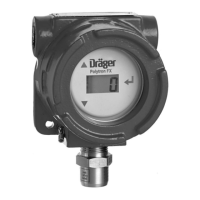
The use of a password is optional with the Polytron FX. A password consists of
a 3-digit number from 000 to 999; a value of 000 disables password protection
and allows anyone to access the software interface. The instrument is delivered
with the password set to 000.
If a password has been set, it must be entered to gain access to the software
menu. Tap the magnetic wand over the Down arrow until the ‘PAS’ menu item is
displayed. The 3-digit LCD will then show ‘000’, with the first zero on the left
blinking. Use the Up and Down arrows to increment or decrement this digit,
then tap Enter. The second (middle) digit will blink, and the correct value should
be set using the Up and Down arrows as before. Repeat the process for the
third digit. Tap Enter when the full password is displayed. If the displayed value
matches the set password, you will gain access to the rest of the menu. If an
incorrect password is entered, the instrument will return to the measurement
mode.
3.4.2.1 Password Adj
Use the Down arrow to scroll to the last menu item, Password Adjust. The
display will show the message ‘PAS’, ‘ADJ’, ‘000’.
NOTE
If a password other than 000 has already been entered,
that number will appear in place of ‘000’.
Tapping the magnetic wand over Enter causes the 3-digit display to flash. Tap
the Up or Down arrows to scroll the value to the desired new password. The
display will stop scrolling at a maximum value of 999 or a minimum of 000; it
will not roll over.
Tap Enter when the desired password is displayed to accept this as the new
password. Once a password is set, you will have to enter it to gain access to the
menu.
3.4.3 Zero Adj
Allows you to adjust the zero reference point of the sensor when no target gas
is present, such as during calibration. See Section 4.1.1, Calibration
Procedure, for details.
Exiting the Menu
Menu Items




 To Next Page