EasyManua.ls Logo

Dräger Primus - Page 21

Dräger Primus
100 pages
Print Icon
To Next Page IconTo Next Page
To Previous Page IconTo Previous Page
Loading...
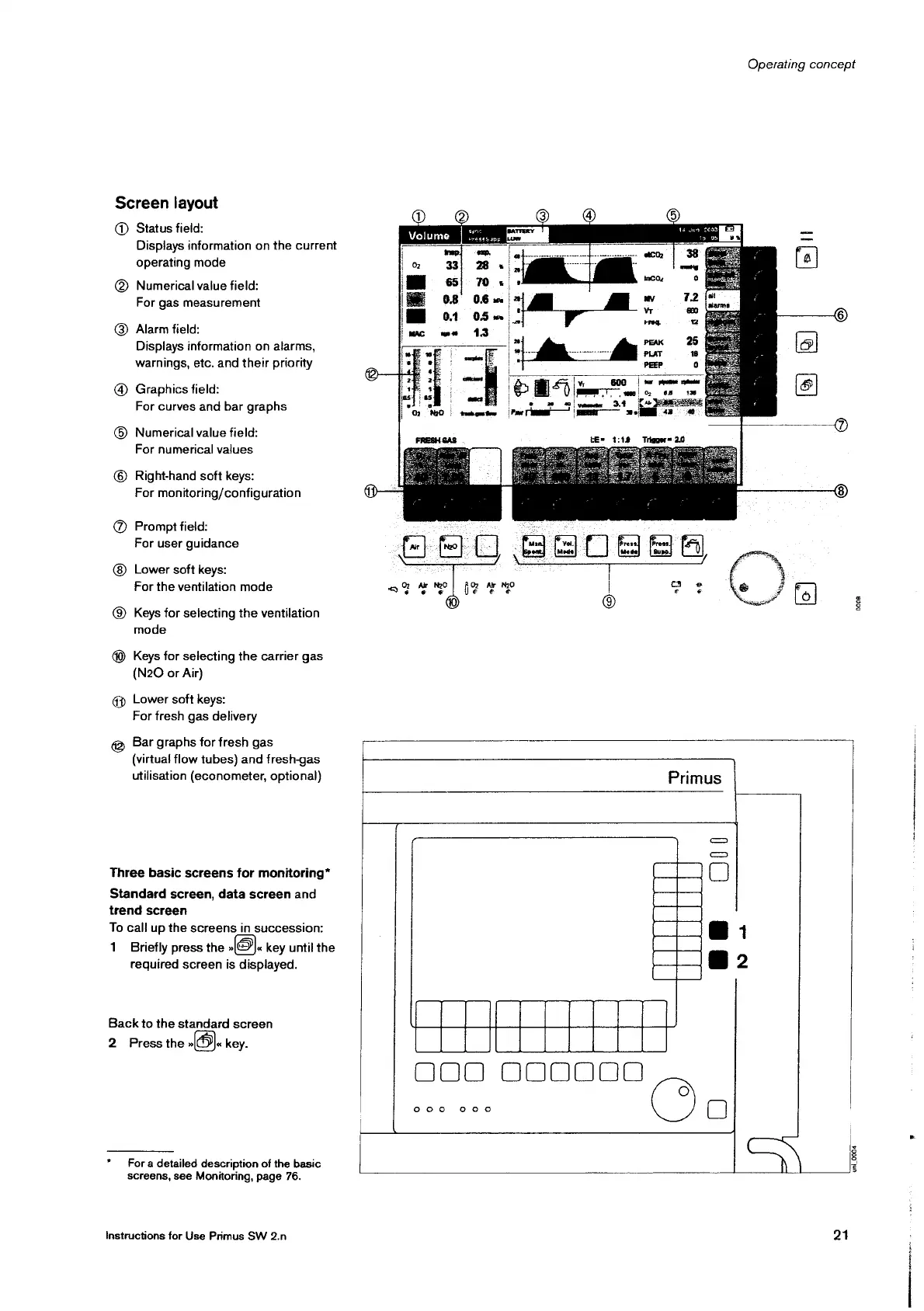
Screen
layout
@
Status
field:
Displays information
on
the
current
operating
mode
@)
Numerical
value
field:
For
gas
measurement
©
Alarm
field:
Displays
information
on
alarms,
warnings,
etc.
and
their
priority
@)
Graphics
field:
For
curves
and
bar
graphs
Numerical
value
field:
For
numerical
values
©
©
Right-hand
soft
keys:
For
monitoring/configuration
©
Prompt
field:
For
user
guidance
Lower
soft
keys:
For
the
ventilation
mode
©
Keys
for
selecting
the
ventilation
mode
(M
Keys
for
selecting
the carrier
gas
(N20
or
Air)
gp
Lower
soft
keys:
For
fresh
gas
delivery
©
Bar
graphs
for
fresh
gas
(virtual
flow
tubes)
and
fresh-gas
utilisation
(econometer,
optional)
Three
basic
screens
for
monitoring*
Standard
screen,
data
screen
and
trend
screen
To
call
up
the
screens
in
succession:
1
Briefly
press
the
©).
key
until
the
reguired
screen
is
displayed.
Back
to
the
standard
screen
2
Press
the
DI
key.
*
Fora
detailed
description
of
the
basic
screens,
see
Monitoring,
page
76.
Instructions
for
Use
Primus
SW
2.n
Operating
concept
14
Jun
20032"!
©
È
m
==
1
|
=>
"jd
48
1:18
Trigger=
24
le
|
©
E
o
Primus
Be
0
N a
0009
000000
do
0008
21
uni
0004

Other manuals for Dräger Primus

Related product manuals