Vigor2820 Series User’s Guide
141
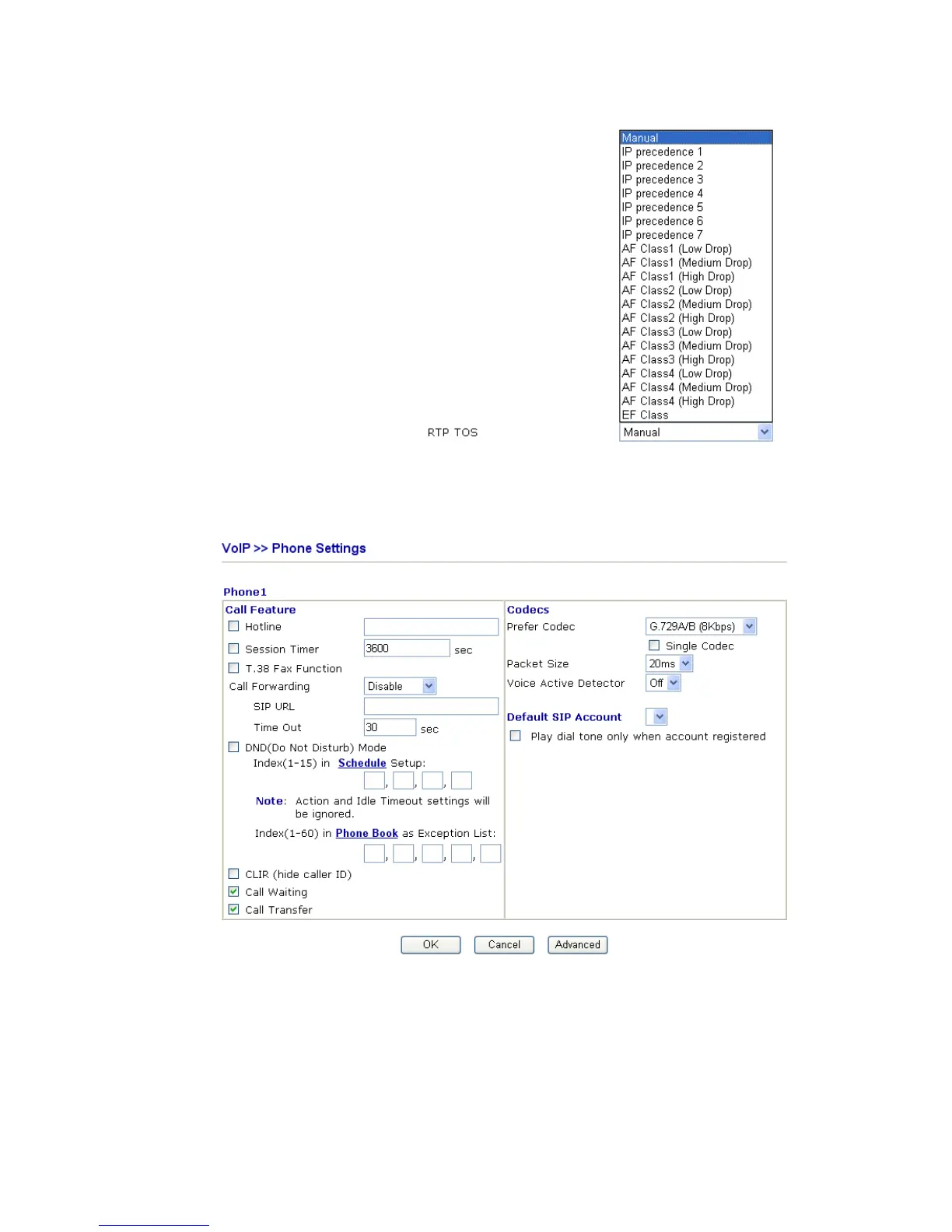
drop down list to choose any one of them.
D
D
e
e
t
t
a
a
i
i
l
l
e
e
d
d
S
S
e
e
t
t
t
t
i
i
n
n
g
g
s
s
f
f
o
o
r
r
P
P
h
h
o
o
n
n
e
e
1
1
/
/
P
P
h
h
o
o
n
n
e
e
2
2
P
P
o
o
r
r
t
t
Click the number link of each port, you can access into the following page for configuring
Phone settings.
Hotline Check the box to enable it. Type in the SIP URL in the field
for dialing automatically when you pick up the phone set.
Session Timer Check the box to enable the function. In the limited time that
you set in this field, if there is no response, the connecting call
will be closed automatically.
T.38 Fax Function If the remote end also supports FAX function, you can check
this box to enable this function.













 To Next Page