Vigor2820 Series User’s Guide
151
3
3
.
.
1
1
1
1
.
.
3
3
S
S
e
e
c
c
u
u
r
r
i
i
t
t
y
y
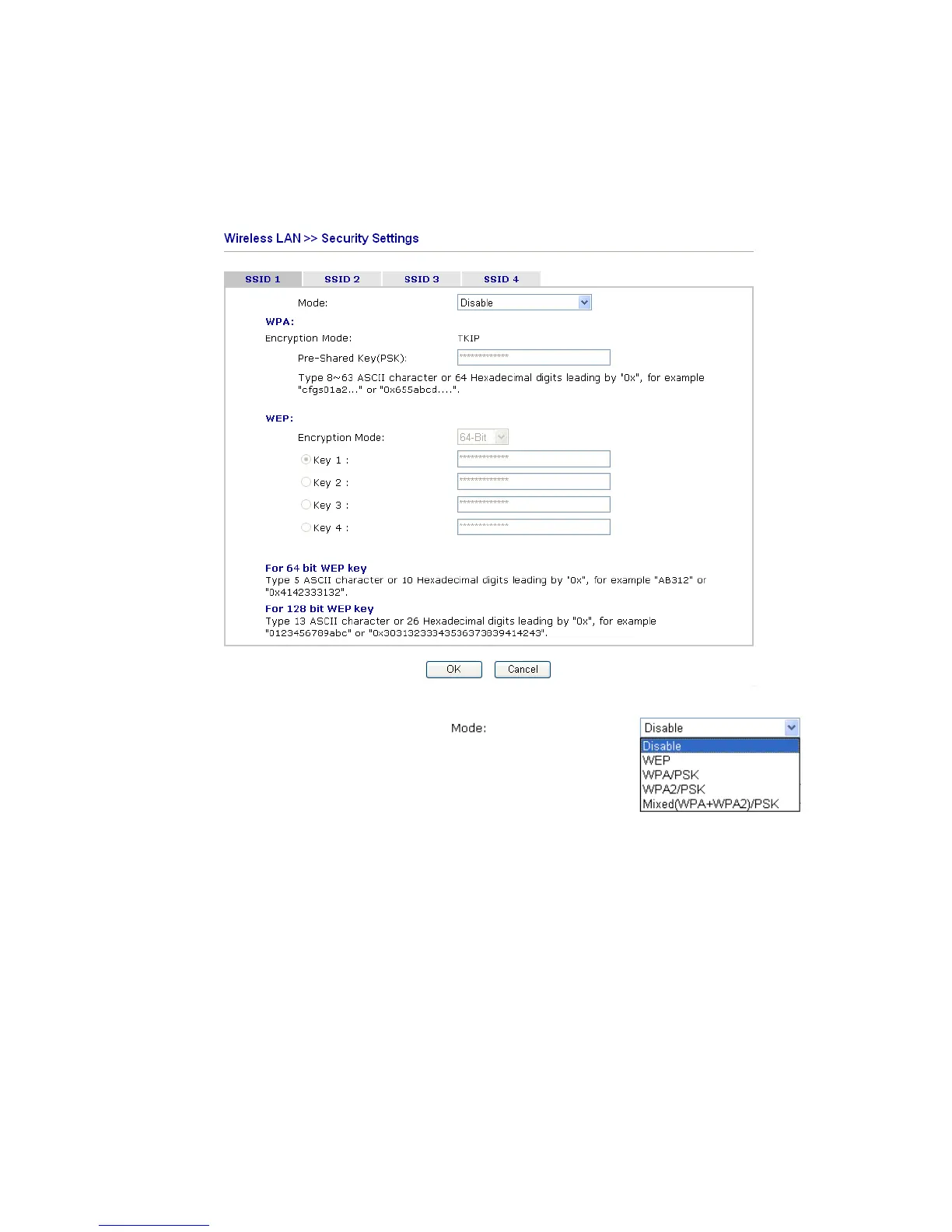
This page allows you to set security with different modes for SSID 1, 2, 3 and 4 respectively.
After configuring the correct settings, please click OK to save and invoke it.
By clicking the Security Settings, a new web page will appear so that you could configure
the settings of WEP and WPA.
Mode There are several modes provided for you to choose.
Disable - Turn off the encryption mechanism.
WEP-Accepts only WEP clients and the encryption key
should be entered in WEP Key.
WPA/PSK-Accepts only WPA clients and the encryption
key should be entered in PSK.
WPA2/PSK-Accepts only WPA2 clients and the
encryption key should be entered in PSK.
Mixed (WPA+ WPA2)/PSK - Accepts WPA and WPA2
clients simultaneously and the encryption key should be
entered in PSK.
WPA The WPA encrypts each frame transmitted from the radio
using the key, which either PSK (Pre-Shared Key)
entered manually in this field below or automatically
negotiated via 802.1x authentication. Either 8~63 ASCII
characters, such as 012345678(or 64 Hexadecimal digits
leading by 0x, such as "0x321253abcde...").













 To Next Page